New post
Avatar
0

Is there a way to have Finale default to the original stem direction once layers are active? For example if I notes on all 4 beats in Layer 1 with stems naturally down and then add notes in layer 2 only on beats 3 & 4, Finale automatically puts all the layer 1 stems up.  Who would ever want music to look like that?? Is there some setting I am missing? Having to constantly go back and change stem direction irks me to no end. 


PC, Latest version of everything.

7 comments

Date Votes
Avatar
0

… if I have notes on all 4 beats in Layer 1 with stems naturally down and then add notes in layer 2 only on beats 3 & 4, Finale automatically puts all the layer 1 stems up.  Who would ever want music to look like that?? …


Music usually looks like that in polyphonic writing (fugues &c.)


… Is there some setting I am missing? …


From your description it sounds like you are working on a score for keyboard.

Instead of using Layer 1 and Layer 2, have you tried using the Speedy Entry Tool feature Voice 1 / Voice 2 ?

You can launch V2 on a longer duration in V1 (e. g. a half note), and add shorter, simultaneous durations in V2 (e. g. two 8ths and a 4tr).

Comment actions Permalink
Avatar
0

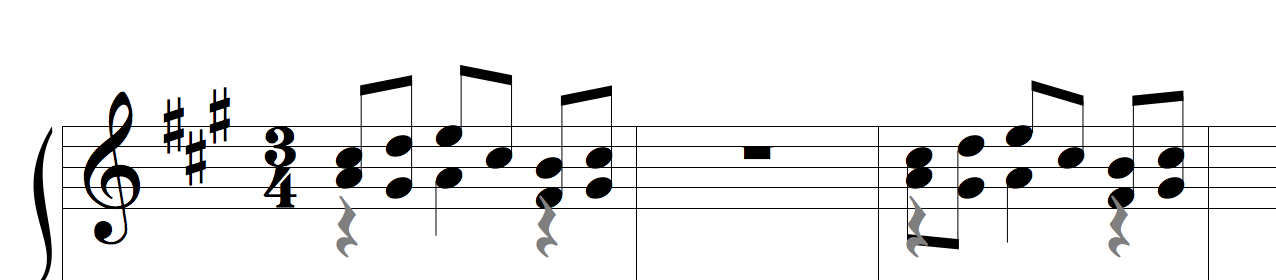
Perhaps the example below will clear it up.  Finale automatically makes the music look like the 1st measure but I want it to look like the 3rd measure (the way any manuscript would be engraved). I don't understand why I have to manually adjust all the stems for beats I don't have notes on. I wish it would default to their normal stem direction:


Comment actions Permalink
Avatar
1

Then follow my advice:

Use Voice 1 / Voice 2 instead of layers.

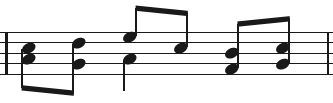
The notes in the attached example are all in the same layer.

The quarter on beat 2 is in Voice 1.

Voice 2 is launched from the quarter, and the two 8ths are in Voice 2.


Comment actions Permalink
Avatar
0

Matthew,

I'm not an expert. Please tell me why you consider your first example to be wrong.

Comment actions Permalink
Avatar
0

I want to put some piano figures on the bass clef stave (having deleted the treble clef stave). I want the notes to be played with the right hand to have stems up and the left hand stems down. I've put in the right hand notes on layer 1 and the left hand notes on layer 2. When I select the bars and the layer and go to Utilities>Stem Direction>Up  (layer 1), all the stems go in the same direction. If I change to layer 2 and ask for stems Down, they all go down. I can't understand why something that seems simple and logical doesn't work. Help, please.

Comment actions Permalink
Avatar
1

… I select the bars and the layer and go to Utilities>Stem Direction>Up  (Layer 1) …


Don Jordan,

I would do it in another way:

Document Options - Layers

Take a good look at the options.

I suspect that you can get exactly, what you need.

Comment actions Permalink
Avatar
0

Thank you, Peter. I followed a suggestion on another page and, by going to Documents > Layers, I found that by checking "Freeze stems and ties" and "Freeze ties in same directions as stems" I got  the result  I wanted. I think the first box was already checked, but not the second. I did that for both layers 1 and 2 and my problem was solved. Cheers.

Comment actions Permalink

Please sign in to leave a comment.