New post
Avatar
0

When I go from d minor (1 flat) to F Major (1 flat) Finale enters a natural for the Bb then puts a Bb back.  It seems unnecessary.  Is that a default or is there another way to notate the key change?

7 comments

Date Votes
Avatar
0

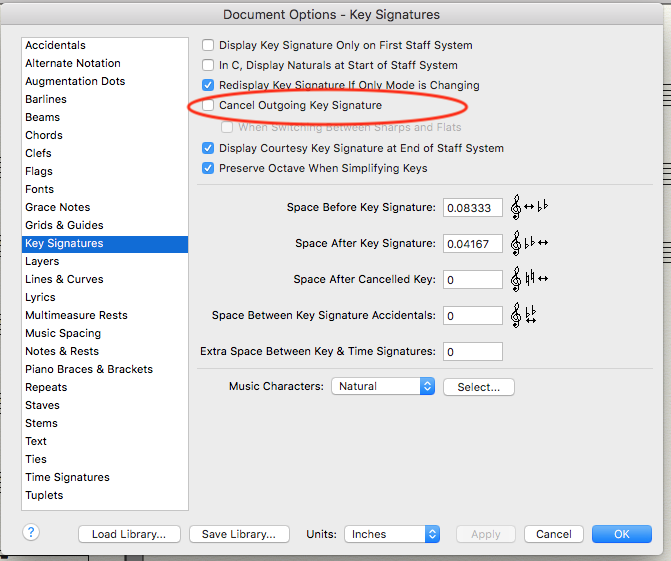
Document Options - Key Signatures


Is the option “Redisplay Key Signature If Only Mode is Changing” selected or de-selected?

Comment actions Permalink
Avatar
0

I think it does that to call attention to the fact that it's a minor to major change.

What do you want to avoid, the natural? If so, go to Document Options>Key Signatures, and uncheck Cancel Outgoing Key Signature. That will just leave the double barline and the B flat.


Comment actions Permalink
Avatar
0

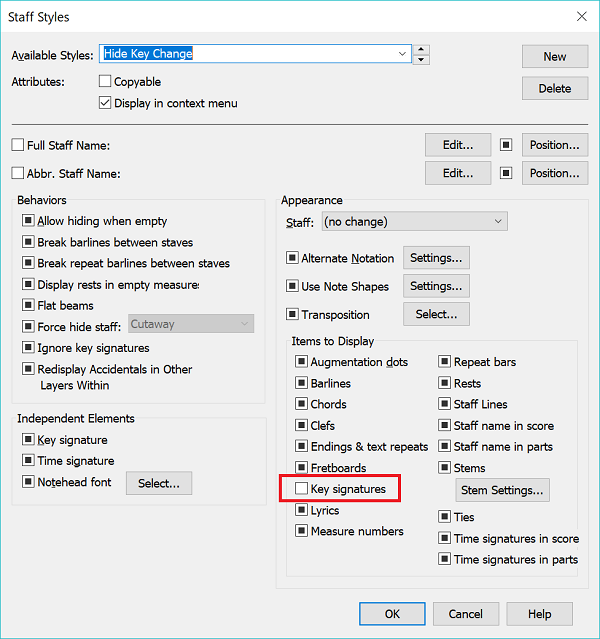
You can use a Staff Style to hide the key change from showing. Just deselect the Key Signature box from the Items to Display options and then Apply the Staff Style to the measure in question.


Comment actions Permalink
Avatar
0

You don't have to use a staff style for this. Just go into document options, key signatures, and uncheck "re-display key signature if only mode is changing".

Comment actions Permalink
Avatar
0

Perhaps more to the point of the issue, if you go to [Document Options>Key Signatures] and uncheck "Redisplay key signature if only mode is changing," that should do it.


EDIT: It's odd that J Adrian's comment was the only one posted at the time I posted this. Is there something wrong with the forum?

Comment actions Permalink
Avatar
0

If the Finale program was only as reliable as this forum sometimes is, sales would plummet.

Comment actions Permalink
Avatar
0

Thanks you guys.  Problem solved.

Comment actions Permalink

Please sign in to leave a comment.