New post
Avatar
0

 How do I move notes horizontally a few beats into another measure and have all of the subsequent notes with the proper timing and rest recalculate and also move the same number of beats.I do not want to move the notes up and down the keyboard; I need to change the beat at which the notes start without having to change every note that follows. I read about a symbol that has a quarter note with an arrow to each side of the note (and it is somehow connected to the hammer symbol) but I cannot locate the symbol.

Please help. I'm using finale 2012.  Thank you.

504.920.6625

11 comments

Date Votes
Avatar
0

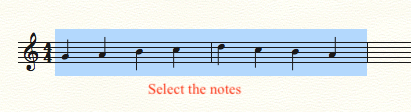
You are talking about the note mover tool (I think) but that’s not what you want. Select the measures/notes and drag them to where you want them, then erase any at the beginning that are still in their starting position.

Comment actions Permalink
Avatar
0

Will this help me move all of the notes just a few beats and then have the software recalculate rest in subsequent measures. Ideally, I'd like to be able to slide the notes of a staff forward or backward a few beats.  My past experience only allowed me to cut and paste measures. Thank you for your help.

Comment actions Permalink
Avatar
0

Yes. Practice with just one or two measures, to get used to it. You have to move all that you want to move. That is, you can’t move just one measure, and have the following ones move, as well.

Comment actions Permalink
Avatar
0

Thank you, I appreciate your help. I'll give this a try and let you know tomorrow if I am successful. Thank you again.

Comment actions Permalink
Avatar
0

"Select the measures/notes and drag them to where you want them, then erase any at the beginning that are still in their starting position"

Just dragging selected material does not work. You have to use Alt-Drag (a cursor will appear so you can place it where you want it) in order to insert the selection and to move all subsequent material to the right (in that staff only). Also works with a whole measure stack if you want to insert all staves.

Comment actions Permalink
Avatar
2

Well, it certainly works for me...

This may be easier in scroll view, if you want to work on long sections.

Comment actions Permalink
Avatar
0

Yes, of course that works.

However, reading "... move notes horizontally a few beats into another measure and have all of the subsequent notes with the proper timing and rest recalculate and also move the same number of beats ..." it seemed to me that he wanted to insert something so that all subsequent notes (sic!) are moved as well. To do this you need to use Alt-Drag. But maybe I misunderstand the question.

Comment actions Permalink
Avatar
0

If you want to do this in only one staff, you could also use Speedy Entry and insert a rest of the value to which you want the following notes to move. When Finale notifies you that the measure is overfilled, select the option 'Keep moving the extra notes until all measures contain the correct number of beats'. If there are default rests involved, you should first change these into real rests. There's a plugin for this.

Comment actions Permalink
Avatar
0

As always, many ways to do things! The OP can decide what works best in their situation.

Comment actions Permalink
Avatar
0

I have tried Mike Rosen's method and the beats and rest change slightly when moving a selection just a few beats. It requires a lot of touch ups. So, I will try Mike Mann's suggestion. Vaughan, I will have to read up on speedy entry to make sure I follow to what you are referring. 

I thank all of you for helping me an having patience with me as I learn.

Comment actions Permalink
Avatar
0

P,

I suspect that you were missing either the “selection” zone, or the “drop” zone (my terms.) It takes a bit of time to figure out grabbing the right beats. You need to consider that there is space “behind” the note that must be included. I really am lousy at explaining it. The drop zone works the same way. As you slide your selection across the measures, you should see a black line bordering the measure, and the blue of your selection would sort of “snap” to the beats in that measure.


But go ahead and try the other methods, as well. The more things you try, the better you know them all!

Comment actions Permalink

Please sign in to leave a comment.