New post
Avatar
0

Hi folks,  I did a scan of a piece with 4 verses. Some of  it turned out well, but when I corrected some text, it pushed the next syllable to another beat. Some of the lyrics are way off. Is there another way to drag and reassign syllables to previous notes? I'm also seeing extra hyphens  that are not in the lyrics window...  Also, I don't see extra spaces causing the misalignment of the syllables. I.e., there is nothing to erase to cause it to move forward.  The shift lyrics button doesn't seem to do anything I need.

12 comments

Date Votes
Avatar
0

Scanned? With what and how did you import the file?

Comment actions Permalink
Avatar
0

Music-to-XML,  exported to Finale as xml

Comment actions Permalink
Avatar
0

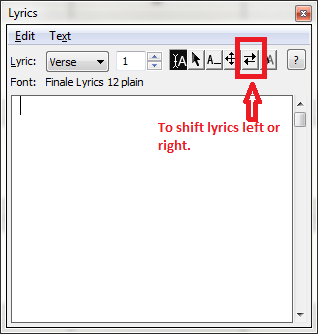
Are you familiar with the Shift Lyrics option (available via the Lyrics menu or Lyrics Edit Panel?


This would allow you to shift a lyric chain left or right one syllable at a time.

In some places erasing and reassigning the lyrics may be more convenient.

Comment actions Permalink
Avatar
0

Yes,   but unless I'm doing it wrong, it isn't working.  I am selecting a syllable and using that key but nothing is happening... 


the dialog box comes up but does not shift anything 

Comment actions Permalink
Avatar
0

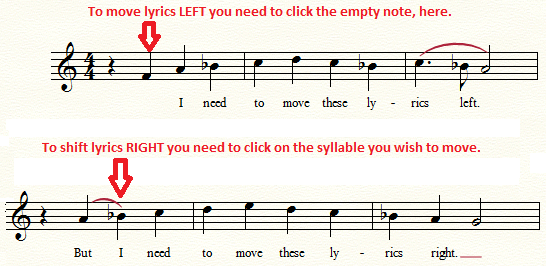
I hope this will help you deal with your situation. You bring the box up to choose left or right. Then you click on a note as follows.


Once you choose a direction. You can choose multiple locations to move different sections of the lyrics without going back to the direction box (unless you need to change the direction of the shift).

Comment actions Permalink
Avatar
0

Sometimes, if it's just wrong, it may be easier to edit the text manually.


Double-click on the bit of text. When you do this, the Lyrics menu will change to Type into Score and the cursor will change to the text. Now you can edit the syllable, cut, copy, delete etc. If you delete the syllable, any hyphens that follow should disappear. Type the correct syllable and hit the Space Bar—the correct number of hyphens should enter automatically as you move to the next note. If you have multiple layers going on, show the one you're working in to make this easier.

Comment actions Permalink
Avatar
0

>Music-to-XML,  exported to Finale as xml<


I see that now in your profile. If everyone does this, it makes identifying problems and answering questions  easier for everyone. Thanks!


I do not have Music-to-XML but I do have SmartScore X2 Pro, also by Musitek. There are a number of differences but only a few where Finale 25 is concerned. The big one is that you can edit the scans in SS2P before export and you can't in Music-to-XML. That's neither good nor bad except that some users prefer to edit in SS2P first. As for me, sometimes I edit in one or the other.


Those who have looked at both apps do not give higher marks to either regarding the quality of the scans. Musitek does have a Facebook page—I've received some good advice now and then.

https://www.facebook.com/pdftomusic/?ref=br_rs


Comment actions Permalink
Avatar
0

It sounds to me like you don't have the correct verse/chorus/section or number selected. Music XML will assign these things almost anywhere, which is a bit of a pain.

Fortunately, you don't have to search endlessly. The Selection Tool is your friend. In the Selection Tool, if you double click on an item, Finale will switch to the tool that created that item. In the case of lyrics, it will automatically switch to the correct verse/chorus and number for you as well. Now your edits should take effect.

Comment actions Permalink
Avatar
0

Scanning often assigns text and lyrics incorrectly. Often, the fastest way to fix it (in my experience) is to delete the lyrics (or scan without them) and re-enter them as they should be.

Comment actions Permalink
Avatar
0

Can one scan without lyrics in Music-to-XML? I don't have it so I don't know.

Comment actions Permalink
Avatar
0

No. So I would do the scan, put it into Finale, and then, if they are bad, delete them.


Just another reason to go with the full scanning package!

Comment actions Permalink
Avatar
0

>No. So I would do the scan, put it into Finale, and then, if they are bad, delete them.

Just another reason to go with the full scanning package!<


As you know, I'm a member of the choir on that issue. Amen!


Comment actions Permalink

Please sign in to leave a comment.