Mac High Sierra ... Finale 25.4.1.164
Is it possible to hide a cautionary time signature only (not key signature) ?
Any advice here gratefully received


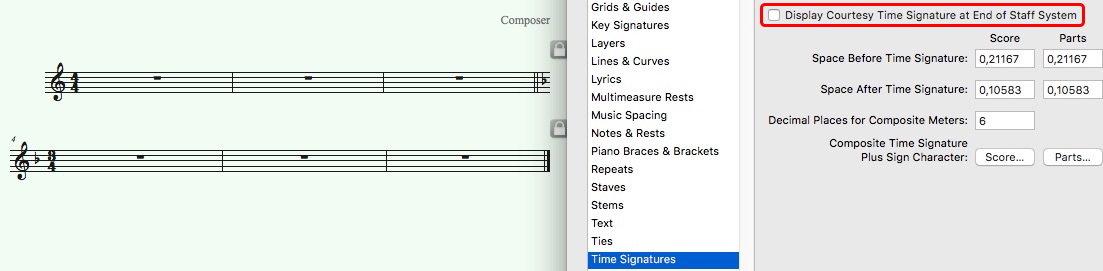
Document Options -> Time Signature : Uncheck "Display Courtesy Time signature...". This will be applied to the whole piece, in all staves.
Ifs you need this for 1 staff, a staff style will do it. Define a staff style and under Items to display, uncheck the 2 boxes related to Time Signature.
Apply to the first measure of the next system.

If I understand you correctly, you need to display a cautionary key signature, but not a cautionary time signature, even if both key and time change at the beginning of the next system, right?
I would add an extra measure (between the two systems), lock the measure in a system of its own, deselect Avoid Margins Collisions (in the Page Layout menu), and position this extra system outside the right edge of the page.
In that way the extra system will not print.
If the layout displays measure numbers, de-select “Include in Measure Numbering” in the Measure Attributes for this extra measure.
In the extra measure you can change key without changing time.
Asa result you will get a cautionary key signature, but no cautionary time signature.
Please sign in to leave a comment.
3 comments
Date Votes