New post
Avatar
0

Hi,


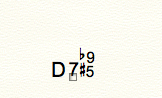
I have Finale Print Music. I need to enter D7#5b9 and it wont let me. I also tried D+7b9 (same chord) and it wont me do that either. If there is a  way to edit or add chords, I would love to know how?


Too bad Print Music doesnt have the same chord ability as the full version of finale. So far, Im loving Print Music software except for this obstacle. Creating, adding and editing chords are a basic need in writing charts. No matter what notation software version one has, it should have this ability.

6 comments

Date Votes
Avatar
0
Comment actions Permalink
Avatar
0

.>Creating, adding and editing chords are a basic need in writing charts.<


 In PrintMusic you are limited to the Automatic suffixes that PrintMusic lets you use.. I'm forgetting the exact number. Edit — it's 272 in new documents; 86 in old.


if you wish to create your own, the Text too works or you upgrade to Finale. 

Comment actions Permalink
Avatar
0

Hi Mike,


Thanks for the info. Unfortunately, I am not set up for a midi keyboard. Do you know of an alternative way to enter D7#5b9 rather than using an actual midi keyboard.? midi is beyond my scope right now.


And I havent been able to understand the number /symbol system by clicking on keystrokes. Im stumped. Figure I will learn this keystroke system later. Just need to know the basics of running print music. Doing a pretty good job but still struggling with that stupid chord! LOL


Thanks!

Shannon


Comment actions Permalink
Avatar
0

I am not set up for a midi keyboard. Do you know of an alternative way to enter D7#5b9 rather than using an actual midi keyboard.? midi is beyond my scope right now.


Mike Halloran gave you a hyperlink to the relevant page in the manual.


You can enter the chord symbols from the computer keyboard:

Either …

type the chord symbol directly, like e. g. D7b9(#5),

or …

use the “colon trick” = type D:0, and hit Return (or Spacebar). You can choose the chord suffix from the Chord Suffix Selection dialog box.

Tip: When you have found the desired suffix in the Chord Suffix Selection, remember in what slot the suffix is located.

In this example let us say that the suffix 7b9(#5) is located in slot 35.

The next time you need to enter D7b9(#5), just type D:35 - followed by Return or Spacebar.

Comment actions Permalink
Avatar
0

In PrintMusic, you have 272 suffixes that you can add to a chord including figured bass—this is generally enough for most users.


How many suffixes are available depends on the age of the document you are working on. Weird but true. I have 272 suffixes available in new documents; 86 available if the file was originally a .mus created in Finale 2011 or earlier—even when I change the fonts. I don't know why but it's true.


As the link and Peter mention, type D:0 <Return> to bring up the chord suffixes menu. 


I need to enter D7#5b9 and it wont let me<

If you follow the instructions, yes it will. I typed it in and it let me. Then I checked the chart to see that is D:79—this means it's available in all text fonts. MaestroTimes and Broadway Copyist Text install with Finale. My default is Times New Roman—same 272 suffixes.


>I also tried D+7b9 (same chord) and it wont me do that <

Correct. It won't. 272 available suffixes and that is not one of them.


Again, if you need to design your own, use the Text Tool or upgrade to the full version of Finale.


Comment actions Permalink
Avatar
0
Comment actions Permalink

Please sign in to leave a comment.