New post
Avatar
0

Version 2014.5.6359 on Windows 7

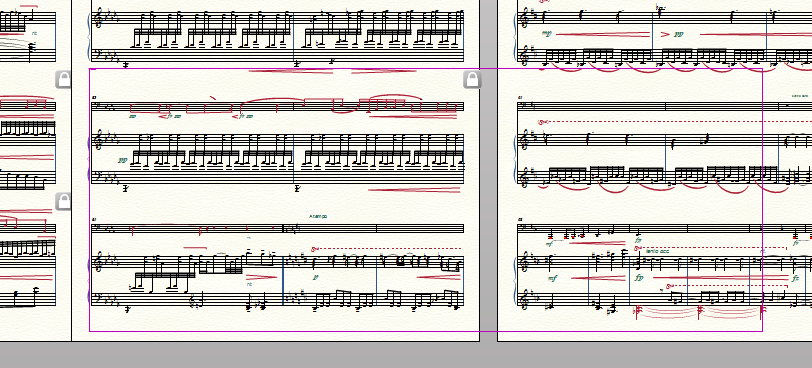
I was cleaning up a piano score, and when I got about halfway into it, found I could no longer select anything to move or edit with the Selection Tool. When I click in the score where I want to edit a box appears with pink borders that blocks any actions. The only way to get rid of the box is by switching to another tool. Has anyone come across this behavior before?
6 comments

Date Votes
Avatar
0

Have't seen that before!

Have you tried restarting the computer, and/or trashing the preferences?

Comment actions Permalink
Avatar
0

Just tried them both, to no avail!

Comment actions Permalink
Avatar
0

In that case, I think it's time to open a help ticket. Use the tab at the top of this page.


And please, let us know what they say!


Also, please add the program and version you are using to your signature, in the user control panel. 


Comment actions Permalink
Avatar
0

Oh I've got it. There were a couple of unattached glissando smart shapes floating on the page. When I delete them the problem goes away.

Thanks Mike.

Comment actions Permalink
Avatar
0

Testing signature.

Comment actions Permalink
Avatar
0

Excellent! Good catch on the problem.


And the signature works fine, too.

Comment actions Permalink

Please sign in to leave a comment.