New post
Avatar
0

Finale 25.4 Mac and PC.

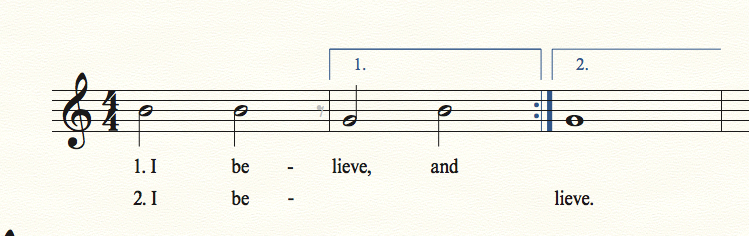
The second verse of a song ends with the syllable 'be-' just before the first volta. In the second volta the word continues with 'lieve'. How can I just have a hyphen attached to the syllable 'be' and NOT have a lot of them going though the first volta.

Cheers
Jens

3 comments

Date Votes
Avatar
0

The following is probably best done in the Lyrics window, rather than in the score:


Instead of the “minus” hyphen, use a hard hyphen:

Text menu > Insert Hard Hyphen

After the hard hyphen, type a space character, to “end” the syllable.


You will get a Word Extension going into the first volta.

Fix:

Lyrics menu > Edit Word Extensions

A handle will appear on the unwanted Word Extension.

Click the handle, and hit the Delete key.


If you need to move the hard hyphen longer to the right, insert hard spaces before the hard hyphen:

Text menu > Insert Hard Space

Comment actions Permalink
Avatar
0

There are a few steps.

Enter an eighth note grace rest after the half note B in measure 1, and hide it. This will cut off the word extension in verse 2.

Enter verse 1 lyrics.

Enter verse 2 lyrics, BUT: after you have entered the syllable "be", tap the spacebar to go to the next note (the half note G) and enter a hard space.

Tap the spacebar until you are under the whole note G, and enter "lieve."

Go back, and enter the hyphen as a text expression. (Text menu> Inserts> Symbol...) You may have to reduce the font size, so that it matches the one above. I would save this step to last, because it may move around as you enter more lyrics and the notes respace.


Comment actions Permalink
Avatar
0

Thanks a lot Peter (again) and Mike for your quick reply and illustration. It certainly solved my problem. I went with Peters solution because all I had to was exchanging the minus sign with a hard hyphen and I was happy with the result.

A very good day to you

Cheers
Jens

Comment actions Permalink

Please sign in to leave a comment.