New post
Avatar
0

Finale 2014.5  Mac OS X Yosemite 10.10.5

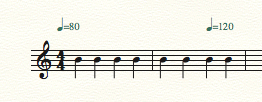
How can I make a mid-measure tempo change?  With ye olde Tempo tool, this was easy as pie, and I could change tempo at any point in the measure, any beat I wanted.  I could make my own personal retardandos and fermata lengths.  How can I do this now without the Tempo tool (may it rest in peace)?

5 comments

Date Votes
Avatar
0

Specifically, I want a new tempo on beat 3 of the measure.  And I need to get this done by 9A PT (26 minutes from now), so I could certainly use a quick response if that's at all possible.  Thanks!

Comment actions Permalink
Avatar
0

I did it by changing m. 2 into two 2/4 measures, and making the barline invisible. Not ideal, but it worked.


Comment actions Permalink
Avatar
0

Mike, that's pretty bleepin' brilliant, as far as I'm concerned.  I can certainly get behind that technique.  For my deadline, since I was in the last bar (with the fermata on beat 3) and since I had no other fermatas in the chart, I simply changed the articulation page for the fermata, changing the playback effect from None to Change Duration and setting the values (top and bottom) at 200%.  That got me the desired playback effect.  In the absence of your reply, I figured that I could copy the original fermata articulation (so's I'd have 2 of 'em), leave the first one as delivered (vanilla) and change the new one to whatever I need.  But..I like your solution better.  Now if Finale would just bring back the Tempo tool and make it fully functional (allowing the units to be changed), we all could expend fewer brain cells.

This is the first time I've used the Community, and I greatly appreciate your response, Mike.  Thanks much!  Other comments/techniques welcome for the benefit of all of us who regularly toast the Tempo tool (may it rest in peace) and cry ourselves to sleep over its demise...

Comment actions Permalink
Avatar
1

It is the Tempo Expression Category Definition that mandates left-aligned tempo changes. You can go to the Category Designer and either change this for the Tempo Marks category or else make a duplicate category (I might call it "Free Range Tempo Marks") and change it there.


Comment actions Permalink
Avatar
1

Adrian (I hope I may call you that...forgive me for presuming so), this is amazing info.  I've managed to heretofore blissfully go through my Finale life without even noticing the Category Designer (I see it now...under Documents) or knowing anything about it.  Powerful stuff.  What you stated makes perfect sense to me.  I'll definitely give this a shot.  Thank you so much for your illumination!  Greatly appreciated...

Comment actions Permalink

Please sign in to leave a comment.