New post
Avatar
0

Windows XP Pro

Finale Print Music 2011

When I enter a tuplet, no matter the method, there is an extra note added to the bracket.  For example, if a tuplet of three 16th notes is required, there is an extra 16th rest placeholder added.  When I try to add notes after the tuplet, they become included in the tuplet.

12 comments

Date Votes
Avatar
0

If it worked correctly in the past, but now it doesn't, trash the preferences.


Please describe exactly your entry method. Maybe we can spot something.

Comment actions Permalink
Avatar
0

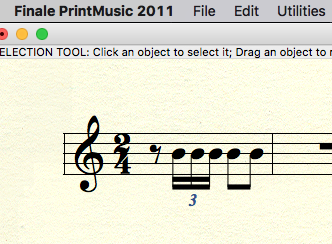
Ok.  In the instance about which I was concerned, in 2/4, I entered an 8th rest, a tuplet of three 16th notes, followed by two 8th notes.  The result was a sollitary 8th rest, and then 16th note tuplet followed by a 16th rest and two 8th notes, all of which were coralled by the tuplet bracket.  I could not break the two 8th notes out of the bracket, nor could I explain why the 16th rest followed the tuplet notes.  Weird.  And, thanks!

Comment actions Permalink
Avatar
0

How did you define the 16th-note tuplet? Tuplets are not necessarily triplets.

Comment actions Permalink
Avatar
0

John Havener,


In this particular case the tuplet should be defined as

3 sixteenths in the space of 2 sixteenths


Make sure that the tuplet definition is correct.

Comment actions Permalink
Avatar
0

From your description, it sounds like you have the tuplet defined as 3 eighths in the space of 2 eights. That would explain the extra notes under the bracket.


Do as Peter suggests, and make sure the tuplet is defined with 16ths.

Comment actions Permalink
Avatar
0

The tuplet was defined as three sixteenths in the space of one 8th.  I am actually extracting parts from a hardcopy score to individual parts, and this figure is in the original:  8th rest, three 16ths in a triplet, followed by two 8th notes, all in a bar of 2/4...

Comment actions Permalink
Avatar
0

John,

I'm not sure what's up, but I had no problem doing it. If you like, give me a call at 2 oh 6, 5 two 3, 9628, and I'll see if I can walk you through it.


Comment actions Permalink
Avatar
0

To Adrian and Peter,

  I've had some problems understanding the notation, which were cleared up by reading this post.  I was trying to do a quintuplet over a 1/2 note, but using 1/4 notes, as it was in 12/8 time, and the dotted-quarter was the unit of beat.

  I tried 8th notes, and it worked just fine.

  So, thanks for the post.


Comment actions Permalink
Avatar
0

After some more work, the quintuplet over a half-note works just fine, but a 5 dotted-quarter-note quintuplet over the whole measure doesn't.  I always get the extra rest intruding into the next measure (but not functionally part of it), or a 16th rest in the measure...

okay, well, I guess I just had to let the computer warm up enough, cause now it works just fine. 

Comment actions Permalink
Avatar
0

… dotted-quarter-note quintuplet over the whole measure doesn't …


There are several ways to enter a tuplet.

One of the ways (= probably the way you are entering a tuplet) will not let you end a measure with a tuplet unless you de-select “Check for Extra Notes”.

Comment actions Permalink
Avatar
0

Thanks, Peter... so I see that it's in the Speedy Entry Tool.  I never use that.  Is it something I'd normally want, or would I have to go back and forth with select, de-select, etc.

Incidentally, I noticed (in the Tuplet Definition dialog box) an item that says, "Never bracket beamed notes on beam side."  I don't have a problem with that--it's in the example above in this thread, and I think I've seen publishers do that as long as I've been studying music, but I can't de-select it.  Any suggestions?

Thanks,

Jon

Comment actions Permalink
Avatar
0

… I see that it's in the Speedy Entry Tool.  I never use that.  Is it something I'd normally want, or would I have to go back and forth with select, de-select, etc. …


Both the Speedy Entry Tool and the Simple Entry Tool have the option “Check for Extra Notes”.

Also, both entry tools have a Tuplet (sub-)Tool.

This means that you seldom need the third Tuplet Tool, namely the (main) Tuplet Tool on the Main Tool Palette; you can enter tuplets without leaving the entry tool.


I have only experienced the problem {end-of-measure tuplet} when using Simple Entry’s sub-tool Tuplet Tool, never in Speedy Entry.

I can generally enter tuplets without de-selecting “Check for Extra Notes”, both in Simple and in Speedy.

I have only experienced the {end-of-measure tuplet} problem with one of Simple’s tuplet entry methods.


… I noticed (in the Tuplet Definition dialog box) an item that says, "Never bracket beamed notes on beam side."  I don't have a problem with that--it's in the example above in this thread, and I think I've seen publishers do that as long as I've been studying music, but I can't de-select it …


There are 3 “radio buttons”:

- Always Use Specified Shape

- Never Bracket Beamed Notes on Beam Side

- Bracket Unbeamed Notes Only

You must select precisely one radio button - can neither select two nor de-select all 3 of them. That is why they are called “radio buttons”.


Also, in the pop up menu above the “radio buttons” you have three choices for the Shape:

- Nothing

- Slur

- Bracket

Comment actions Permalink

Please sign in to leave a comment.