New post
Avatar
0

Hello,

The issue I'm writing about was on another post, and though I commented on that post, it says "Completed," so I'm guessing that my comment might not get read??  Anyway, here is a revised version of my comment, regarding what the MakeMusic representative Michael labeled FIN-3819:

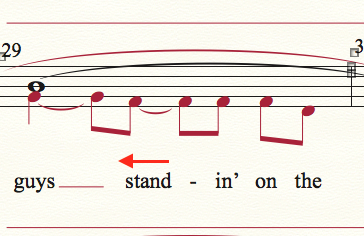
This issue is one that I have been trying to get MakeMusic to address for years now, and I've got the case numbers to prove it. The problem began with Finale 2011 and hasn't been repaired since. If you were to input my example below into any version of Finale 2010 and prior, that particular collision would not occur. The problem occurs whenever there is a long syllable that requires either a word extension or a hyphen, and that syllable is followed by a note (or rest) that doesn't have a syllable attached. Finale no longer accounts for any "lyrical space" with the "un-lyricised" note or rest, and the result is that syllables collide, even though Lyrics are checked in the Music Spacing Options. (Sorry for all the quotation marks; I think I'm inventing words to describe this problem LOL) It becomes a nightmare for me, as a large portion of my business is professional choral music engraving and editing. Prior to Finale 2011, the automatic spacing worked great for this issue, but no longer.

A related issue is this: if I have a long syllable on beat 3 (in common time), followed by a rest, Finale treats the syllable on beat 3 as though it needs a word extension, and justifies it to the left. It does not need a word extension, therefore it should stay centered. This issue becomes pronounced if beat 3 is followed by a rest and then more notes in beat 4, as shown in the example below.

Thanks for looking at this; I REALLY hope this issue might be resolved soon.

Bradley Knight

Mac OSX, Finale 25.4.1.163


5 comments

Date Votes

Official comment

Avatar

Hi Bradley:


The thread you posted to was re-purposed after I marked it "Completed" by answering Laird's question. As I mentioned in that thread to Christopher, Adrian, and Mike, please provide the details, as you did, to the subsequent issue. To be clear, we have not completed the work for FIN-3819, which is a story in our backlog for further improvements to lyric spacing and collision avoidance in those situations. I have also changed feature request thread status from Completed to Answered.


Cheers,
Michael Johnson
VP, Professional Notation
MakeMusic


Comment actions Permalink
Avatar
0

Not relevant, but a coincidence: while reading this, I was working on a different arrangement of this very psalm and verse!

Comment actions Permalink
Avatar
0

Lyric stand in verse 2, attached to layer 2. It should be centered under the first eighth note F. All settings in doc Options are for lyrics Align Center; Justify Left. (Changing Justification to Center made no difference.) And while we're on the subject, what's the difference between the settings?


Comment actions Permalink
Avatar
0

Hi Mike:


Thank-you for circling back with an example of when music spacing fails with the presence of ties. I've added your example to the story.

Alignment and Justification behave just as they do in the Text tool

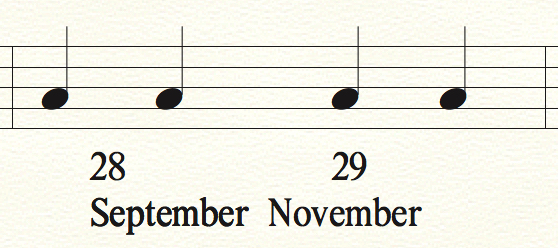
Alignment sets the horizontal position of a note relative to its attached syllables while justification sets the selected syllables relative to their alignment to noteheads. Put another way, alignment adjusts the lyrics to the note and justification adjusts the various verses. You'd see no difference in your example when changing justification because there is one 1 verse.

In the following example, 28 September is Align Center and Justified Left while 29 November is Align Center and Justified Center.


Cheers,

Michael Johnson

VP, Professional Notation

MakeMusic


Comment actions Permalink
Avatar
0

Michael, 

Thanks for that explanation! It certainly clears up some things for me, especially the comment that there is no difference if there is one verse. 

Comment actions Permalink

Please sign in to leave a comment.