New post
Avatar
0

Running Mac OSX10 Finale 25

Hi everyone,

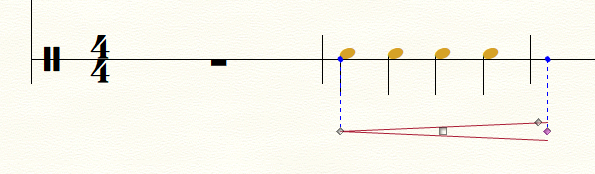
So I can't seem to attach my smart shape dynamics to a one line percussion staff (in this case bass drum). I found a work around in that if I create a 5 line bass drum staff it works fine. Only problem is I want to differentiate notes that are played on different parts of the instrument using x-noteheads and it's clearer to read on a one line staff.


Does anyone know how I can get around this?

Thanks all :-)

14 comments

Date Votes
Avatar
0

By your words “smart shape dynamics” I suppose that you mean hairpins, right?


Unfortunately I am unable to reproduce your problem.

I can attach crescendo and diminuendo hairpins to a 1-line staff without any difficulties.


Could you perhaps provide exact steps to reproducing your problem?

Comment actions Permalink
Avatar
0

Hi Peter,


Thanks for your reply.

I have a percussion staff in my score which I created through the setup wizard when I originally created my score. I set it as the starting instrument - temple blocks. Part way through I need to change instruments so I did so using Utilities - change instrument. I then changed it to Bass drum - single line. Since i changed it I can't then attach hairpins to any sections of the one line staff, I can to the temple blocks 5 line staff though.

So I then try changing the bass drum to a 5 line staff and voila the hairpins work again......

Frustrating as I really want to use the one line staff.

Perhaps I'll try closing and re-opening the program. The only other thing I can think of is that maybe there is a setting in staff attributes that is doing something strange?

Comment actions Permalink
Avatar
0

Ok, so I just checked the other one line staves in my score and they will all let me attach hairpins - just not the staff where I have the instrument change from temple blocks to bass drum. If I switch between 1 line staff and 5 line staff through apply staff styles then the haripin works with 5 line but not with 1 line........

Comment actions Permalink
Avatar
0

… The only other thing I can think of is that maybe there is a setting in staff attributes that is doing something strange? …


Staff Attributes are “global” (= for all the measures in the entire staff).

A staff style is “local” (= only for the region with the staff style).


Hence I conclude that the explanation can not be a setting in the Staff Attributes - since you only have the problem in the regions with 1-line staff.


A staff style is a much more plausible culprit.


In the dialog box Alternate Notation you can de-select the showing of Smart Shapes.

Try looking there.


An idea (as a test, not as a solution):

What happens if you first attach a hairpin to a 5-line staff, and then change the staff to a 1-line staff?

Does the hairpin disappear?

Comment actions Permalink
Avatar
0

When I use the Setup Wizard to request Temple Blocks, the staff is set up only to play one temple block on the center line, rather than the five blocks I expected. Is this what Fiona is experiencing for her temple block(s) selection?

Comment actions Permalink
Avatar
0

Thanks again for your response Peter,

I had a look at the alternate notation dialogue box which is the one in staff attributes correct?

It isn't selected. When I click on settings it has normal notation selected with everything ticked. So that doesn't seem to be the culprit.

I tried attaching hairpins to a 5 line staff (bass drum) and then changed the staff style to a 1 line staff with full barlines. The hairpins don't disappear but the weird thing is if I try to move them they all re-attach themselves to the closest 5 line staff they can find (in this case about 2 bars away). I then also tried attaching dynamics and articulations to the 1 line staff and realised that these won't attach either. Dynamics do the same thing as the 5 line staff and articulations won't even go anywhere near the notes.

Some of the notes are yellow, but I'm assuming this just means they're out of range? Some of the temple block notes are also yellow but things are still attaching to them fine. The most frustrating thing is that it's the same staff as the temple blocks....... If I create a new bass drum 1 line staff on the score there is no problem?

Does this suggest some kind of setting on this staff?........ There are no staff styles applied to the sections with the problems.


Hi Adrian - no the issue isn't with the temple blocks - here I have a 5 line staff with 5 different temple blocks as expected :-)


Comment actions Permalink
Avatar
0

Is it possible you are clicking too close to the notes in the one-line staff. See if clicking lower (below what would be the bottom line of a five-line staff) will allow you to add the smartshape.

Comment actions Permalink
Avatar
0

… I had a look at the alternate notation dialogue box which is the one in staff attributes, correct? …


Actually I was thinking of the Alternate Notation dialog box in the staff style that changes the staff from 5-line staff to 1-line staff.

Comment actions Permalink
Avatar
0

Hi Peter,

Yes I looked in the staff style alternate notation box too - not the culprit


Adrian - No I can't click anywhere - the attachment handles don't point to the staff at all but I get this strange double arrow that will only point to the 5 line staff before or after the 1 line staff.


Am going to try creating a new staff and copying and pasting the temple blocks

Will let you know how I go!!

Comment actions Permalink
Avatar
0

Fiona Hill,


At this point we really need to examine your actual Finale document, to find the culprit.

Unfortunately you can not attach a .musx document in this forum, but you can upload the document elsewhere, and then add a hyperlink here.


One option (for uploading your Finale document) is this forum which is an independent forum (= not monitored by MakeMusic):

http://www.finaleforum.com/index.php 

You can attach Finale documents there, not immediately after your registration as a new member, but after a certain delay.

The delay is that forum’s way of excluding spambots.

Comment actions Permalink
Avatar
0

Maybe it's a bug when changing instruments? I had a 1 line bass drum staff below the problem staff which was working fine.

I then change earlier bars to temple blocks using change instrument. Then when I go to enter dynamics/smart shapes etc on the one line bass drum doesn't work anymore - even though worked fine previously to using the change instrument.

For now I'm going to live with it and attach items and move manually and just hope they stay in the right place in the page view and parts.....Have to get this music finished!! Will upload a score for you to have a look at when I get a chance. Would be interesting to get to the bottom of it!!


Thanks for the heads up on the independent forum will check it out. I'm not a new member so should be fine - have just been using sibelius for last 9 or so years and coming back to finale now........

Comment actions Permalink
Avatar
0

Fiona, I have had the same (or a similar?) problem several times. When I use both 1-line and 5-line staff styles, Finale sometimes (!) doesn't let me assign hairpins on the 1-line staff style. But I don't use "Change Instrument" and it's not a percussion staff, but a standard staff.

Here is a screencam video that demonstrates the behaviour:

https://www.youtube.com/watch?v=5CORbgYAZns

First I tried to assign the hairpin to the first 1-line measure (the third measure from left), but both the start and the end hairpin anchor point appear in the previous measure (in the last 5-line measure).

When I try to assign the hairpin to the next measure, the anchor points appears in the first 5-line measure afterwards.

After I have removed the 1-line staff style, everything works fine again.


I have noticed this in several documents, but it only occurs seldom. Maybe a Finale bug.


Jan

Comment actions Permalink
Avatar
0

Fiona:  I assume that you have solved this problem by now. If not, try this:

if in scroll-view, scroll past the point where you made the instrument change and then try adding hairpins.  In other words, the point at which the instrument change was made must not be in view on your screen when you attempt to add hairpins.

If in page-view, move past the page where the instrument change occurs and then add the hairpins. As above, the point at which the instrument change occurs must not be viewable on the page on which you are adding the hairpins.

I found this to work for me.  The problem is clearly a Finale bug.

-Michael

Comment actions Permalink
Avatar
0

Micheal,


You are correct that the behavior that you are seeing in this situation is a bug in Finale and we are aware of this. The video that Jan had created illustrates the issue exactly. When you have used the Change Instrument Utility to change to an instrument that is using a single staff line (after a 5 line staff), the SmartShapes will not want to attach to the notes in these measures. This is a particularly pesky bug that can be a bit difficult to work with but there are work arounds. 

There are two ways to get around the issue. One method is to insert the SmartShapes on measures that with a full 5 line staff and drag these into place. Another method is to change the staff to to 5 line staff in the Score Manager, enter in the SmartShapes, then change this back to a single line staff after the shapes have been entered. I can't say that these are exactly ideal but they can get around the issue while a permanent fix get's determined. 


Comment actions Permalink

Please sign in to leave a comment.