

Basic smart shapes (crescendo, decrescendo, simple lines, etc.) cannot be placed precisely after using the Peterson Beam-Over-Barline plugin.
In this simplified example, I place a crescendo between two other expressions and adjust the ends to fit nicely between the two:

After deselecting and doing something simple like Zoom In or Zoom Out, the length changes:
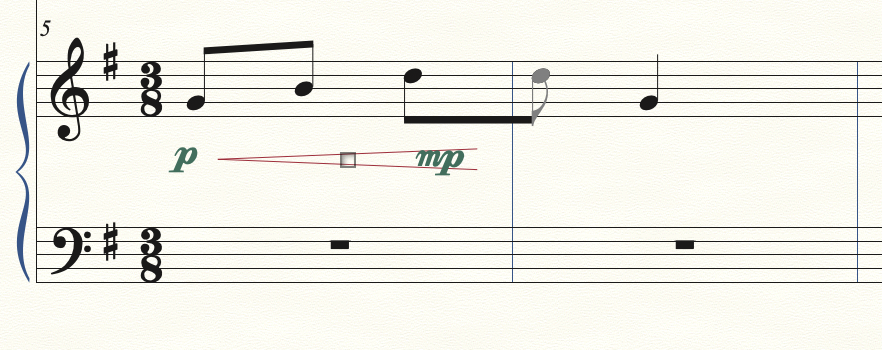
Clicking on the handle will restore the original position until another Zoom is done.
It appears that this is related to the presence of the "extra" eighth note that has been added by the Peterson Beam-Over-Barline plugin. When I select the handle and drag one end or the other, the blue "rubber band" appears to snap to one of 4 possible positions within the measure. In the case shown above, it snaps to a presumed position of the "extra" eighth note as if it where spaced within the measure. Then after deselecting and changing the Zoom, it appears to jump to a position based on the actual location of the "extra" eighth note which is in the next measure.
Any ideas on how to prevent this from happening and be able to precisely position the Smart Shapes? Automatic Update Layout and Automatic Music Spacing are both off in the Preferences. Finale 26.3.1.643 on a Mac OSX 10.15.7

2 comments
Date Votes