Hiya, here's what I'm looking to recreate:
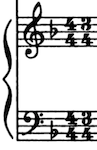
Thanks,


One way to do it:
A composite time signature of 4/4 + 3/4.
To get rid of the plus sign, go to
Document Options > Time Signatures
and change the Composite Time Signature Plus Sign Character to the space character.
Now the time signature will display as 4/4 3/4 (without the plus sign in between).

… What if I want to put 3/4 and 6/8 on the same staff? Is that possible? …
Yes, that is possible.
However, it is not clear what you mean:
a) A composite time signature of 3/4 + 6/8 (so that one measure = 12 eighths).
b) Alternating time signatures of 3/4 and 6/8 (so that one measure = 6 eighths).
a) or b)?
Thanks, Peter. It would be letter b). These meters alternate along the song but I don't want to write them every time it changes even more because sometimes one voice is in 6/8 and other in 3/4 and vice-versa. In addition, the song can be performed in either 3/4, 6/8 or a mix, depending on the interpretation. It's an arrangement I am making for choir and keyboard accompaniment.
For each and every measure Finale must know the “real” time signature.
That is the way Finale works - since the “real” time signature “controls” how Finale “sees” the measure (beaming, playback):
What are the beats? - 3 beats in 3/4? - 2 beats in 6/8?
But the “real” time signature does not have to display.
… It would be letter b) …
In this example let us say that the pattern is
Measure 1 - 3/4; measure 2 - 6/8; measure 3 - 3/4; measure 4 - 6/8; &c.
In Other Words: Odd measure numbers - 3/4; even measure numbers - 6/8.
For measure 1, set the “real” time signature to 3/4.
Set the “display” time signature to 3/4 + 6/8, but change the Composite Time Signature Plus Sign Character to the space character.
For measure 2, set the “real” time signature to 6/8.
Set the “display” time signature to 3/4 + 6/8.
Make a Stack Selection of the first two measures, Copy, and Insert the two copied measures as many times as needed.
You can delete the measures after the (many) inserted messures.

Thanks again, Peter and yes, J. Adrian, Bernstein wrote 6/8 and a 3/4 inside parentheses. This would do for me even if Finale would think that 6/8 is the "real" time signature. I don't want to saturate the score with a time signature per measure. I might have to use the Text tool to write the 3/4 inside parentheses, right?
… if I want to put the 3 above 4, I need to use the Text tool for the parenthesis …
No need to use the Text Tool.
It can all be done with the Expression Tool.
Either
- use multiple expressions, and set their Default Positioning as needed,
or
- use one single expression, created as a shape expression.
Please sign in to leave a comment.
11 comments
Date Votes