How the hell to you enter 5 sixteenth notes to a quarter note, or 2 eighth notes?? or whatever?? this is most annoying..


No, what’s annoying is people who don’t look in the help files, first. Just my opinion, of course...
https://usermanuals.finalemusic.com/FinaleMac/Content/Finale/TPDLG.htm?Highlight=Triplets

Gary Schwartz,
You are using Mac Finale - right?
The latter (2 eighth notes to a quarter) is not a problem. Just enter the eighths.
The former (5 sixteenth notes to a quarter) is a quintuplet.
Are you entering notes with the Simple Entry Tool, or with the Speedy Entry Tool?
In the Simple Entry Tool:
Enter the first sixteenth.
Then, with the sixteenth selected, hit Alt-9, to open the Simple Entry Tuplet Definition.
Define the tuplet as 5 Sixteenths In the Space Of 4 Sixteenths.
Click OK, and enter the remaining four sixteenths.
In the Speedy Entry Tool:
Alt-5
Hit the number 3 key five times to enter the five sixteenths.
Hi Peter.. I did this.. it still does not allow me to enter the 5th sixteenth note.. I am at a total loss on this.. I am on a Mac.. I have the most recent version of it and Finale. I am using the simple entry tool.. I enter the first of the sequence of 16th notes, then it opens the symbol or configuration for the 5. I then commence putting the rest of the 16th notes in, and then by the 5th.. it simply does not allow me to enter it.. So far, I have been successful with only 1 measure that I use this rhythmic sequence so I have been copy and pasting and just changing the notes. What am I doing wrong?
Gary,
Here's a link to a tutorial I wrote a while back. See if it helps.
https://www.dropbox.com/s/weehrytsb4x0wao/Tuplets%20with%20Simple%20Entry.pdf?dl=0
You will probably have the best success by setting the tuplet to 5-sixteenths in the space of 4-sixteenths.
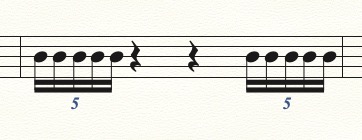
… I am using the simple entry tool.. I enter the first of the sequence of 16th notes, then it opens the symbol or configuration for the 5. I then commence putting the rest of the 16th notes in, and then by the 5th.. it simply does not allow me to enter it.. So far, I have been successful with only 1 measure that I use this rhythmic sequence so I have been copy and pasting and just changing the notes …
My first guess would be that the quintuplet is ending a measure.
Depending on your entry device (mouse, computer keyboard, MIDI keyboard) you may have to de-select the option {Check for Extra Notes} - since your way of entering notes may be “overfilling” the measure.
Please sign in to leave a comment.
6 comments
Date Votes