New post
Avatar
0

Finale 26.3.1, MasOS 10.15.7
I created a bunch of "old" clefs to use for incipits in early music editions . My problem is that in the alto and bass clefs, when I use a key signature (and one flat is the only one my sources ever use), the flat appears above the staff. I have carefully read and explored the manual and tutorial for nonstandard keys, even found how to change the linear key format (which I was missing for awhile), but nothing I do changes the position of that flat. What am I missing?

3 comments

Date Votes
Avatar
0

I wonder if it could be something to do with the baseline of your clefs? I really don’t know.

Comment actions Permalink
Avatar
0

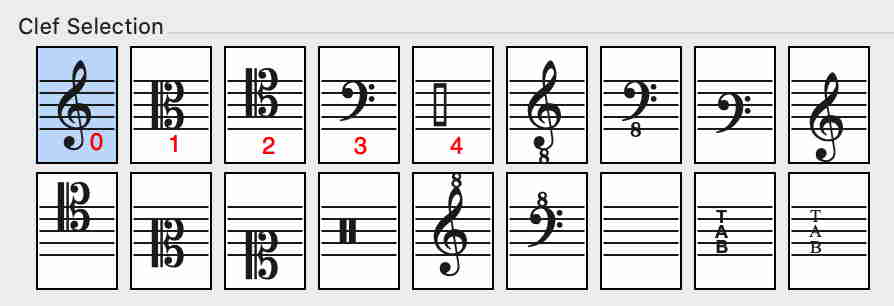
1) You need to find your clef’s number in the Finale document.

In the Clef Selection the clefs are numbered in the “reading direction” left-to-right so that the first clef is Clef 0, the next clef is Clef 1, the next clef is Clef 2, &c.

In the screen shot the Bass Clef is Clef 3.


2) Go to the dialog box Nonstandard Key Signature.

Linear Key Format 0 and Linear Key Format 1 are “hardwired”.

But from Linear Key Format 2 and onwards all options (buttons) are available.

Click the button Acc. Octave


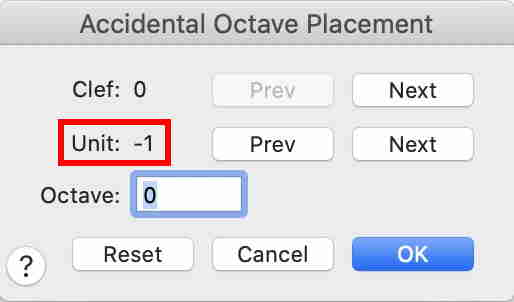
3) In the dialog box Accidental Octave Placement the clefs are available in the top row.

To get to the Bass Clef, click Next until it says

Clef: 3

The accidentals are available in the next row.

To get to the first flat, click Prev to get Unit -1

Comment actions Permalink
Avatar
0

THAT was it! Thank you!
It's not at all clear from the online instructions that the unit number ALSO has to have a minus, because it's a flat. I had the "Number of accidentals: -1" but I thought that "unit" was just the position in the progressive stack of fa (for flats) or ti (for sharps). But only in a standard key signature would things be all sharps or flats. In a mix, you'd have to specify whether each position was a sharp or a flat.

Comment actions Permalink

Please sign in to leave a comment.