New post
Avatar
0

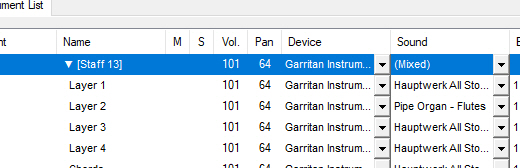
I'm running Finale 26.0.1.655 on Windows 10. I have an ensemble of brass instruments, chorus, and organ. For playback purposes (prospective conductors want to hear what the work sounds like!), I need to change the organ playback sound from default of "Hauptwerk All Stops" in quieter sections of the score. When using Utilites | Change Instrument, I am not presented with any choices; it says All | Keyboards | Organ. I read one post that said playback sounds could be changed by layer so I could simply move all the notes in quieter sections into layer 2. That seems like a good idea, but I don't see how to change playback sounds by layer.

5 comments

Date Votes
Avatar
0
Comment actions Permalink
Avatar
0

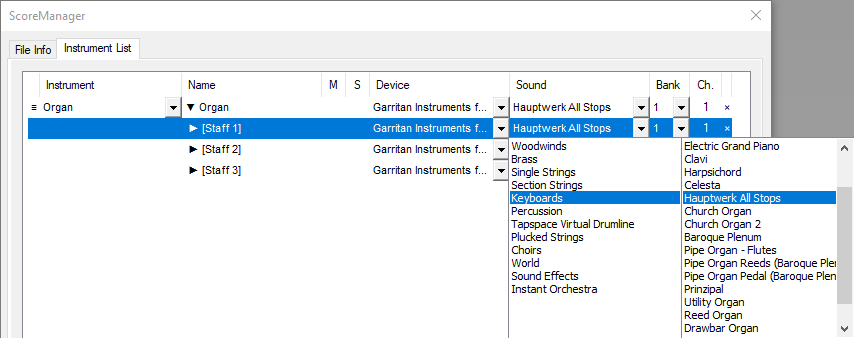
One way would be to use different layers and set the layers up with different "stops" in the Score Manager.


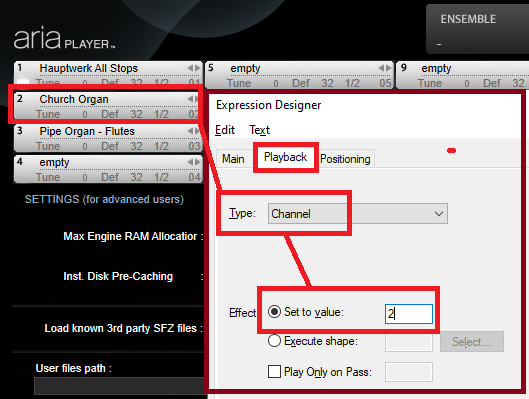
Another option (if you need multiple layers for each organ stop setup) would be to create multiple Organs with different sounds in different slots of the Aria Player and then use a Change Channel expression to switch the staves of the organ from one slot to the other.


Comment actions Permalink
Avatar
0

Thanks, Mike and Adrian. Your suggestion, Mike, seems like it would apply to the whole score, not just to one section, and also has the disadvantage of continuing to play back the same sonority (full organ as opposed to flutes, e.g.). Adrian, you seem to be addressing what I read in another post: changing playback sound by layer. I don't see how to do it, however. Changing playback sound on one staff of the 3-stave organ (your example highlights staff 1) changes the sounds for ALL staves and changes it for the whole score. (I've never used Aria player! Maybe it's time to learn how it works.) I did try using Change Instrument, as shown in my screen capture, but Finale is unwilling to let me select any other instrument. That lets out using the Start Measure feature of Score Manager. (I'm going through all this difficulty because so many conductors and editors seem unable to read a score and require a "recording" of a new piece.) Any other thoughts? Thanks for your suggestions.

Comment actions Permalink
Avatar
0

Wait! I found it...changing layback sound by layer. I just didn't click far enough down in the hierarchy. Thanks again for your help, everyone.

Comment actions Permalink
Avatar
0

Michael S,


If you are using Garritan Sounds, you are already using the Aria Player. You can see it by choosing MIDI/Audio > VST Banks & Effects and clicking on the pencil (edit) icon beside the name of the player. One can do amazing things directly in Aria, auditioning instruments and finding the best (say, violin) sound for a given piece. As mentioned above, you can also match instruments to slots and use channel-change expressions to mute or switch instrument sounds.


I suggest you may want to play around with it in a test project. You might like it.

Comment actions Permalink

Please sign in to leave a comment.