

Windows 10, Finale 26 current
I am converting a duet for viola and cello (in which each have double stops) to a string quartet.
In the duet, notes in Layer 2 are off-set when the interval is a second--to avoid collision.
For the quartet, I isolated each Layer in the duet by showing only one layer, and copy and paste it into the new instrument, e.g., copy layer one from viola and paste it into the Violin part, etc.
However, when I do this when the double-stop is a second, the spacing remains and I have to try to properly align the notes in the two instruments manually.
Is there a way to select the staves and automatically adjust the spacing? I have tried Utilities/Music Spacing... but to no avail.
Here's are screen shots
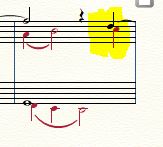
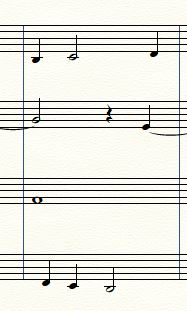
Hope this makes sense. The first screen shot is of the duet (viola/cello), followed by the quartet, violin I, violin II, viola, cello, top to bottom.
:-)
Vanessa

2 comments
Date Votes