New post
Avatar
0

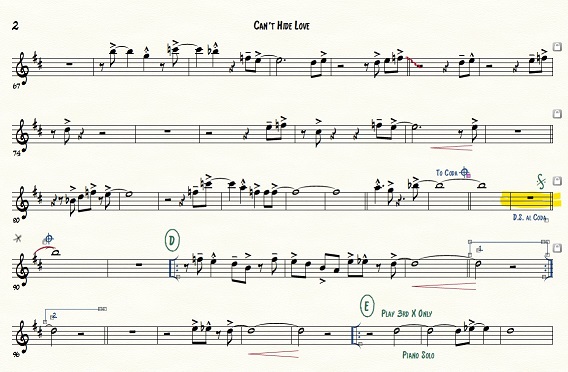
Hoping Michel Herr can help me on this one. There was a time when we could simply click on the speedy note entry tool and ctrl click a note, select tie end and get a tie on that note. Now in the new versions of Finale you can still use ctrl click when in the speedy note tool to pull up the window but when you click on tie end you get nothing. So when I have a to coda jump and I need a connected tie to enter that coda jump, I can no longer make that happen. Making a fake tie does nothing for me. I need the end tie or some might call it the reverse tie. Finale actually calls it the end tie but it is not working. Can you help?

7 comments

Date Votes
Avatar
0

Are you using Windows Finale? - version 27?


For What It Is Worth:

In my own copy of Mac Finale v27 the Tie End is possible.


My steps:

In the Repeat Tool I selected the measures for the First Ending, then

Repeat menu > Create First and Second Ending

I entered notes into the measure before the 1st Ending, and tied the last note to the first note in the 1st Ending.

Then I entered the first note in the 2nd Ending.

To get the Tie End I did not even have to go to the Edit Frame dialog box.

I could do it directly from both Entry tools:

a) Simple menu > Simple Edit Commands > Modify Entry > Tie To Previous Note

b) Speedy menu > Speedy Edit Commands > Tie/Untie to Prev Note


I also tried the Edit Frame dialog box.

It worked, too.

Comment actions Permalink
Avatar
0

I am using version 26.3.1.520

Maybe you don't have an empty measure before the coda bar. This is why I can't tie to previous note because is no previous note. See the attachment. And thanks again.

The program is not allowing me to upload. My file is only 218Kb. Not 2Mb. I will try again.


Comment actions Permalink
Avatar
0

Comment actions Permalink
Avatar
0

I am having problems with the note in measure 90. The red tie is the made up tie I created. 

I never had this issue with the older versions.

Comment actions Permalink
Avatar
0

If I understand you correctly, you do not have any problems with adding a Tie End in m. 96 - right?

The problem is only the missing Tie End in m. 90 - right?


One more question:

Does the playback sound correct?

In wonder whether there is a mistake somewhere (perhaps an error in the repeat playback)?

Since I do not have the actual Finale document (only the graphic you posted), I can not check the playback myself.


By The Way:

The systems are locked.

To me the systems have very different “music tightness”.

The third system has more measures (higher tightness) than the second system.

I would push the first two measures of the third system (= m. 80–81) back up into the previous system.

Comment actions Permalink
Avatar
0

They have that tightness for a reason. My only concern is the end tie for measure 90. I do get a hiccup when I jump to coda for playback. But with the check ties function and the end ties working I would not have this issue. 


Comment actions Permalink
Avatar
0

… I do get a hiccup when I jump to coda for playback …


I am not sure what you mean by your word “hiccup”?

Does the “hiccup” happen just before the Coda?

Are you saying that you hear correct playback in m. 90 (= whole note B♭)?

Comment actions Permalink

Please sign in to leave a comment.