How do I insert a pick-up measure:
1) At the beginning of a piece
2 In the middle of a piece (i.e. right after a "Fine") ?


I always use the Time Signature Tool:
Double-click the measure.
The dialog box Time Signature appears.
To get more options, you can click a button to expand the dialog box Time Signature.
When the dialog box has been expanded, you can set both a ‘real’ time signature (e. g. 1/8), and a ‘display’ time signature (e. g. 4/4).
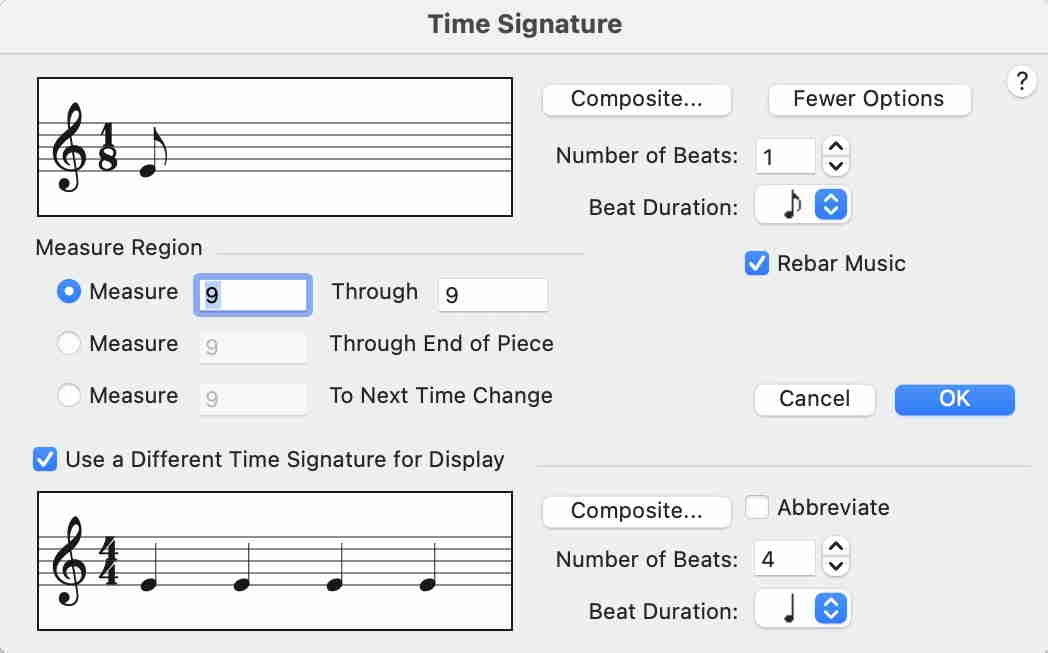
This method works everywhere in a Finale document.
By The Way:
Finale also has an older way of creating a Pickup Measure (look in the Document menu).
This “older way” only works in the very first measure of the document, and it does not play back correctly (= always plays a full measure).

Peter's way works. The manual should just dump these instructions.
Finale also has an older way of creating a Pickup Measure (look in the Document menu).
This “older way” only works in the very first measure of the document, and it does not play back correctly (= always plays a full measure).
Please sign in to leave a comment.
3 comments
Date Votes