New post
Avatar
0

I never have had a problem saving a finale document to a file from which I opened it. Now for every document I get the following when I do a control S save: Error id moving file "s" to "s" The system cannot find the path specified.

Of course there are duplicate files in my C drive, but the same problem exists in every file I can find. How do I fix this so I can use my old simple control S? Not only is this more trouble to save after a small adjustment to the document, such as a page number location adjustment; but this opens the danger of miss-copying a file with the wrong name in the file.

21 comments

Date Votes
Avatar
0

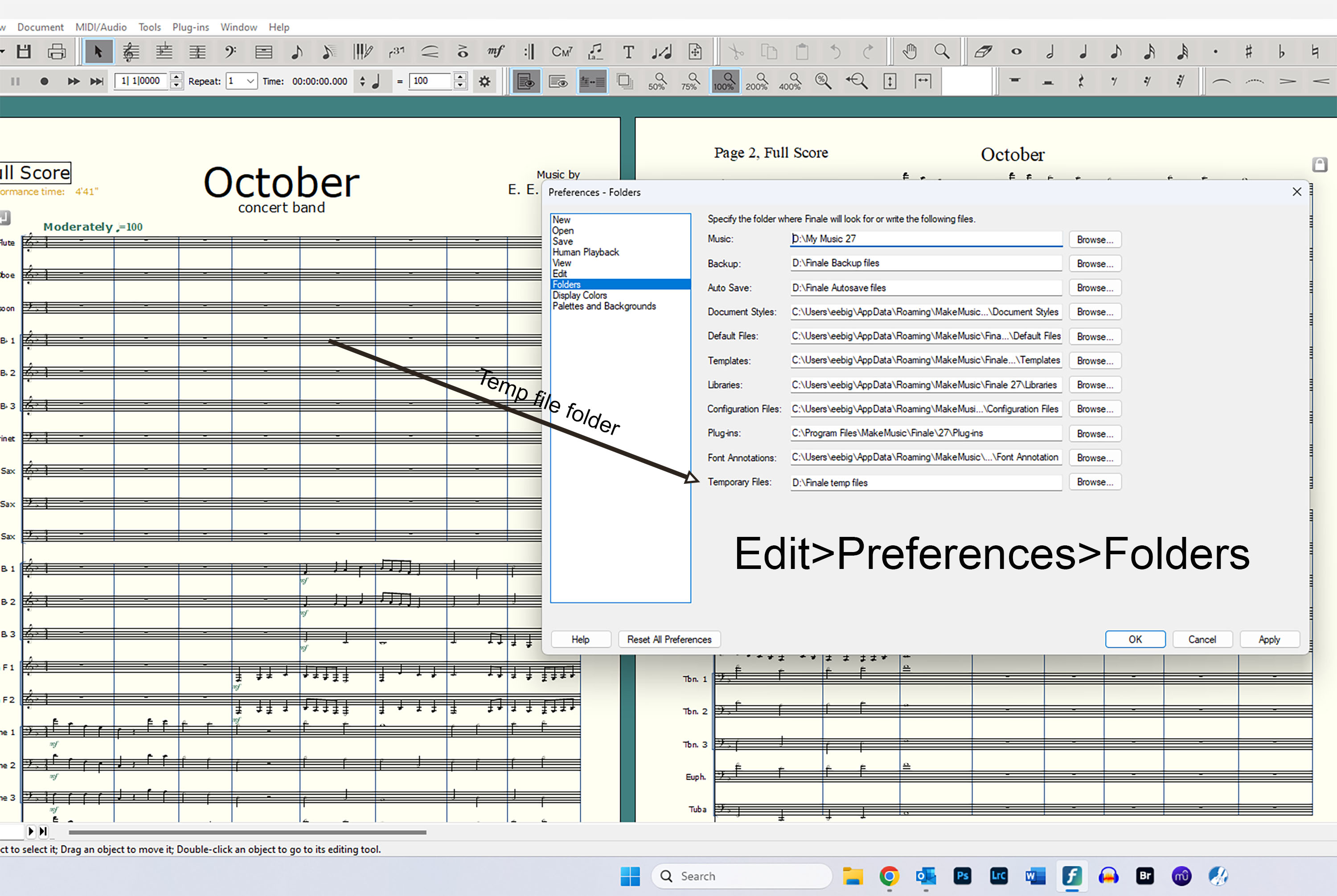
I am going to guess you are Windows? If so the temp folder has been deleted or corrupted. Best practice is to create your temp folder where Windows can not get to it. I have mine on my D:\ drive. I would also reset your preferences in Finale after you correct the temp file folder.

If you are on Mac a more informed forum member will probably be able to help.

Comment actions Permalink
Avatar
0

Ernest, Thanks for your response. I do have windows. How do I even find my temp folder? Can I retrieve it from my D:\ thumb drive? I have several recent saves on two different thumb drives. Still, from what you are saying I have no idea how to fix this problem. 


Comment actions Permalink
Avatar
0

Comment actions Permalink
Avatar
0

If this is the cause and it is a pretty good assumption, your temp file folder got deleted or emptied or corrupted. You need to make a new one. If you have only one hard drive in your machine create a folder called C:\edmond/temp (or some other safe name) and point Finale to it. You must manually create the folder first because Finale will not make it for you. Then go into Edit>Preferences> Folders and browse  to that folder you just created. If you have a D:\ hard drive make the temp folder on it and call it whatever you like. Windows doesn't bother the D:\ drive.


Again, I would reset preferences also.  You can see that button on the bottom left of the Edit screen by the Help button. Keep in mind this will set Finale back to factory default. You will have to reset up your screen and colors, etc., all over.

Comment actions Permalink
Avatar
0

Thanks. There's a file there saying "crash reporting" which I cannot open. There are also other files there which I cannot open. I tried making a new file, but mus files still won't save with control s. I don't what to do with this file.


Comment actions Permalink
Avatar
0

Don't worry about what is in the old temp folder. It is corrupted. If you cannot do a Save As on the file you are trying to save it may be lost because of this situation. You can try Export it as a XML? File>Export>Music XML.  You can later Import that XML back into the new Finale setup. Also you can print it out to hard copy.

Comment actions Permalink
Avatar
0

Here is the scenario, this can happen when Finale has been left open for a while. Finale creates temporary files in the Windows temporary folder that it needs, but doesn't lock or protect them, Windows comes along and decides they're old enough to delete and it does so. It's a terrible bug which should be fixed, but for some reason it lingers. Since I made folders that Windows doesn't bother I have not had that error for years and years and sometimes I leave Finale running for very long periods.

It is also a best practice to do backups on every save. In addition you should have Autosave on every 10 minutes or whatever is your best time frame. You set these items in the same Edit>Preferences screen.

Comment actions Permalink
Avatar
0

Thank you. But I did what you said, and the same thing happens.


Comment actions Permalink
Avatar
0

You made a new temp directory, first, of your own somewhere, then point Edit>Preferences>Folders>Temporary Files to that new folder? Make sure you use the Browse feature in the folder preferences next time to point to that folder. Restart Finale. Make a new Finale document, just the default file will do, and try to save it. If it still gives you the same error you did not do the temp folder set up correctly.

If this fails to correct it,  you need to completely delete Finale form your machine and reinstall it. You need to make sure Finale is completely gone. Delete anything than Windows may leave behind yourself so you get a clean install. Before you start Finale again make sure you create that temp folder first. My suggestion is to use C:\edmond/temp unless you have a D:\ drive then use D:\edmond\temp.

Comment actions Permalink
Avatar
0
Comment actions Permalink
Avatar
0

Reinstalling creates new paths. 


However, it still puts them in a vulnerable place. So, I don't see it as a first option. Fixing the temp folder usually will correct this problem.

Edmond do follow Mike's link to help the uninstall. The link Mike posted is very important and you need to follow it carefully

Comment actions Permalink
Avatar
0

You're entitled to your opinion but mine comes from supporting Windows for about 15 years and I'm sticking to it.

Comment actions Permalink
Avatar
0

I have reinstalled program and it still does the same thing!

Comment actions Permalink
Avatar
0

Ernest,

I think the problem is in "Making sure you use the Browse feature in the folder preferences next time to point to that folder" (in my C drive). How exactly do I send Finale from the browse preferences file to the file I created in my C? This time I shut the computer down before attempting to save the new file.

Comment actions Permalink
Avatar
0

I have reinstalled program and it still does the same thing!


Edmond,

I have the greatest respect for Mike H as he is a world of knowledge with Finale and Mac but I was a beta tester for Finale for nearly the same amount of time he was Windows supporter or whatever. I have seen what works and what isn't so successful. And, I know how my machine runs.

Using the Browse feature simply makes sure you have pointed Finale to the correct folder. That's all. Before you begin you will create that folder using the suggested name C:\edmond/temp. Do you know how to create folders in Windows?

Now reinstall Finale after you have made certain you have totally and completely removed it from your system. If you do not completely remove Finale it may still not work properly.

Then go to the Edit>Preferences>Folders>Temporary Files and click the Browse button. That will take you to your folder layout in Windows. Find the folder C:\edmond/temp and select it. It will show in the Folder preference window like mine shows D:\Finale temp files. Click Apply.


Simply doing as Mike H suggests puts things back exactly the way they were. Most of the time that is fine but sometimes it is not. For some reason Windows is finding that default folder and deleting the necessary temp files before they are of no more use to Finale. That is why you can't save your Finale document. They are temporary files for sure but they are not so "temporary" while Finale still needs them. It is a good thing that Windows cleans out temp files form time to time otherwise they would mount up to enormous numbers and serve no functional value. BTW, when you make your own safe temp folder you will need to go in a clean it out manually because Windows won't.

Comment actions Permalink
Avatar
0

Ernest,

I appreciate your help. But I am not so good with Windows. If I go to my C drive and try to do as you say ( C:\edmond/temp) It will not allow me to use : or either slash. Sorry to be so dumb. The closest I can come to that is edmondtemp. Then I load the finale files into that. I have three mus folders: compositions, arrangements, and standards. As you can see, my problem is in the details of sending the saved document from the preferences folder in finale to the C drive temp folder I create. Again, I appreciate your help much, and I am sorry to know so little as to be this hard to help.

I did reload finale, but that didn't work because I didn't delete all the files. There are so many in so many places--and I'm not sure if I will need some of them in the future. So I am back to your temp file method, but I don't know enough to do it properly.

Ed

Comment actions Permalink
Avatar
0
  1. Open File Explorer using one of the following methods:

    • Press the Windows logo key + E.

    • Find it from the Start menu (Windows 7 or Windows 10).

    • Click the folder icon in the taskbar.

    • For Windows 8 or Windows 8.1, swipe in from the right edge of the screen, and tap Search. If you're using a mouse, point to the upper-right corner of the screen, move the mouse pointer down, and click Search. Type File Explorer in the search box, and then tap or click File Explorer.

  2. Navigate to where you want to create the new folder, and click New Folder.

  3. Type the name of your folder, and press Enter.

  4. To save a document to the new folder, open the document, and click File > Save As, and then browse to the new folder, and click Save.

Comment actions Permalink
Avatar
0

Edmond keep in mind the naming logic is C:\edmone temp but that is what will show up in the Finale preferences window. When you type in the new name, in this case "edmond temp", you do not type the C:\. Just edmond temp.

You also will not use this folder for anything. Finale will use it for temp files exclusively. You can leave the other folders Finale sets up as they are. Do not put files in this temp folder.

Follow Mike H's link on how to remove Finale from your computer exactly.

https://makemusic.zendesk.com/hc/en-us/articles/115003352327-Uninstalling-Finale#: 

Comment actions Permalink
Avatar
0

Ernest,

I created the temp file in my C drive as you said. I opened up a document in finale and saved it to that new C temp file called edmond temp. I saved the document save as. I can see the file there. Then when do control s, I get the same error message. It didn't work.

Comment actions Permalink
Avatar
0

Ernest,

I created the temp file in my C drive as you said. I opened up a document in finale and saved it to that new C temp file called edmond temp. I saved the document save as. I can see the file there. Then when do do control s, I get the same error message. It didn't work.

Comment actions Permalink
Avatar
0

Do not put files in this temp folder. That temp folder is not for you to use it is strictly for Finale.

Edmond there are no further instructions I can help you with. If you follow the link Mike H gave you about the uninstall and follow my instructions exactly as I have given them to you it will work. It is possible to just reinstall Finale and leave everything as is. You may not encounter that error again. My way is just a safe guard for the possible error as it will not happen.  As Mike H said, it creates all new paths. But the uninstall is critical first.

Comment actions Permalink

Please sign in to leave a comment.