New post
Avatar
0

Finale v27+, Windows 11

I think I know the answer to this--and have found one thread dating back six years--but it is worth asking again:

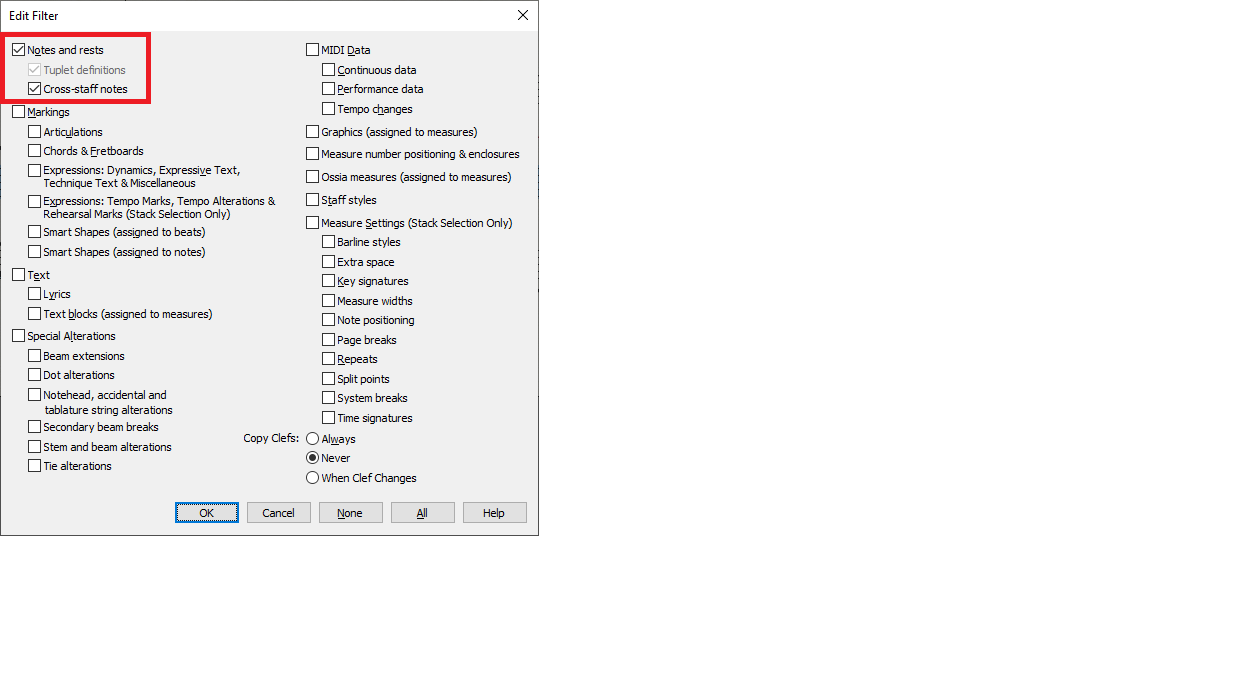
I wish to copy only the notes from one document and then paste only the notes into another, and without any of the Expressions from the first document. In the drop-down menu to edit the selection options I deselect everything, but it still copies and pastes the Expressions.

So, is there now a way to do this?

Thank you!
:-)
Vanessa

7 comments

Date Votes
Avatar
0

Select the source region. Edit -> Edit Filter. Click on None, then on the Notes and Rests checkbox.

Copy and paste to the second document.

After you are finished, set the Filter back to All.

Comment actions Permalink
Avatar
0

Thank you, Michel,

However, if I click on "None" the nothing gets copied, so I click on "None" then click on "Notes and Rests."

When I do that, then the Expressions get copied as well.

Strange...
:-)
Vanessa

Comment actions Permalink
Avatar
0

That is not the case when I try it.


Comment actions Permalink
Avatar
0

Vanessa send me the file.

Comment actions Permalink
Avatar
0

Hi Ernie (and all),

I haven't seen or heard from you for awhile, glad to see you are still with us.

I was going to send you the file, but opted for a little more experimentation first.

I had considered that I was working with an older file, so waited to update the new Finale 27.4 update, and created two new identical documents, but in one I placed notes and smart shapes and expressions, and the other kept blank.

I then went back to document the first, selected everything, right-clicked and selected "Edit Filter", selected "None," did a CTRL+C (and also "Edit/Copy") and went to the second document.

There, I clicked on the first measure to select it, and then did a CTRL+V to paste, and nothing showed.

I repeated the process but this time selected the "Notes and rests" options and got the same results.


HOWEVER, JUST TO BE SURE, and just before I returned here, I tried it again, using the same two new documents and, lo and behold!, It worked with selected "Notes and rests"--meaning ONLY the notes and rests copied and pasted, and no smart shapes or text blocks or expressions, just the notes and rests.

Once again, if I did not select "Notes and rests" then nothing copied and nothing pasted.

Weird; strange.
:-)
Vanessa


Comment actions Permalink
Avatar
0

Imagine that!

Comment actions Permalink
Avatar
0
Comment actions Permalink

Please sign in to leave a comment.