How do I make one of the notes in a chord into a grace note? I can only make all the notes in a chord into grace notes, whether in Simple Entry Tool or Speedy Entry Tool.


Welcome to the forum!
- What version of Finale? - Windows or Mac?
I am confused by your question.
Why do you need to turn a single chord note into a grace note?
What is the problem you are trying to solve?
The better we understand, the better we can help.
Normally you do not turn a single chord note into a grace note.
Instead, a grace note is positioned before the beat (= before the chord).
It is difficult for me to imagine what you are trying to do.
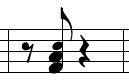
Perhaps something like this?
Dear Peter,
How did you do what you did in the picture you attached?
I do this because I compose in Cubase, not Finale, and I usually export midi files from Cubase and import them into Finale.
In Cubase I'll put the grace notes and normal notes together, this is to make it easier to quantize. The quantization is so that the midi files don't get messed up when imported into Finale. I keep track of the voicing, pitch and position of these grace notes in a memo so that I can readjust them in Finale. So after I import into Finale the grace notes and normal notes will become one chord, that's why I have to convert one of the notes to grace note.
My version is Finale27 in Windows11.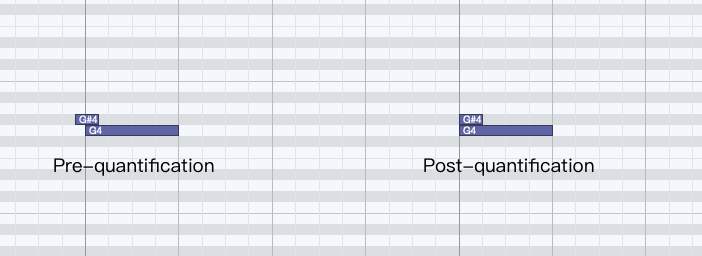
Yasaka Chen,
I need more info from you.
I do not know Cubase, but I suspect that there is a less time consuming way to do, what you need.
1) You tell that you “export midi files from Cubase”.
Is MIDI file the only export option in Cubase?
Cubase can not export MusicXML?
2) You tell that you need to convert one of the chord notes “to grace note”.
Is the issue layout or playback?
What layout / playback should be the final result?
In Other Words:
What are you trying to achieve?
How are you trying to do it?
What happens when you do that?
What doesn't happen that you expect to happen?
3) To create the layout I attached, I used the Special Tools Tool, sub-tool Notehead Position Tool.
Select the notehead handle, and hit Return.
In the dialog box Notehead Settings it is possible to edit the notehead.
NB: only layout, no playback effect.
Dear Peter,
1) Cubase can output XML files, but I have to write Grace Notes in the Score Editor in Cubase first, and the Score Editor workflow is cumbersome and not as professional as Finale. Of course I would choose Finale to produce the score. I want to do all the work on the score in Finale.
2) The problem is in the layout. I usually don't need Finale playback, Cubase can synchronize playback with Finale.
Maybe if I put it this way you'll understand. I've tried splitting Grace Notes to another track in Cubase, and when I exported the midi, some of the voices actually had many tracks, some of which were Grace Notes. this method is actually used by a lot of people, especially when writing scores for drums. I was able to merge the different voices in Finale using Implode Music. But this doesn't apply to Grace Notes, which automatically become normal notes after using Implode Music. They still automatically become a chord. So what I'd like is to turn one of the notes into a Grace Note after they've been turned into a chord.
3) Thank you, but the method you shared doesn't solve my problem yet, you are making one of the notes smaller, not turning it into a Grace Note.

If I understand you correctly, you need a normal grace note, with normal grace note layout - right?
So that the grace note is positioned to the left of the chord - right?
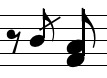
But your solution for fast import into Finale turns the grace note into a chord note - right?
I would delete the chord note, and add the grace note.
With the Simple Entry Tool it is fast and easy to enter the grace note with a click.
Your understanding is absolutely correct, Peter. However, summarizing through my own experience, I don't think it's convenient to use Speedy Entry for Grace Notes. Because all my notes are already composed, I can only convert on the basis of those notes. In Speedy Entry you can only convert by "g" or ";", but after converting many of the notes in this measure change their positions, so you have to reserve two note positions for Grace Notes and regular notes. And then I'd have to change their timings individually. So in this case, it's easier for the Simple Entry Tool to enter the Grace Notes directly.
I don't know if there's a way to delete notes without leaving the rest of the notes in place, but if there is, then the Speedy Entry Tool is pretty handy.
With the Simple Entry Tool you can delete a single note from a chord.
The chord will stay in place:
Select the note, then hit delete.
To select a single note in a chord, use the keyboard shortcut *) CTRL-UpArrow (or CTRL-DownArrow) to move the selection up/down.
*) I am not sure about the correct modifier key in Windows Finale.
The CTRL key is just a guess.
Please sign in to leave a comment.


10 comments
Date Votes