New post
Avatar
0

Windows 10 Pro, Finale 27.4 (latest)

Hi, again, everybody.

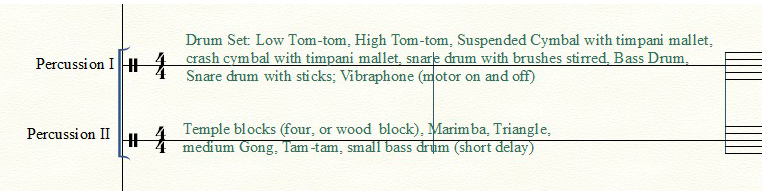
So, I've been down this path before... I want to hide the staff lines of JUST a few selected bars, not the entire staff.

The reason, in this case, is to allow text to be more readable, rather than sitting over the staff lines.
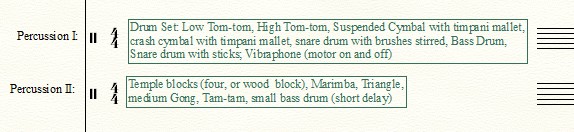
In this case, the first two bars of the percussion, where I list the instruments that will be required per percussion part.

The closest I've come is to "Change Instrument" and select something that requires only one line.
The problem: it messes up my percussion instruments further into the score, even though I select just the first two bars to change.

Here's a screenshot:
11 comments

Date Votes
Avatar
0

You can do it with a custom (= user created) staff style.


A staff style can be applied to a selected region (unlike the Staff Attributes = for the entire staff).


Apply the staff style to the “few selected bars”.

Comment actions Permalink
Avatar
0

Thank you, Peter,

That was too easy (ha, ha)

Worked perfectly!!
:-)
Vanessa

Comment actions Permalink
Avatar
0

BTW--here's what I ended up with on the first page of the score:

Thank you, again,
:-)
Vanessa


Comment actions Permalink
Avatar
0

Question, Vanessa:


Are these two measures beat by the conductor as part of the music? If so, how will the percussionists know how many measures they have "missed"?

Comment actions Permalink
Avatar
0

Great question!

The measures are still there, just hidden. Also, I manually placed full measure rests and hide them.
Perhaps it might be a good idea to show the bar lines for these measures, but the measure numbers do appear in the part.
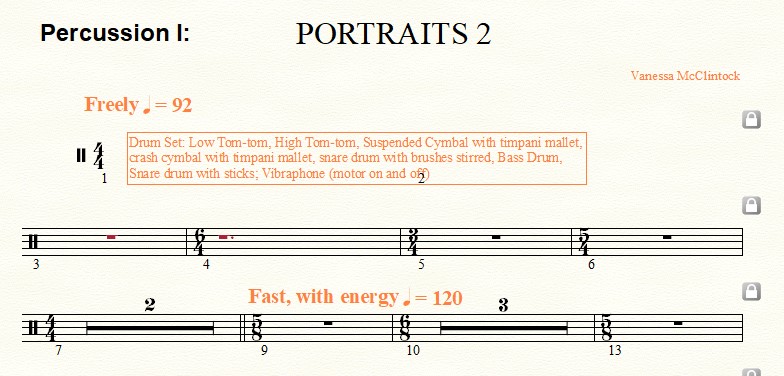
After looking at the result in the part, I can see where I have to rework font attributes and line breaks, but otherwise this appears to be a good solution. (Screen shot follows)


Comment actions Permalink
Avatar
0

Here's another, totally dfferent approach. You could create an expression with your text, with an opaque frame, superimposing it over your staff lines, without hiding them. That way you retain (in may opinion anyway) a more consistent look of a score, where you still have your barlines and measure numbers. You'd probably have to experiment a little with font size of the text and the size of the frame.

Comment actions Permalink
Avatar
0

Hi Michael,

That is exactly what I have been trying to accomplish, but never did see the option, nor details in the user manual.

I had also considered creating a graphic, but that did not seem (to me) as practical.

When I read your comment I probed the "Expression" options and found the opaque frame option.

Thank you--this might be more efficient.

:-)
Vanessa

Comment actions Permalink
Avatar
0

Nessa,

I would totally advise against hiding the measures. If I were a percussionist or any other musician I would be very confused.

It would at least take up valuable rehearsal time, explaining, which always seems to be in short supply. It is always best to make it as clear as possible to the players.

Your Percussion 1, 2 is a very busy person. I would be freaking out!  Adding a Percussion 3  IMHO, would be a lot better idea. You could put your instrument and instructions in a percussion legend. 

A Percussion legend lists the percussion instruments in use when using the five-line percussion staff. Percussion legends include all instruments that are represented on the staff. They not only show sounding instruments in a set range but remind players which instruments to play at certain points.

EB

Comment actions Permalink
Avatar
0

The Percussion Legend can be placed almost anywhere then the certain points in the music can be noted above the staff at that place, I.E., snare drum with sticks or SD w/sticks, etc.

There is also the special drum symbols you can use to indicate what the percussionists is supposed to do.

Comment actions Permalink
Avatar
0

Hi Ernie,

Thank you for the follow-up. Good to know!!

BTW--Merry Christmas to you.

:-)
Nessa

Comment actions Permalink
Avatar
0

And to you Nessa a very merry and happy holiday season.

Comment actions Permalink

Please sign in to leave a comment.