New post
Avatar
1

Ok, so it seems there is now nowhere for me to ask support a question.

The tempo tool has now been dumped. I have looked at the very inadequate tempo set tool in the MIDI menu and it does not deal with scores that use continuous tempo changes. I have tried setting the 'match tempo to expression' in the expression tool and that does not work at all. Any suggestions?

24 comments

Date Votes
Avatar
-2
Comment actions Permalink
Avatar
1

...and if you click through all the links to try and get help you are re-directed to these forums instead. As demonstrated here my question has been answered by someone implying i don't know where to look.

Comment actions Permalink
Avatar
0

Yes, I can see that now.

I never thought MakeMusic would make such a counterproductive, customer-unfriendly change.

EDIT: Found an interesting review of Finale 25 at

http://www.rpmseattle.com/of_note/finale-finally/ 

and it had a work-around for changing tempi--as well as a suggestion that this work-around via the MIDI Tool is not sufficient, something I would agree with.

Comment actions Permalink
Avatar
0

Scott and J Adrian - I have run into the same thing about being shuttled to this forum instead of being able to find a link taking me to a case creation. I stumbled onto the proper link by reading the rules for the forum above - the last rule! I don't know if I'll ever see that link again, but I did manage to create at least one actual new case submission a few moments ago.


I agree with the puzzlement about the user unfriendly non-support nonsense. I have been a user for a little over a year and before I dropped my cash on them they ASSURED me HONOR BRIGHT that there would be support available. It has been acceptable, but not ideal,  for the time I have been seeking to learn this program. I confess I feel somewhat abandoned.


Now, as to the tempo question: I have been entering a tempo for a piece - often by default - when i create a new manuscript, because I just don't know at that point how fast it will need to go. I'm tearing my hair out trying to figure out how to change the tempo once that has been entered, to either slow it down or speed it up upon the playback. Do either of you have advice for me? Thanks!

Comment actions Permalink
Avatar
2

Estelle,

I think the change in tempo Mr. McIntyre was referring to was a carefully designed change in tempo from say quarter=72 to quarter=60, a ritard, as it were. DAW's can manage this, and it is a feature not easy to accomplish in Finale's antiquated MIDI tool.

I take it the support link you found was https://makemusic.zendesk.com/hc/en-us/requests/new 

I wish MM made that more easily accessible (on their web site support page, for example) instead of sending folks to this help board first in what appears to be a run-around. Thanks for pointing out that link.

Comment actions Permalink
Avatar
1

Hi All

The easiest way to change tempo is via expressions.

Create an expression, say "Presto" (or just copy and then edit the Presto expression in the Expression selection box, in the Tempo Marks category)

In the expression designer there are the three tabs at the top. Select the "Playback" tab

If your expression has a musical note in it, such as "Presto q=180" (whre q is a quarter note) then you can select the "Match playback to metronome marking text" This will automatically set the playback to match the marking you have set.

If your expression is just a word, then set "Type" to "Tempo", then next drop down to whatever beat value is to be used.

For Effect, enable the "Set to value" radio button and enter a numerical value eg, 180

To have the score speed up and slow down, add "rit". or "accel". expressions. Other tempo modification expressions such as stringendo, rall, stretto etc all work as well.

Now the magic bit. If your score has midi data already in it (if was created by hyperscribe, or importing a midi file) then any tempo events in the score will override these expressions.

To cure this issue, use the selection tool and select the entire score. From the menu, Edit->Clear Selected Items...

In the dbx presented, click on "None", then select Midi Data->Tempo changes

I'd suggest consulting the manual. Do a search for "Tempo Marks"

Cheers...

Comment actions Permalink
Avatar
0

Dear J. Adrian, 

I hope I am replying to the correct comment. On the left of each comment there is a number (presumably the numbers of replies the comment received.) There is also an upward arrow and a downward arrow. I chose the downward arrow in order to get the reply box. So it is all a vast adventurous experiment!  

You are welcome for the link. You have expressed my perspective exactly about the very ragged transition they are making in creating a new customer service paradigm. I do hope they get it ironed out, for over the year I've been working with the program, I've found it to be powerful. However, I'm groveling around in the very dregs of basics and know I could be doing so much more than I am doing - a lot quicker! - if I could obtain the grounding I need. I have found the tutorials and manual helpful at times, but too many times there is knowledge assumed on the part of the user that isn't necessarily there in the use of this kind of program. This past year is my first experience actually working with one. I had Sibelius for a number of years and gave up because there was NO support AT ALL. Enough of my gritching...

Yes, I think I understood what you explained about Mr. McIntyre's question. I recognized it didn't exactly fit my own question, but it was in the neighborhood of the topic I'm interested in, so took a chance! 


Thank you for your gracious reply.


Comment actions Permalink
Avatar
0

Dear Darrin Smith,

I hope this reaches you - as I have explained to another poster on this forum, I am unsure how to select the proper arrow for the proper reply.

Wow! thank you for your explanation of how to work around the problem! What I may not have mentioned, is that I seem to have a problem that disallows me for the moment to try your solution. 

For past few weeks, whenever I have sought to use the Expression Tool, Finale 2014.0 crashes and goes away. Yesterday I did manage to find the link to submit a problem for assignment of a case number, and so once i have had help solving that glitch, I can then try to work with the advice you have given me.

Again, thank you for your thoughtful and helpful reply!

Comment actions Permalink
Avatar
0

Thanks Darren but I don't use expressions in my score. I use exact tempo changes. I have also tried to use the match tempo mark and it seems to only use the numbered value when you use the Text font which does not match any of the customs fonts I use in my scores. 

Comment actions Permalink
Avatar
0

Scott,

If setting a specific tempo without an expression is your goal, does the Playback tab in the expression Create or Edit screen not work? One can always customize or hide the expression in your score or parts.

(I take it by now you have read that the "Submit a request" link at the top of this screen is designed to lead to individual help from MM.)

Comment actions Permalink
Avatar
1

No, it doesn't seem to work. I have found a workaround but it is very clumsy. It requires me to select an entire area to assign a new tempo rather than specifying the tempo 'for' a certain point to the end.

And in regards to the 'submit a request' the following sentences precede it (see attached screenshot)

Comment actions Permalink
Avatar
0

If the Feature Request I have made in that section of this BBS reflects what you are after, please feel free to vote for it if you are so inclined.

Comment actions Permalink
Avatar
2

So I'm not crazy! I've been using Finale since it first came out back in the 90's and always there was a metronome and I could easily set the tempo in any measure. Then. poof! Gone! I thought I was getting senile! I can't imagine why they thought that was a good idea. I'll request its return!

Comment actions Permalink
Avatar
2

I started using Finale around 1997.

I use it on both PC and Mac platforms.  I had been sticking with Finale 2012 because I had heard that 2014 was a bit of step back.  Now Sierra OS on Mac requires Finale 25, so I had to bite the bullet and I have to say, I'm almost at the point of wanting to go back to Finale 2012 and El Capitan.

But I digress from the thread, so back to the When I inquired about where the heck the tempo tool went, I was told that Finale 25 had "streamlined many of the abilities of the tempo tool into the MIDI tool.
I did try the MIDI tool.  First,It was a bit hard to find and I had some trouble figuring out how to apply a change to say only the last beat or note of a bar.  It's a bit of a process.

Click the selection tool, click and drag the section of the bar you want to alter, click on tools then advanced tools, then midi tool, then set, then enter the metronome speed, then ok, then go back to the selection tool, select the next bar after the changed bar, then click on tools then advanced tools, then midi tool, then set the tempo back to the original speed, so that your piece can proceed "a tempo".
.
With tempo tool it was all done in one window.  You could select any bar number, any beat or subdivision of beat in that bar, then set the tempo and voila.

This is what's called streamlining in the corporate world.


I tried using the scale option in the Midi tool but it doesn't offer the control that the tempo tool offered.  Can you imagine the number of steps I'd have to take in order to create a substantial change of tempo on each note of a bar?

This is really sad.  It stunts one's creativity to have to do so much work just to give a bar a unique feel.

I have both the mac and PC versions of Finale.  I tend to use my desktop PC more with Finale, but when I'm traveling it's the laptop mac I bring.   I didn't upgrade to Finale 2014 because of the loss of flexibility with the program and I was quite happy sticking with Finale 2012.  Because of Sierra OS on my Mac I had no choice but to go with Finale 25. 
I wonder if it might be possible to get a refund for the PC portion of Finale 25.  I'd like to uninstall it and reinstall Finale 2012 on my PC. 

I really believe that Finale 25 is a step in the wrong direction.

Comment actions Permalink
Avatar
0
Comment actions Permalink
Avatar
0

I also used the Tempo Tool and have for many years. The functionality that I can't find a workaround for is percent change. I don't use expressions to set tempo. For playback I use the playback setting. Expressions disable the playback setting. The Tempo Tool let me set a change of 150% moving from a duple section to a triple section then change it back with a 66% change. There's nothing in the MIDI Tool that has that functionality, that I can find anyway.

Comment actions Permalink
Avatar
0

Yup.  and despite all this talk, all this frustration, no one listens.

Many steps backwards, no moving forward.  Just more trouble, less convenience, and since you can't use the better (older) versions because of Sierra OS, you're stuck with crap and have to live with it.  Looks like crap, acts like crap and does less and less for true composers, arrangers and musicians than ever.

Comment actions Permalink
Avatar
0

On the contrary, MM does listen, they just don't give you the answer you want.

https://makemusic.zendesk.com/hc/en-us/community/posts/239436668-BRING-BACK-TEMPO-TOOL 

Presumably future versions will come up with improvements to the MIDI tool (as MM_Michael has said) to help with tempo changes. Meanwhile most people are using expressions (visible or hidden) to set tempo directly.


True, Pamela, that percent changes are not available except using the MIDI Tool.

https://usermanuals.finalemusic.com/FinaleWin/Content/Finale/ID_MAINTOOL_MIDI.htm?Highlight=MIDI%20Tool 

Comment actions Permalink
Avatar
0

Dear make music...I love finale, you have a great product, but hey...why not just say sorry...we made an easy tempo control much harder...we apologize. Put on your big girl pants, eh?

Comment actions Permalink
Avatar
0

Valerie, 

You can use an expression to do what you did before. There are other functions that require the MIDI Tool (which is more complicated), but just setting a new tempo in the middle of a piece is much easier.


Comment actions Permalink
Avatar
0

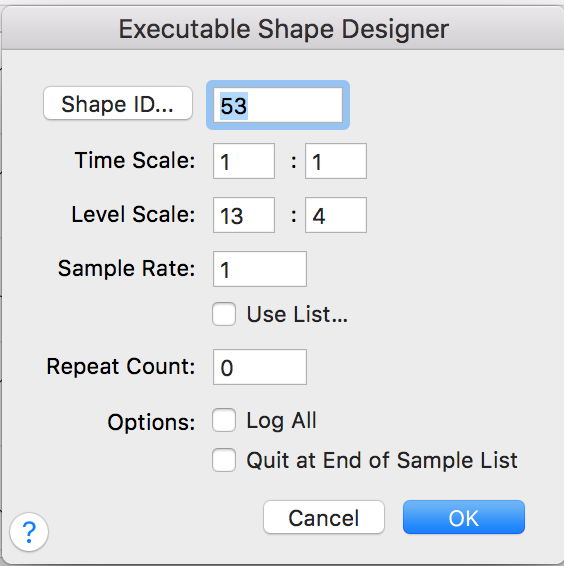
I am giving J. Adrian Verkouteren a huge apology. The tempo alterations in the Expression Tool do allow one to make desired tempo changes, albeit not as easily as the old metronome. Maybe Mr. Verkouteren can explain the what the Time Scale, level scale, and sample rate mean in the Executable Shape Designer pictured below (this window is 4 clicks into the Expression tool...which makes it, again, harder than just clicking on the icon of a metronome).

Val Smalkin


Comment actions Permalink
Avatar
0

Val,

You said 9 months ago,"I could easily set the tempo in any measure." I do not understand why you are using shapes to do that. Are you trying to set an accelerando or ritard? That did not appear to be what you were requesting in your original post, the only on with specifics in it.


If you are trying to set a graduated tempo change, then I did not understand your situation. I have not used playback shapes in eons since, I think we will agree, they are arcane and virtually impossible to control. For graduated changes--if simply writing a carefully placed rit. expression and a target tempo will not do--I would hold my nose and work with the MIDI Tool.


Let me know if you want an example of that, and I'll give it my best shot at an explanation.


--Adrian


Comment actions Permalink
Avatar
0

Hey Val, Hi J

Using the MIDI tool to control tempo doesn't work as easily as the metronome tool did, we all know that of course, but it does an ok job.  It requires several extra steps to achieve similar results.  The metronome tool truly was easy as pie and gave you full control with a lot of precision.  Much of that has been lost when Make Music made the colossal mistake of removing one of their most useful tools and keeping other crap we never use.  I don't understand the logic of it.  It makes absolutely no sense for Make Music's team to remove a menu item that used to appear on their main tool palette and suggest using a tool that's quite hidden when you think of it. 

Tempo changes with the MIDI tool works this way...

Go to Tools / Advanced and select MIDI.  You might get a Human Playback warning so just follow what it says. I know too many steps already and a total pain with the human playback warning.  Before you just needed to click on the metronome. That's not all though, there's still more to do.

Click on the MIDI Tool which now appears as a menu item.

Select Edit Tempo.

Click on the bar where you want the tempo change to occur.  You can also drag and click to select a portion of the bar or several bars, depending on how precise you want the changes to be.

Under the MIDI tool menu choose Set to if you want to change the beats per minute of the section you highlighted.

Once you've entered the speed, click OK.  The area you chose should now play at the altered speed. Good luck there.  It doesn't always happen and sometimes you need to go into the playback options and make sure the "Play recorded tempo changes" is checked.

UNFORTUNATELY, WE'RE NOT DONE.

The speed you chose here will now be the tempo for the remainder of the song, so you'll have to do select the point after the area you just altered, if you want your piece to return to its original tempo.

You can also slow down (or speed up) an area incrementally by choosing the Scale option under MIDI tool.  This allows you to change the speed going from one tempo to another, by increments that you choose.  Depends on how big a gap you have between the from speed to the To speed.  Small gap, small increments.  Big gap, larger increments.

I've never used the other options under MIDI Tool as they are pretty useless.  The two I showed here do pretty much everything you'll need.

That's it.  Hope this helped some and on behalf of Make Music, I apologize for the inconvenience.  So much of the best of Finale was lost when 2014 came out.  Even the look of it is sterile now and I don't even have the option to change it.  Classic view was so much easier. 

Nuff said

Pete


Comment actions Permalink
Avatar
0

I would never use the MIDI tool just to set a fixed tempo for a series of measures, I would use simple tempo expressions (hidden or shown). The only time I would use the MIDI Tool would be to control graduated changes in tempo.


Comment actions Permalink

Please sign in to leave a comment.