New post
Avatar
0

Finale Songwriter 2012, Windows.  Entering Second Verses. 

The user manual seems to not know how to explain this. It says to make sure "verse" is selected.  Where??  After I click on Specify Current Lyric, nothing appears that allows me to select Verse.  

A later instruction says to select Click Assignment.  This is not an option that I can see anywhere in the menu.  But apparently I am supposed to have this choice.

Then it says to "refer to lyric text below" - what lyric text, where??  I don't see what this refers to.

Now it says I can click on a "corresponding icon" in the Lyrics window.  What window?? I see no window!!

then there's something about a last word extension that I don't have any clue about.

Finally, numbering the verses is not explained when you have the second verse starting at a location different than the first verse.  how do you do that??

And finally, Finale, why doesn't the manual actually instruct poor little old me on how to use this product which I have purchased?

5 comments

Date Votes
Avatar
0

Have you looked at either of the Quick Start videos on lyrics that came with your Finale package? They only take about a minute each.

Comment actions Permalink
Avatar
0

Go to where you want to start entering your 2nd verse. Click on the first verse lyric (it should highlight). Press the down arrow key and the cursor should now be in the 2nd verse position. Does that work for you?


It has been said that the Song Writer help files are full of mistakes, often referring to features that are only available in full Finale. I don't know if this is the case here, but it might be.


And as J Adrian suggests, watching the videos are always a good idea.

Comment actions Permalink
Avatar
0

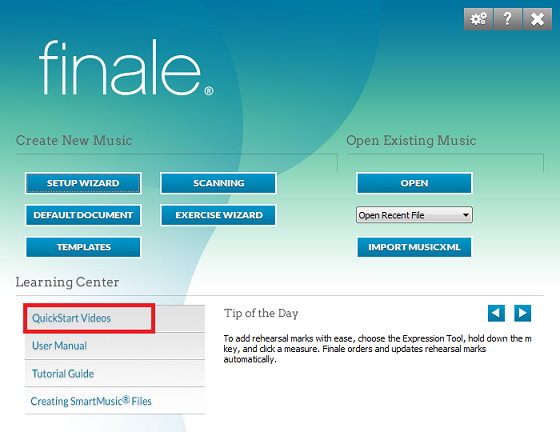
Thanks J.A.V., I am afraid I don't know how to find Quick Start videos...?

Comment actions Permalink
Avatar
0

Yes, B.K., that does work!

I still don't know how to number, since my second verse does not start directly below the first, but that's not the biggest issue.

Comment actions Permalink
Avatar
0

QuickStart Video tutorials are accessible directly from the opening Finale splash screen.

Comment actions Permalink

Please sign in to leave a comment.