New post
Avatar
0

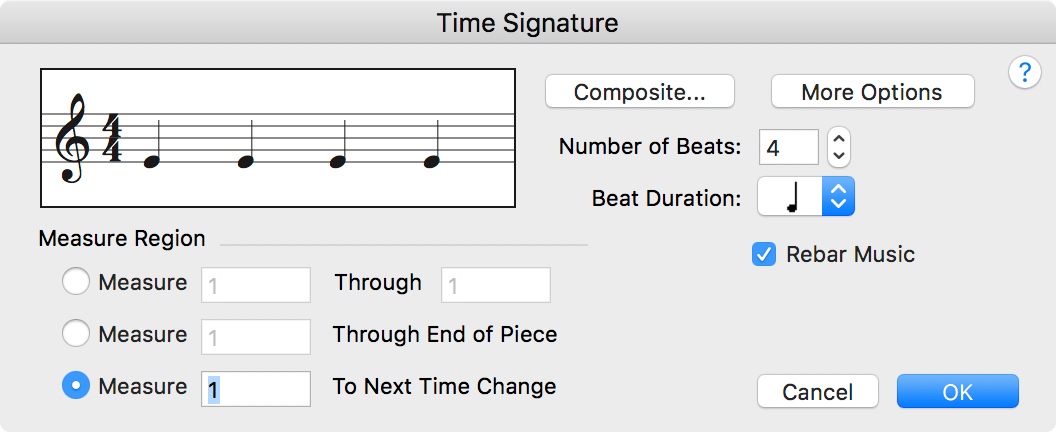
In the Time Signature or Key Signature Tools:  It used to be, I could either 1) drag the little button or 2) click inside the scroll bar.  I prefer the latter, but it's not available now.  Is this Finale, or is it Mac Sierra OS?  (I updated both simultaneously.)  Thank you!  Opinions from other users are welcome.

4 comments

Date Votes
Avatar
0

I'm guessing it is Sierra, since I am not having this problem on my Mac copy of Finale v25.

Comment actions Permalink
Avatar
0

I have the same problem.  I blame it on Sierra...


Comment actions Permalink
Avatar
0

For many years now, I have been completely missing the arrows on the scroll bars in both the time signature and key signature dialog boxes. I think this started around the same time that the general scroll bar was redesigned to put the scroll arrows close together. So, in order to change either key or time signatures, I have to click on the scroll bar and drag it - carefully - to the desired setting. It is very difficult and not user friendly. Am I missing some special setting for this? and if so, why would this even be a setting choice?!

Comment actions Permalink
Avatar
0

For What It Is Worth, this issue has been fixed in Finale v25.


Comment actions Permalink

Please sign in to leave a comment.