New post
Avatar
0

While I'm using the playback when I am writing the music everything sounds fine, but when I export the file to make a sound file, play it back, I hear all these skips.... how can I correct these? Please answer asap. Btw I'm using VSL.

14 comments

Date Votes
Avatar
0

You do not say which version of Finale your are using. Since the audio export works differently in various versions, it would be helpful to know which version of Finale and which operating system you  are using.

Comment actions Permalink
Avatar
0

I'm using iMac OS Sierra with Finale Version 25. The main problem, from what the VSL experts say, is an audio export bug. 

Comment actions Permalink
Avatar
0

Hi Westley. I'm having the same darn thing. I have apple El Capitan, with Finale 2014.5.  I can hear beautifully during playback, but the export of the file to AIFF form is successful, but I feel as though I'm listening to a very well-used 78RPM. At one point I was advised to contact Apple because it was something to do with a "buffer setting." I contacted Apple and they said they could not help me because it is not their program. Catch 22?


If you learn the answer, I'd love to know! Of course we have different versions, so who knows if the answer would be the same...


Comment actions Permalink
Avatar
0

I'm experiencing the same problem. The skips in my case sound like quick audio dropouts. They don't appear in playback within the program, but on files created through audio export. Has anyone found a solution yet?

(I should note that I've been having other, dissimilar audio problems which may be traceable to a hardware issue on my logic board, so I can't rightly fully blame Finale until I get this fixed, but the fact that this problem does not occur within the program is what makes it notable to me!)

Mac OS X Yosemite Version 10.10.5

Finale 2014.5.7098

Comment actions Permalink
Avatar
0

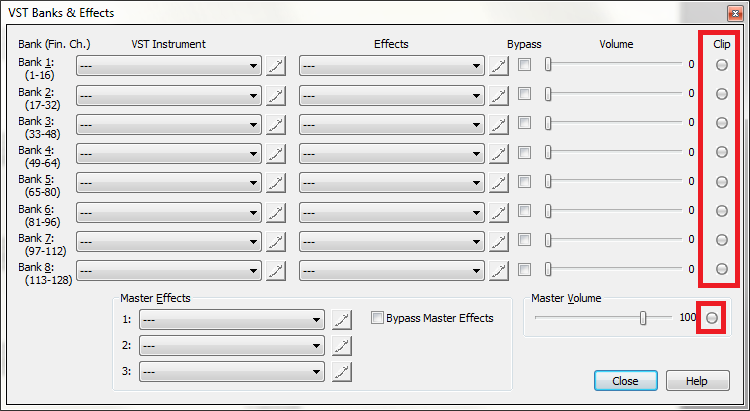
If you run the program with the Midi/Audio > Banks & Effects panel open, do any of the Clipping dots light up? That could explain brief (flickering) dropouts.

Comment actions Permalink
Avatar
0

The clip isn't the problem. I even put Bank 1 on 70 and left the Master Volume on 100. I'm very sure the software is faulty and needs to be checked.

Comment actions Permalink
Avatar
0

To even double check, I put both Bank 1 and the Master Volume on 70. I still hear these skips. With all kindness and respect, please tell your developers to fix this issue immediately before I start using Sibelius. My future clients will not put up with audio skips and I want performance out of this software. Just to clarify the software I am using.

1. Finale Version 25

2. Vienna Symphonic Library Special Edition Complete Bundle

3. Vienna Symphonic Library Ensemble Pro 6

4. Vienna Symphonic Library Instruments Pro 2

5. Vienna Symphonic Library Suite Pro

6. Vienna Symphonic Library Imperial

Comment actions Permalink
Avatar
0

Since you're using VSL, you should contact contact them and explain your problem. Andi at VSL is very knowledgeable about using their products with notation programs.

Comment actions Permalink
Avatar
1

This is a user support board. Our developers are your developers. 


All the same, most of us do not have this problem. In my case, I'm using Philharmonik, GPO and Kontakt. I'm not using VSL so I can't help here.

Comment actions Permalink
Avatar
0

How old is your Mac?

VSL takes a lot of memory and processing.

  1. Were you at any earlier stage able to use the VSL libraries without problems, either on your current machine or another?
  2. Were you at any earlier stage able to use the VSL libraries without problems, on an earlier iteration of the Mac OS or an earlier version of Finale?

(To echo Mike H, with only a few clearly labeled exceptions, we are users here, not MM developers.)

Comment actions Permalink
Avatar
0

You can try Clear Selected Items... > MIDI data.


But if you haven't already done so, open an official support ticket by clicking on the Submit a Request link at the top of this page.

Comment actions Permalink
Avatar
0

The issue was just solved! In order to export audio files you have to select the highest buffering option, but do not use the highest buffering option during feedback. One of your developers, David C., brought it to my attention and I really want to thank him a lot.

Comment actions Permalink
Avatar
0

I have a remedy for the horrible audio files concerning VSL. Buy Snagit, it costs around $50 but you can capture your screen and the system audio. With the mp4 file, you can upload a video on YouTube then use a YouTube-to-mp3 website to extract the audio. In my opinion, Snagit does a better job with audio processing than Finale.

Comment actions Permalink
Avatar
0

>Snagit does a better job with audio processing than Finale.<


So do many things, most of them free including Quicktime, part of the OS. I like the VLC Media Player which has a number of functions not supported in QT 

Comment actions Permalink

Please sign in to leave a comment.