Hello,
What I'm serching for is a way to have a double suffix chord on two lines.
Es A7(b9#11) where b9 is on the upper line and #11 on the lower line.
Is there a command to write for this? I dont like the one line long chord.
Thanks


Some libraries that come with Finale offer some superimposed elements, but not systematically. You can load the various chord suffix libraries to see what suits your needs best. Facing the same problem, I made my own chord suffix library, with all my personal preferences (size, font, layout, symbols used, etc...). It took me 2 or 3 hours, but I can now load it into all my files.
To save time, you can start from an existing library, duplicate suffixes and modify them. When you are done, save the library.

Hi Jai,
I assume you have installed the font in your system (Windows or Mac). Then the font becomes available under Document -> Document Options -> Fonts -> Chords.
Now, if you are talking about suffixes, you would need to have them in a chord suffix library or in a document.
Usually, the only way to have new suffixes is (in your case with the "new" font selected) is to create them in the Chord Suffix Editor. It takes some time, but then you can save your suffixes as a library which you can load into any other document.

Please sign in to leave a comment.
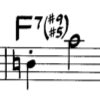 This is what I'm meaning. Any idea with Chord Tool?
10 comments
Date Votes