New post
Avatar
0

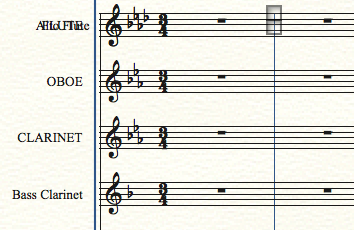
Hi there.  I'm importing from a midi file and setting up via their dialogue boxes.  It's pretty buggy, but I've worked around it, but I can't figure out how wo correct it putting two staves on one.  For instance, it put the alto flute under the flute and you can see two clefs and key signatures.  I used the staff tool to open attributes but it only mentions the flute, not the alto flute.

Any suggestions are welcome.  Thanks.

I'm working in Finale 25 and on a 2016 macbook pro.  OS 10.11.15

14 comments

Date Votes
Avatar
0

Can you show us an image of a few measures that illustrate what is wrong?

Comment actions Permalink
Avatar
0

Hi yes, if you look at Flute, you'll see that it's got the Alto Flute under it.

Comment actions Permalink
Avatar
0

What created the MIDI file if you know?

Comment actions Permalink
Avatar
0

This is likely because both Flute and Alto Flute in the original (MIDI) file used the same sound and same MIDI channel. If you are lucky, you have access to the program (DAW?) that created the file and can re-generate the MIDI file after assigning Flute and Alto Flute to separate MIDI channels.


Otherwise you need to create a new staff or two and tease out (or re-enter) the flutes' noted on the proper staves.

Comment actions Permalink
Avatar
0

I created the midi file in Digital Performer.  The flute and alto flute were separate patches, even separate instruments.  One was from East West and one was from VSL.

This issue of Finale placing one staff on top of the other has been happening a lot while importing midi, even though I go through the setup and assign each track to its own staff and correct the clef.  The doubling of the staff is random - sometimes it will be an oboe with a cello under it, or a bassoon with a horn under it, so clearly this is not an issue of the midi being on the same track.

Comment actions Permalink
Avatar
0

Also, even though I'm correcting and assigning clefs in the initial setup, Finale is ignoring what I'm fixing/changing.  For example, I will assign an alto clef to the viola and after I do that, it still appears with a treble clef.

Comment actions Permalink
Avatar
0

If DP on export doesn't differentiate between the two instruments, then Finale won't import them that way. The instrument VIs you assign won't matter because of the way that DP handles MIDI. You know what I mean by that.


Digital Performer 9 supports MusicXML export. Yoy might try that instead. If you are not using DP 9, you should download the demo, open your file in it and see what that does.


It's too bad that we can't create user profiles here. I run DP 9.12. It's been my DAW of choice since v. 2.6.


I compose in Finale and export to DP if needed—never the other way around.

Comment actions Permalink
Avatar
0

But I'm correcting everything in Finale and it should recognize that.  As I mentioned, it's ignoring changes I made to clefs in the initial setup.  I'm checking slot numbers and and everything looks kosher, but when the file opens it's like I didn't enter anything.  I can understand there being confusion when I first import the midi file, but I can't understand why Finale is ignoring my fixes and changes.  That seems buggy to me.

I'm using DP 8.07.  I'm in the middle of a massive project and won't update until I'm finished with it, as I don't like to update in the middle of projects.

Mike, you said "The instrument VIs you assign won't matter because of the way that DP handles MIDI. You know what I mean by that."  Actually, I don't know what you mean by that.  

Comment actions Permalink
Avatar
0

DP 8 does have the option of exporting as a Final Cut Pro XML.  Would that work if I just selected and exported the MIDI parts?  I've been exporting "Selection as MIDI file..."

Comment actions Permalink
Avatar
0

Just as a quick patch, what would happen if you exported just the Flute, then just the Alto Flute, and then opened each in its own Finale file? Could you then paste those two parts into your master file on two newly created staves?


I know this isn't a solution, but until a better one appears....

Comment actions Permalink
Avatar
0

Really? You don't understand that DP handles the MIDI and the Device data separately—they are linked but no other DAW handles MIDI the way that DP does.


Finale doesn't support Final Cut XML as far as I know.


I'm not suggesting that you finish your project in DP 9. I did suggest that you download it, open your file and try exporting as MusicXML to see if that solves your problem.


Anyway, Finale is not understanding the MIDI data the way you want it to. This may or may not be a problem with Finale. I have run out of suggestions. Sorry.

Comment actions Permalink
Avatar
0

I like that idea.

Comment actions Permalink
Avatar
0

Hi Amanda,


Thanks for posting!


Just curious, in the screenshot it looks like that may actually be two separate staves super-imposed on to of each other. It is hard to tell if that is the case, but you can check this by selecting the Staff tool and then dragging the handle that appears just to the left of the treble clef downward. That should help fix the staves if they are super-imposed.

Comment actions Permalink
Avatar
0

Please don't judge my next comment as from fanboys. I mean my comment sincerely.

My professional opinion is as follows:

Up to the latest version (quick scan for MY previous issues...

1) Finale still (since Finale's birth) adds new added staves PAST the bottom edge of the page. Now waste time to shrink systems.

2) I often get staves on top of each other.

3) Far too many spacing issues to mention here, but some obvious eg: Accents, Staccatos, Fermatas are ALL entered ON TOP of each other on the same note! EVERY-SINGLE-VERSION!

4) The designers STILL don't understand that Ctr+Roll mouse wheel ZOOMS a page.

5) Articulation and expression dialog boxes are often empty.

The list WILL increase should I actually use Finale again for my projects...but no.

My professional recommendation is, well...is would have been...GET SIBELIUS! But now they have gone renting out their software (which, truly unbiasedly put, are superior to Finale in so many ways. Just give it a proper unbiased test and you WILL soon see what I mean). BUT...like I said, they are getting greedy so...

1) Stick with Finale! The software is still doing the job AND you are used to it....AND it's YOURS! (I still check Finale's updates EVERY time...but the issues remain! Eish!)

2) Get Dorico. This software is still being born (although already extremely powerful). So, as for me, I will still do my projects in Sibelius (and you, Finale), but as soon as Dorico can carry the weight, I will convert completely. I only purchased it now as it is still cheaper.

3) Get Overture 5. VERY good software....and underrated; and lastly

4) Notion 6. Maybe the BEST audio engine in notation software out there, but the engraving is found wanting...big time!.

So, in a nutshell, I test ALL notation software I can find, in MY opinion, Finale has hardly improved since I left in 2011.

The same can be said of Sibelius. Since version 8.x, the growth is not worth the money they want. Still fantastic software, though.

My friends, while Finale grows so slowly, others have so much potential...check out StaffPad (Windows users) and Notion for Windows tablets and IOS (I think?).

I really don't understand why all these OLD problems still present themselves in Finale...but I continue to visit and hope.;-)


Comment actions Permalink

Please sign in to leave a comment.