New post
Avatar
0

Hi there!  I am a piano teacher, and I write a lot of music for my students.  This music includes a lot of fingerings.  I'm using Finale Version 27.

I discovered through the magic of YouTube that I can easily add fingerings by holding down the desired finger number and clicking on the note I want to apply it to.  Then, if I'm unhappy with where the fingering is placed, I can select "a" for "above" or "b" for "below."  So far, so good!  This has saved me a lot of time over the old way (painfully selecting each fingering from the articulations menu).

Now I'm getting greedy -- I want my fingerings to line up neatly above the notes.  Like this example:
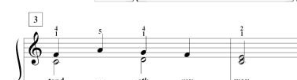
Currently, I go back after all the fingerings are in and manually try to line them up, not always successfully, I might add!  Is there a way to line them up better?  Maybe there's a plugin I'm not aware of?  I already possess Perfect Layout -- is there a setting on Perfect Layout that would fix this problem that I just don't see?

Thank you for your wisdom.  I'm sure this question has been asked before, but I've been searching the forum for the last 20 minutes, and I can't seem to find it.

6 comments

Date Votes
Avatar
2

1) It is not clear to me, what Finale tool you are using for piano fingerings ?


2) It is not clear to me, whether “line up” means vertically or horizontally, or both ?


2) Some users create compound, multi-number fingerings as shapes, with an opaque background to hide the staff-lines behind the numbers.

Like this (only one shape, with three numbers):


Comment actions Permalink
Avatar
0

Peter, thank you for the reply!  Sorry I wasn't clear.

I am using articulations to enter my fingerings.

By "line up," I mean I'd like my fingerings to appear above the staff (or below the staff, for bass clef fingerings) in a neat line, as in the example I posted.  So fingerings would be horizontally aligned with each other in a line above the staff and vertically aligned above the notes they apply to.

Thanks for the tip about using shapes!  I might try that in some instances.  

Comment actions Permalink
Avatar
1

… I am using articulations to enter my fingerings …


You can also use the Expression Tool, or the Lyrics Tool.

I mostly prefer the Expression Tool because I can position expressions precisely, by numbers.

What works best (Articulation Tool, Lyrics Tool, Expression Tool), depends on the actual context.

Comment actions Permalink
Avatar
1

Thank you so much for suggesting the Expression Tool.  I looked into it, and, yeah, that's exactly what I need!

I found this YouTube video describing how to make custom fingerings with the expression tool.  Looks like they're going to line up above the staff how I want them to.  I had no idea to look at the Expression Tool to do this, so thank you!


Comment actions Permalink
Avatar
0

Hi Melissa, 


Now that you have this working, it is a good idea to edit the title of your original post to add the word, RESOLVED. This will help others searching for the solution to this same issue.

Comment actions Permalink
Avatar
1

Ah, will do!  thanks!

Comment actions Permalink

Please sign in to leave a comment.