New post
Avatar
0

I'm using PrintMusic 2011, and have a score which is set to A4 page size.  When I extract the individual parts, they are in Letter.  Why would that be, and how can I get all the parts to be A4 without changing each one individually?

7 comments

Date Votes
Avatar
0

You may need to set the page size, not only in PrintMusic, but also in your Printer settings so they match.


(After all, if you ask Finale for a Tabloid size page--17x11", A3 size perhaps?--you probably cannot get the printer to print it (unless you have a really high quality printer.)

Comment actions Permalink
Avatar
0

Thanks for the thought.  The printer's default is A4, so it's not that.  Printmusic seems to default to Letter for the extracted parts despite the score being in A4 and the printer's setting being A4.  Very tiresome!

Comment actions Permalink
Avatar
0

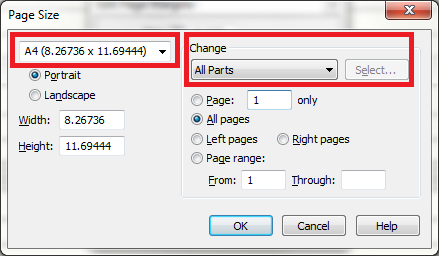
Do you have this config screen under the Page Tool menu?


Comment actions Permalink
Avatar
0

No, sadly not.  I'm thinking that this is another legacy of the template I'm using, which must have been set up in Finale with these options, which I can't now change.  If I continue to use PM, I'll set up a new template which works the way I want it, and avoid these issues in future.  Thanks for your input.

Comment actions Permalink
Avatar
0

Did you find a solution to this dilemma?  I have the same problem with a scor that was created as an A4.

Comment actions Permalink
Avatar
0

David Beecroft,


Are you using the "full Finale” - or are you (like Stephen Joy) using Finale’s smaller sibling PrintMusic?


In the “full Finale” you can access and edit document settings for Page Format of both the score and the linked parts.

Comment actions Permalink
Avatar
0

Unfortunately not.  I have ruled out the theory that it's connected with the template I was using, since, like you, I've found that it happens even with newly created scores that started out as A4.  I'd be interested if you do find a solution.

Comment actions Permalink

Please sign in to leave a comment.