New post
Avatar
0

Doesn't seem that I can attach a screen movie of what I'm going to describe, but if I select two notes that are not on the downbeat in a single staff, easy to do with dragging. But selecting this region in several staves messes it up-the selection instead either includes an extra 16th or incorrectly selects the last two 16ths. Only way for me to do what I want is to select the region in one staff and then hit Shift (I'm on a Mac, running the latest version of F27). I'm pretty sure I used to be able to drag a partial measure and select it in multiple staves, even if not on the downbeat, or am I mistaken? Thanks. 

1 comment

Date Votes
Avatar
0

I link to YouTube videos when I need to demonstrate something like this. Although one can screen-scrape in QuickTime, I find the free version of Wondershare easier to use and it will capture System audio digitally as well instead of using the microphone like QT.


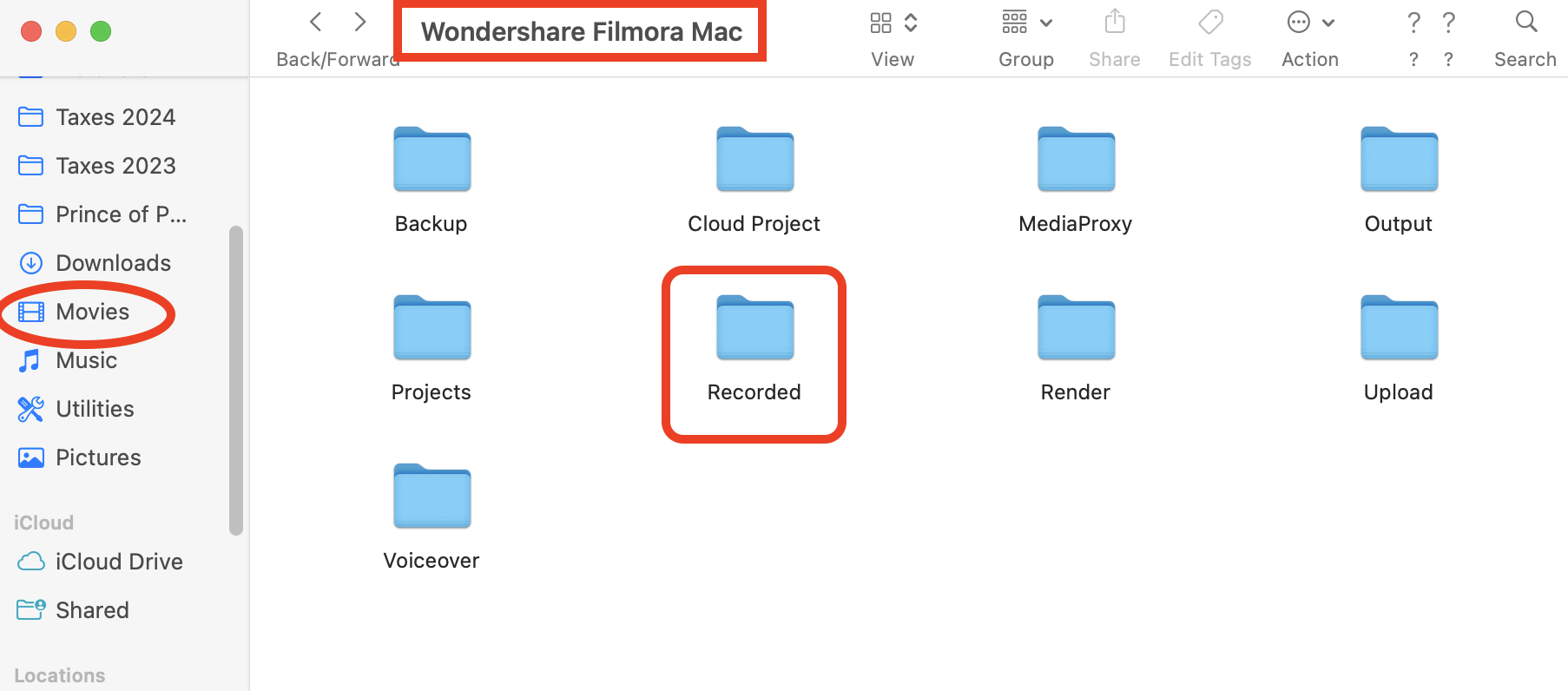
Wondershare doesn't tell you where your video recording is—they want you to purchase, of course and use it inside the app. On a Mac, the default location for the raw recording is Users/(user name)/Movies/Wondershare Filmora Mac/Recorded where they are stored as mp4, useable in iMovie, QT and any other AV application.


Wondershare is not a Mac only app but I no longer have a Windows machine so I don't know where the mp4s are stored. It looks to be a decent AV editor but I use others.

https://filmora.wondershare.net/filmora-video-editor.html?gad_source=1&gclid=Cj0KCQjw5ea1BhC6ARIsAEOG5pzm-UYTc_BJs--d8MOLU-EthqsTtFmw4XajLWyN2eB-KA5JnmVbFBYaAkzwEALw_wcB 


Comment actions Permalink

Please sign in to leave a comment.