New post
Avatar
0

What would keep the rit and a tempo expressions from working in a score? A friend send me a doc in cut time, q=120. HP is Standard. Putting a rit in has no slowing effect.


If I set up a default document, the rit and a tempo work correctly. I tried it both in 4/4 and 2/2, with no change. Adding a tempo expression of q=120 seems no different from simply having the tempo selected in the playback window. So why won't my friend's doc work the same way?


14 comments

Date Votes
Avatar
0

Mike,


What would happen if you exported the song as XML and imported it into a new document? The only thing I can think of (since you are likely as knowledgeable about Finale as I am) is that something has scrubbed the MIDI in a way that neutralized the tempo changes.

Comment actions Permalink
Avatar
0

Thanks for the idea, Adrian. As it happens, I tried clearing the MIDI data, first. That worked fine. I’ve used that before, but not often enough to where it becomes an automatic thought.

Comment actions Permalink
Avatar
0

Mike, Can you instruct me how to clear the midi data? I'm experiencing the same issues! Thanks, Brian

Comment actions Permalink
Avatar
0

Mike, Can you instruct me how to clear the midi data? I'm experiencing the same issues! Thanks, Brian

Comment actions Permalink
Avatar
0

I'm not Mike but I just happened by...

Select the music, select the menu item Edit/Clear Selected Items and then select MIDI Data.

Comment actions Permalink
Avatar
0

Thanks, Vaughn. I did this, however, the file still does not follow the tempo changes! BC


Comment actions Permalink
Avatar
0

… Select the music, select the menu item Edit/Clear Selected Items and then select MIDI Data …

… I did this, however, the file still does not follow the tempo changes …


This works for me:

Select the music, select the menu item Edit/Clear Selected Items and then de-select everything except Tempo Changes


When you have cleared Tempo Changes, expressions with playback effect Tempo will “take over”.

Also, the expressions will “override” tempo in the Playback Controls.


To set playback tempo via Playback Controls, remove the Tempo playback effect from the expressions (or clear the expressions).

Comment actions Permalink
Avatar
0

I tried this to no effect. My opening temp is 120 bpm. 35 measures in the tempo assigned is 40 bpm, but the playback continues through.  There is a rit. at ms 33 it DOES follow. Then it goes a tempo at 35 rather than dropping down to 40.  BC

Comment actions Permalink
Avatar
0

Are you assigning that tempo change with an expression?

Comment actions Permalink
Avatar
0

yes!

Comment actions Permalink
Avatar
0

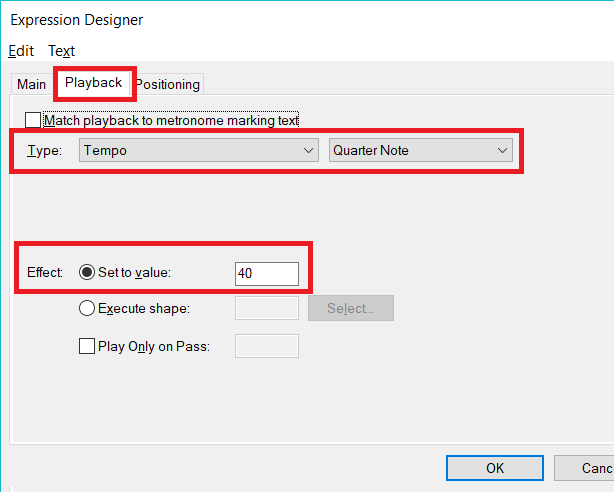
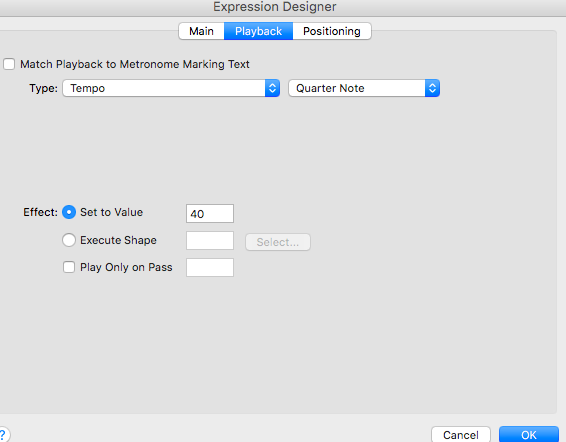
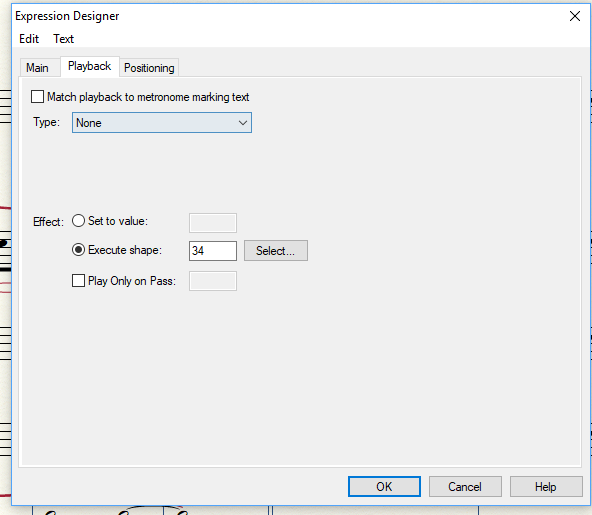
Please show us an image of the Playback Tab of the Expression Tool for the tempo expression that is not taking effect.

It should look something like this:


Comment actions Permalink
Avatar
0

Comment actions Permalink
Avatar
0

Win 10, Fin 2012


Will the "edit/clear MIDI data" work with 2012?


I've have a rit. in a score for ages that stopped working a while ago.  I had only assigned it as an expression, nothing fancy.


I didn't understand that the "set to value" is the "goal" value.  Right?

Comment actions Permalink
Avatar
0

If you're using Human Playback in your file, then HP simply understands "ritard" or "rit.". In that case, you should choose "set to value" and enter "0" as the value. You should not choose a shape.


Just open up a blank default file and look at how the playback is defined and make your ritard use the same info.

Comment actions Permalink

Please sign in to leave a comment.