New post
Avatar
0

Hello, 

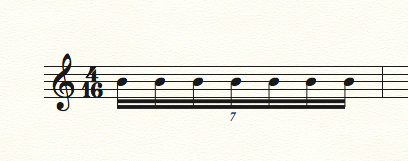
I am on Finale 2014 and having an issue entering 7 sixteenths: 4 sixteenths in a measure of 4/16. I am using simple entry 9since I don't have a MIDI keyboard for speedy). 

I click on a measure, enter a sixteenth note, then go tot he tuplet option and select the 7 and 4 for the 7:4 ratio that I want, but I can only enter 6 sixteenths in the measure. I cannot figure out why the last note will not go into the measure. 

I know the way to do this in speedy entry, but again, no MIDI controller. Any advice is appreciated. 

8 comments

Date Votes
Avatar
0

No problem here. Did you set up the tuplet as 7 sixteenths in the space of 4 sixteenths?


Simple Entry, QWERTY keyboard.


Comment actions Permalink
Avatar
0

Yes. I have tried about 10 times and I make sure it is 7 sixteenths in the space of 4 sixteenths. I am missing something simple here and I just can't seem to figure it out. 

When you started, did you enter a sixteenth note into the measure, then click on the note and then click on the tuplet tool to make the 7:4?

Comment actions Permalink
Avatar
0

No. I (almost) never use the tuplet tool. Enter the first note. Hit Alt+numpad 9 (Opt-9 on Mac) and OK. You should then see the first note and 6 rests under the bracket. Just replace the rests with your notes. I use the ABCDEFG keys on the keyboard for the notes.

Comment actions Permalink
Avatar
0

I think I m have been staring at my screen too long. First off, I cannot see anyone's comments anymore except mine. That is frustrating. 

I figured out what I was doing wrong. If I make the measure, enter a sixteenth note, then make it 7:4, but then leave the measure, my issues are with going back into the measure to start adding the rest of the notes. 


Also, even though brackets are clicked to show, it doesn't have any. Not sure why. 

Comment actions Permalink
Avatar
0

John,

If you can see this, call me at 206-five two three-9628


Mike

Comment actions Permalink
Avatar
0

… I figured out what I was doing wrong. If I make the measure, enter a sixteenth note, then make it 7:4, but then leave the measure, my issues are with going back into the measure to start adding the rest of the notes …


There are several ways to enter a tuplet.

The culprit is your way of entering a tuplet.

When ending a measure with a tuplet, and entering the tuplet the way you do it, it is usually necessary to de-select “Check for Extra Notes”.

If I understand you correctly, you have by now found a solution, and managed to enter the tuplet, right?


… even though brackets are clicked to show, it doesn't have any …


There are two places where you can affect the display of tuplet brackets:


1) In the pop up menu Shape there are 3 choices:

- Nothing

- Slur

- Bracket


2) Below the pop up menu Shape you must choose exactly one out of three “radio buttons”.

You can not choose two buttons, and you can not de-select all three buttons.

Hence they are called “radio buttons”:

◯ Always Use Specified Shape

◯ Never Bracket Beamed Notes on Beam Side

◯ Bracket Unbeamed Notes Only


Comment actions Permalink
Avatar
0

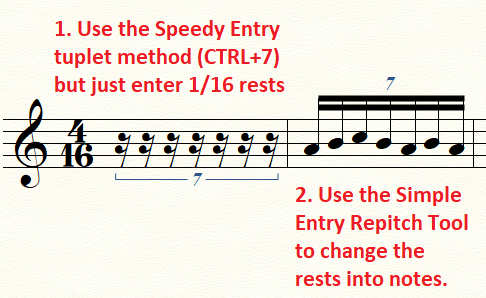
There is also a way to use the Speedy Entry method without a MIDI keyboard.

And Peter already told you how to move a bracket underneath.

Comment actions Permalink
Avatar
0

Without a MIDI keyboard you can enter the septuplet directly, in both Speedy Entry and Simple Entry.

No need to enter 16th rests first.


In this example let us say that the septuplet 16ths are all G’s.


In Speedy (via computer keyboard):

Position the cursor on the desired scale step (= G)

Ctrl-7 (Windows), or Option-7 (Mac) (telling the Tuplet sub-Tool that a septuplet is coming up)

3

3

3

&c. (7 times)


In Simple (via computer keyboard):

Choose Simple menu > Simple Options, and then ensure Use Simple Entry Caret is selected.

3 (setting the rhythmical value)

G (entering the first note)

Alt-9 (Windows), or Option-9 (Mac) (opening the Simple Entry Tuplet Definition)

7 (7 notes…)

Tab (…in the space of…)

4 (…4 notes)

Return (OK!)

G

G

G

&c.

Comment actions Permalink

Please sign in to leave a comment.