New post
Avatar
0

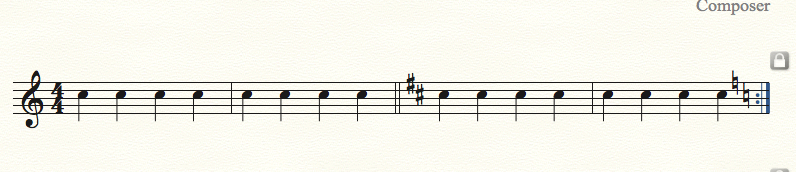
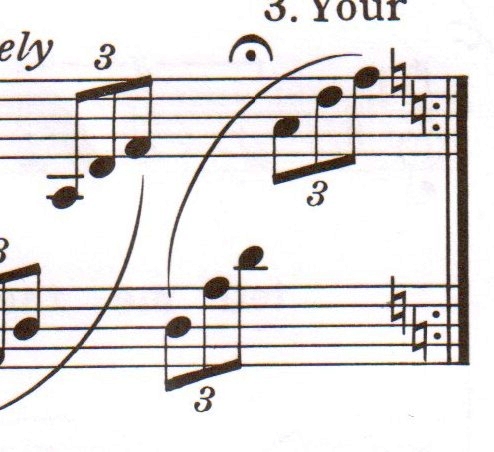
Is there a way to have Finale generate key change accidentals at the end a measure like in the image below?

This measure is within a fragment in D but repeats back to the beginning in C.

Thanks!
 

7 comments

Date Votes
Avatar
0

What is in the next measure?

Comment actions Permalink
Avatar
0

The next measure is in D major. The beginning (in C major) changes into D major after 10 bars, then continues in D until the end while skipping the bars you see in the image.

Comment actions Permalink
Avatar
0

I did this by hiding the courtesy accidentals in that last measure (measure attributes) and put them back in as text expressions. That got them on the left side of the repeat bar.


Comment actions Permalink
Avatar
0

In this particular case I would add the naturals as expressions.


To make room for the accidentals, use the Measure Attributes to add Extra Space At End of the measure, probably something like 12pt.


To get the naturals at the precise Vertical position, remember this:

The height of a staff is 24pt.

Hence the distance between the staff-lines is 6pt.

And one scale step is 3pt.

Comment actions Permalink
Avatar
0

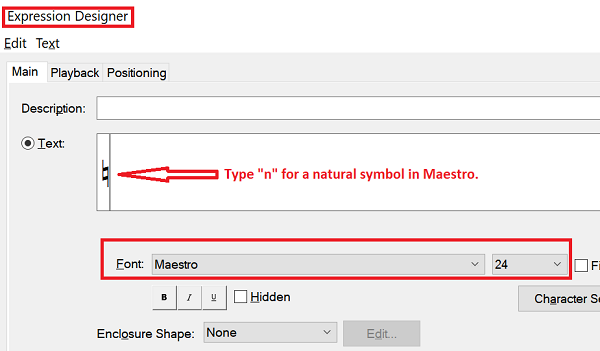
@Peter: I see what you mean but there are no accidentals in the Expression Tool and I can't find a way to create or insert accidentals in the 'Create (Misc.) Expression' tab of the Expression Tool.

Comment actions Permalink
Avatar
0

Make sure to choose the Maestro font.


Comment actions Permalink
Avatar
0

@Adrian: After widening the measure a bit, this did the trick, thanks!

Comment actions Permalink

Please sign in to leave a comment.