New post
Avatar
0

Hi all. I have a finished piece that I have composed. However, I would like to know how to delete the empty vocal line in the first 8 bars of the intro. Whenever I click on the Staff Tool and select the very first staff and click Delete Staff, it deletes the first staff/vocal line throughout the entire song. I just need the empty staff in the intro to be deleted. 

I have Windows 8 and Finale Printmusic 2014. 

Thank you. 


12 comments

Date Votes
Avatar
0

Tina,

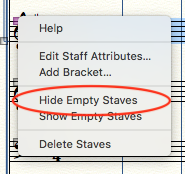
Select the empty measure range at the beginning of your score. With the staff tool, right click in the handle at the upper left of the staff, and choose Hide Empty Staves.


Comment actions Permalink
Avatar
0

Hi Mike. Thanks for your reply. I clicked on Staff Tool and selected the empty measures. I right clicked the handle and selected Hide Empty Staves and nothing happened. The empty measures still remain. Not sure if I'm doing something wrong. 

Comment actions Permalink
Avatar
0

Do the measures fill out a system? That is, they go from the beginning to the end?


You can send me the score at wawoodman at aol dot com, and I'll take a look.

Comment actions Permalink
Avatar
0

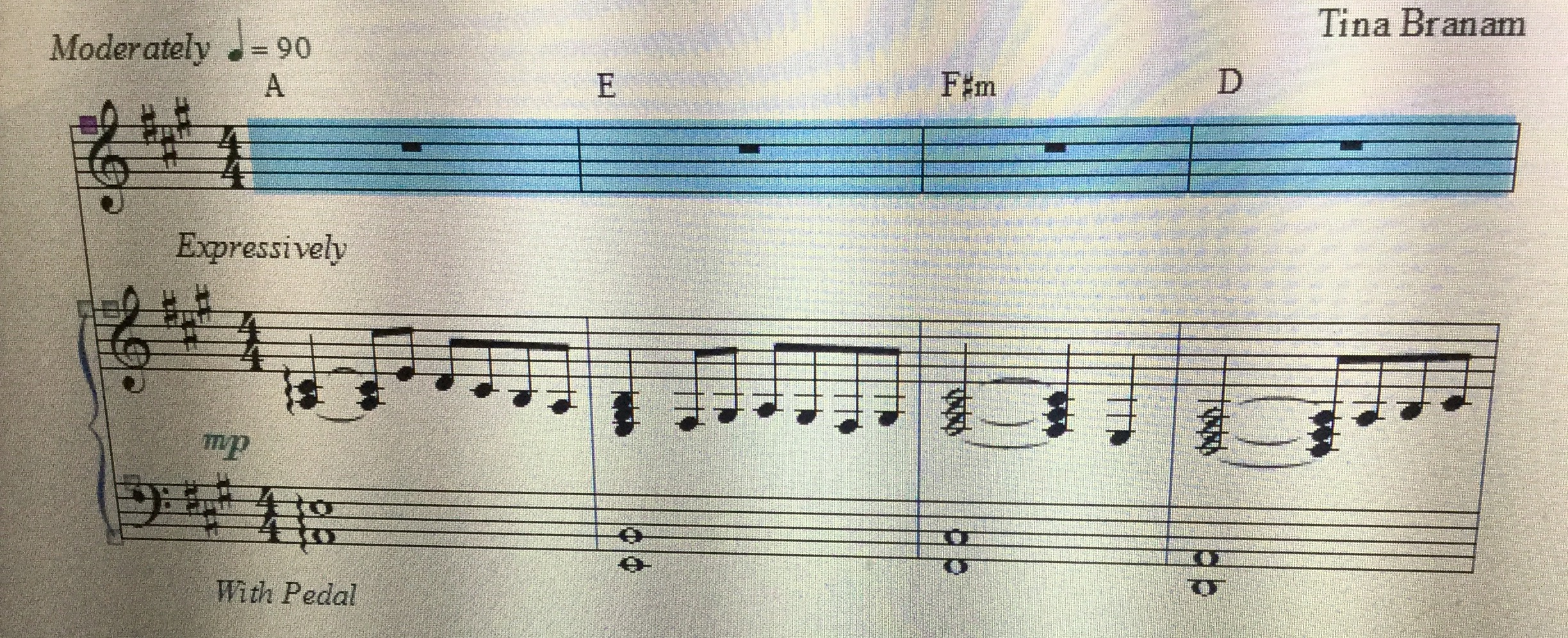
Here is a sample of the score. The 4 measures go from beginning to end of the first line. So I wanted to delete or hide those empty measures in the intro. 

Comment actions Permalink
Avatar
0

You have chords attached to them, so they aren't really empty!


Delete the chords, and attach them to the piano staff, instead.

Comment actions Permalink
Avatar
0

When I delete the chords by using the Chord Tool, it keeps coming back. I click Chord Tool and then click on the handle and press Delete, but somehow keep re-appearing on top of the staff. How can I permanently delete them off this empty staff?

Comment actions Permalink
Avatar
0

Right click on the chord, and select DELETE.

Comment actions Permalink
Avatar
0

Ok. I figured it out. I managed to delete the chords and deleted the empty staves, finally. 

Thanks so much for the help Mike. You certainly relieved my anxiety a little. I'm trying to get this score as perfect as I can. 

Comment actions Permalink
Avatar
0

Glad I could help!

Comment actions Permalink
Avatar
0

Hello,


I am having the same problem above...I think. I have a two top vocal staves (treble soprano and bass clef bass plus a piano line below with treble and bass. For the first 20 measures, I need to delete or hide JUST the bass clef bass line at the beginning of the song....I'll need it later on. How do I hide or delete just the first 20 measures of just the bass clef line? Seems I figured this out several months ago, but I can't remember how I did it.....maybe something with reposition the score or saving space or something??? Please help, this is driving me crazy:-) David

Comment actions Permalink
Avatar
0

David,

if you follow the instructions ll the way at the top of this thread, that should do it for you. With the Staff tool, select the empty measures, right-click on the handle, and click Hide Empty Staves.

Comment actions Permalink
Avatar
0

Morning Mike.......yes......I figured it out! For some reason it wouldn't hide the bass clef selected measures that I needed it to, but when I deleted the one measure of notes in the treble clef line above it, and then used the Staff Tool, right click on the top right little square, and choose the hide empty staves, it worked. Thank you!!!! :-)

Comment actions Permalink

Please sign in to leave a comment.