New post
Avatar
1

Hello,

Help!!! I am 82 and I not very savvy with Finale. I have Finale 2012.

I have a full orchestra score of an opera and a separate piano-vocal score. I would like to take the string lines from the orchestral score and create a new score that has the string lines with the piano part.

In other words, I am doing a reduction to string quartet from full orchestra score and piano vocal score.

Does anyone know how to do this? I am not sure how to copy a full part versus just measure by measure. This applies to deletions, as well. I do not know how to delete en masse. I have been deleting measure by measure. 

Thank you very much,

Richard and his daughter Rebecca

8 comments

Date Votes
Avatar
0

If you click just to the left of the first measure, it should select the entire staff comtaining that part. You can then copy and paste it into your destination score.


Take a look at the help videos. I’m almost sure there is one about making different types of selections.

Comment actions Permalink
Avatar
0

I haven't done this in a while, and have moved on to Finale 2014.5, but here's how I'd do it. Rather than create an entirely new piece of music (unless you're making edits that you don't want to appear in the original full score), I would use the "Extract Parts" function. Here's the link for that in in the Finale 2014.5 manual: https://usermanuals.finalemusic.com/FinaleMac/Content/Finale/SPLTORCH.htm?Highlight=Extract%20parts. You should also be able to to get your version-specific instructions in your Finale Help Menu>>User Manual, then search for "Extract Parts." This has the advantage, that if you ever edit the original score, those edits would carry through in the extracted parts.

Otherwise, if you really DO need to create a separate score (e.g., because you want to insert a measure or so from another instrument's part into the piano to maintain continuity), I've had no problem using the MEASURE TOOL to:

In the original score, select the measures to be copied from the desired staff (staves if contiguous, e.g., piano—easy way: click on the top staff first measure, scroll to the end, shift-click on the bottom staff last measure of selection).

Copy.

Switch to the new score (just to be safe, make sure it's set up for the staves you need and has enough measures to contain the copied material—I've had it crash occasionally at this point if I don't).

Select the starting measure in the desired staff (staves if contiguous).

Paste.

Repeat as needed for the other part(s).

Best of luck!
Mike Horstman
Richland, WA

Comment actions Permalink
Avatar
0

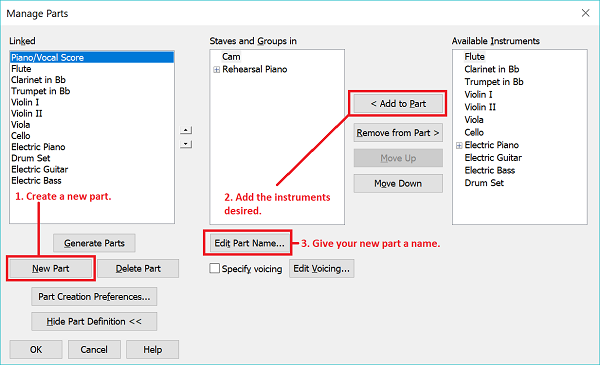
Rather than using an extracted part, use linked parts via Documents > Manage Parts:

  1. Create a new part.
  2. Add (and order) the string parts and piano part you desire.
  3. Name the part.
  4. Click "Okay."

Use the Document > Edit Part pull-down list to select your new part for viewing and formatting.


Comment actions Permalink
Avatar
0

Richard,

I don't know where you are currently with your request, nor am I trying to hijack this thread, but one thing you should know about copying and pasting from one file to another in Finale is that Finale will add all the attached expressions from the source file to the target file, dumping them into the Miscellaneous category; without exception.

If you have a fairly large score, and you end up doing a LOT of copy/paste executions, you will have a TON of cleanup to do to the expressions and their associated categories.

This may or may not be a big deal in the end for you, but I thought you might like to be aware of this deficiency.  I had to edit a very large orchestra file, doing a lot of copy/paste, and it was a cleanup nightmare.

I have made a request to the developers to address this issue, suggesting some kind of expression sorting and merging, but I'm not sure how it was received nor how complicated it would be to address with the application for a future update.

J D Thomas

ThomaStudios


Comment actions Permalink
Avatar
0

JD, while you are correct that moving a file from F 2012 to F 25 will almost certainly dump all expressions into the Misc. category, if Richard is used to working with F 2012, he may be comfortable just leaving them where Finale puts them instead of trying to recast everything to F 25 standards. It all depends whether Richard expects to have to continue to revise this file in the years ahead.


I have followed both practices, sometimes moving all the expressions (helps if one copies into a F 25 "template" without libraries) and sometimes just leaving everything as it arrived in the new program. It depends where I expect the file to go in the future.

Comment actions Permalink
Avatar
0

That is precisely why I commented it may or may not be a big deal.  But if he's looking to automate placement of certain expressions, it is a consideration.  Otherwise it's a non-issue.

Comment actions Permalink
Avatar
1

Hello everyone,

Thank you all for your help. I am trying this out today. Took a while to get back to this. I may have some questions, but this is very very helpful. I am assuming I can have more than one document open at a time? 

We'll see! 

Richard

Comment actions Permalink
Avatar
0

Yes, you can have more than one doc open at once and switch between them in Finale's Windows menu (at the bottom?)

Comment actions Permalink

Please sign in to leave a comment.