New post
Avatar
1

Latest Finale and latest OSX

OK.  All I wanted to do is change the tempo of playback.  This is not an unusual thing to do.  I suspect at some point everyone wants to do this.

So, I look on the playback box and there is no tempo change there.  So, I go not to the manual (to hard to know what word to use) but I go to Goggle and find a whole article on the subject.  

First, there is a small triangle with no words near it in the Playback Box, that I'm supposed to click on.  OK, there it is. Tempo, with a chooser for what note gets the beat and a box to type in what tempo I want.  Cool.

But

The tempo section is greyed out.  Great.  

So now I go back to Goggle and find out that I was using something called spacebar playback and that I have to click the actual stop button before the grey out.will  go away..

So it worked but I had to go to Goggle twice.  I don't need to listen that often so I'm going to have to go through the same procedure the next time I want to listen to a certain tempo  A few versions ago the change tempo was in plain sight.  What genius decided to hide it?

Thank you from Sonora CA


11 comments

Date Votes
Avatar
1

You might have found the solution more quickly, if you had gone to the Help files in finale, and typed in change tempo.


The tempo box in the playback dialogue is for setting an initial tempo. You don't keep changing that, to change the tempo. The correct way to change tempo is with an expression.


Expression  tool, click where you want the change.

Expressions selection > Tempo Marks > Create Tempo expression.

Comment actions Permalink
Avatar
0

Mike  I have the same problem as David.  All I want to do is speed up the entire arrangement from m.m. 80 to m.m.110   This should be an easy fix.... just increase the tempo in the box, but when I play it back the tempo stays the same at m.m.80 even though the box says 110.   I don't want to create an expression, just increase or decrease the tempo in the simplest way possible.... any suggestions...thanks ... Sim Wierdsma

Comment actions Permalink
Avatar
0

If the tempo doesn't change, then you already have a set tempo, either via an expression or a MIDI setting.

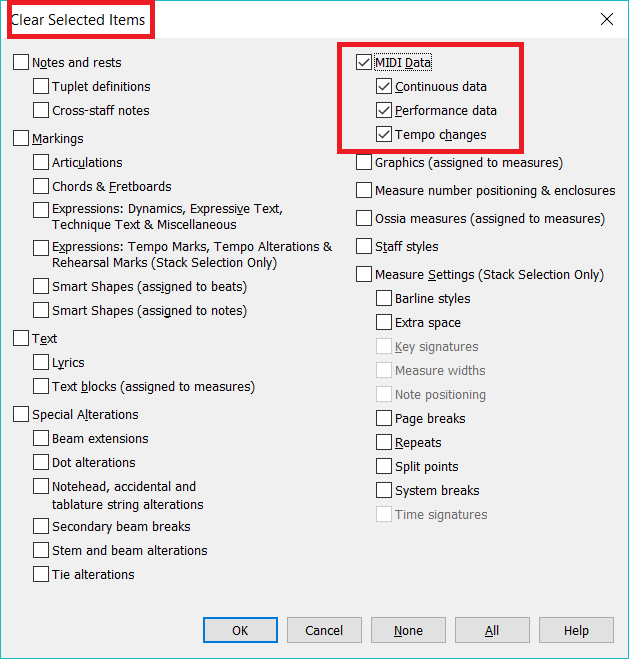
  • You can clear any (usually imported) MIDI setting by selecting the entire piece and using Clear Selected Items.
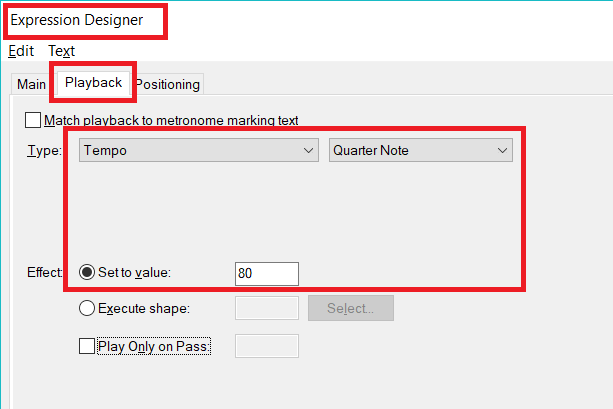
  • You can change an expression using the Playback tab in its Edit screen.
Comment actions Permalink
Avatar
0

Adrian   When I go to midi and choose "clear selected items" that just erases the score so thats not it.   Please walk me through it if you don't mind and  I don't understand your suggestion re  changing an expression using the playback tab in its edit screen.    please explain..thanks ... Sim

Comment actions Permalink
Avatar
0

Select your entire document.

  1. Right-click on a measure to bring up the context menu and choose Clear Selected Items.
  2. Click the None button at the bottom of the Clear Selected Items panel.
  3. Then click the MIDI checkbox (or at least the Tempo Changes checkbox).
  4. Click OK.


Comment actions Permalink
Avatar
0

To redefine a tempo expression...

  1. Right-click the tempo expression.
  2. From the context menu, choose Edit Text Expression Definition.
  3. In the Edit panel, choose the Playback tab.
  4. Change the playback parameters.


Comment actions Permalink
Avatar
0

Adrian  I   followed your instructions but I'm still missing something.      After 20 bars of playing at the new tempo it slowed down back to the old tempo.  . Could you please clarify  your point  #2    " From the context menu, choose Edit Text Expression Definition"? 

Comment actions Permalink
Avatar
0

Is there a tempo indication or change-tempo indication anywhere near the point where your music slows?

If not, then MIDI may be the cause.


Realize you can use the "Submit a request" link at the top of this page to submit your situation to MakeMusic support and can (on that site) attach your file or a segment that exhibits the problem.

Comment actions Permalink
Avatar
0

|No there is no tempo change indication.  I actually added the tempo again at bar 20 but it made no difference. The tempo still slowed. 

Comment actions Permalink
Avatar
0

Adrian .... I followed your suggestion and went to the Make music support. The answer lies in page 2 of "Tempo tool Alternatives"   With the Midi Tool I select a region of measures,   then selected "Scale".     In both boxes I put in my desired tempo.  I had to do this several times as the select region only covers 4 score pages in the smallest (50%) scale. Using the Midi tool is mainly meant for accelerating and decelerating in the 'playback tempo but also works if you want to bring the entire song  to a desired tempo.  It's too bad that  Finale eliminated the tempo change in the menu.  That was a lot easier.  The tempo counter is pretty much useless now.. 

Comment actions Permalink
Avatar
0

I usually just use Clear Selected Items to clear any embedded MIDI info out of an imported or troublesome files.


Decades ago I used MOTU's original Performer sequencing software to work with MIDI directly, and I swear it was more transparent than Finale's MIDI editor has ever been. A better MIDI interface from Finale is long overdue.

Comment actions Permalink

Please sign in to leave a comment.