New post
Avatar
0

I am using Finale Printmusic 2014 for Windows 8.

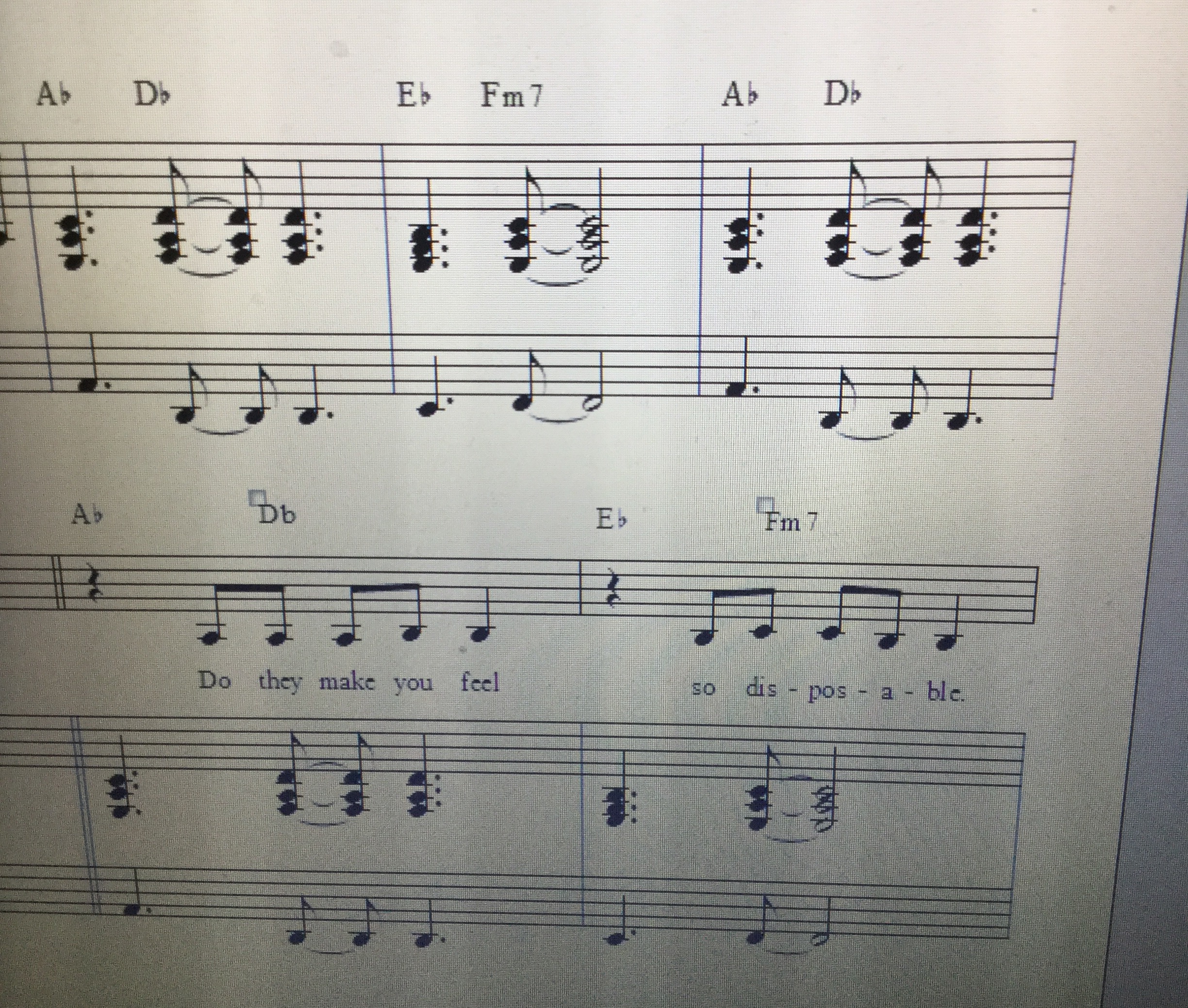
First of all, I'm having issues with placing Chord symbols using the Chord Tool above the staff at certain points. If you refer to the attached picture, it might be easier for you to understand.


With the top measures without the vocal line, I was able to place the Chord symbols exactly where they should be using the Chord Tool. Also there were no glitches during playback with those measures.


Now, referring the bottom measures with the vocal line, the Chord Tool wouldn't allow me to place the second Chord within the measure in the correct place (in this case on the upbeat of best 2) and I had to manually move the Chord name to the correct position above the staff. Second of all, with those measures during MIDI playback, there was a glitch. I heard a high pitched note at the end of each measure that wasn't even notated or supposed to be there.


So I manually deleted the Chord name and instead I used the Text Tool to write the Chord name in the correct position and during MIDI playback, the glitch I was hearing previously disappeared. So the glitch seems to appear when I use the Chord Tool for some reason but not the Text Tool. Could you please help? I'm a little confused. Thank you.
5 comments

Date Votes
Avatar
0

Tina, it worked OK for me. I don't have PM 2014, but I used 2014.5.


What you might try, is to export your doc as an XML file, and then import it. I have found that to clear up a number of glitches. Also, how are you placing the chords? I put the first one over the rest, then used the spacebar to move to the next position. then tab to move to the first beat of the next measure, etc., etc.

Comment actions Permalink
Avatar
0

Hi Mike. Thanks for the reply. As far as the Chord symbols, I place the first Chord right at the first beat and then I use the space bar but it only allows me to place the second chord on beat 2, whereas I want the second Chord to be placed right after the dotted quarter note which makes it the upbeat of beat 2. So the second Chord should be placed right above the eighth note if you refer to the picture. The glitch happens since the Chord cannot be placed in the right position for some reason.  It when I delete the Chord name, the glitch disappears. 

Comment actions Permalink
Avatar
0

It might be a 2014 issue. Download the 2025 demo, and see if that works better. If it does, the upgrade is not too expensive.


Also, send it in to tech support. Use the Submit a Request tab at the top of the page.

Comment actions Permalink
Avatar
0

Also, I wanted to mention that in one of my other pieces, I have noticed a glitch where there are 2 whole measures with no vocals, just the piano. And the high pitched tone appears towards the end of those 2 measures. 

Comment actions Permalink
Avatar
0

I sure will. I'm sending the request to tech support as we speak. I'll also check on the 2025 version on the website. Thanks so much Mike. 

Comment actions Permalink

Please sign in to leave a comment.