New post
Avatar
0

Supposedly, there is a "percussion font" library that comes with finale when you initially install it. I do not have this library. I'm running Finale 25.5.0.290 on Windows 10. Additionally, at my school, (Mac) this percussion font library was also missing. If I could get a link where I can download this library, that would be great (I haven't been able to find one thus far).

7 comments

Date Votes
Avatar
0

It is not a library; it is a font called Maestro Percussion. Is that what you are looking for?

Comment actions Permalink
Avatar
0

I am not sure what you mean.


Finale comes with many fonts, including the Finale Percussion font.


If you look at the libraries that come with Finale, you will indeed find libraries with different fonts, such as

- Broadway Copyist

- Engraver

- Jazz

- Maestro

- Petrucci


But these 5 fonts are so called “music fonts” that can be used as Default Music Font in a Finale document.

These 5 fonts contain symbols for all the primary music notation elements, such as accidentals, clefs, flags, noteheads, time signatures, &c.


The font Finale Percussion is not a “music font”, but rather a symbol font that can not be used as a document’s Default Music Font - since the Finale Percussion font does not contain symbols for accidentals, clefs, flags, &c.


In the font Finale Percussion there are many percussion symbols, showing e. g. triangle, cymbals, timpani, &c.


What is the problem here?

Do you need to put e. g. a triangle symbol in the score?

Comment actions Permalink
Avatar
0

Yes, I need some of the percussion symbols that are listed in the finale manual online as part of the "percussion font." I do not have these symbols loaded into finale by default. When I go to load a library, it opens the folder with all the fonts where I would assume that the percussion font would be, but it seems to be missing. Additionally, I never found anything called "maestro percussion" either...

Comment actions Permalink
Avatar
0

… I need some of the percussion symbols that are listed in the finale manual online as part of the "percussion font" …


There are several ways to enter a font character in a Finale document.

- You can use the Text Tool, and add a text block with the character.

- You can use the Expression Tool, and add an expresssion with the character.

- You can use the Lyrics Tool, and add a lyric with the character.

- You can use the Articulation Tool, and add an articulation with the character.


… I do not have these symbols loaded into finale by default …


Normally, fonts are not loaded into the Finale program itself.


… When I go to load a library, it opens the folder with all the fonts where I would assume that the percussion font would be, but it seems to be missing …


Font files and Finale libraries are two different things.

Fonts should be installed in the Fonts folder.


When you go to load a library, Finale shows you a directory dialog box that opens the folder Libraries, not the folder Fonts

Comment actions Permalink
Avatar
0

Alright, I think I was confused because I thought that the percussion symbols i needed would appear as premade articulations, but I assume the only way to obtain those symbols for articulations is by creating a new articulation and selecting a percussion font. Is that correct?

Thank you for your help and patience. 

Comment actions Permalink
Avatar
0

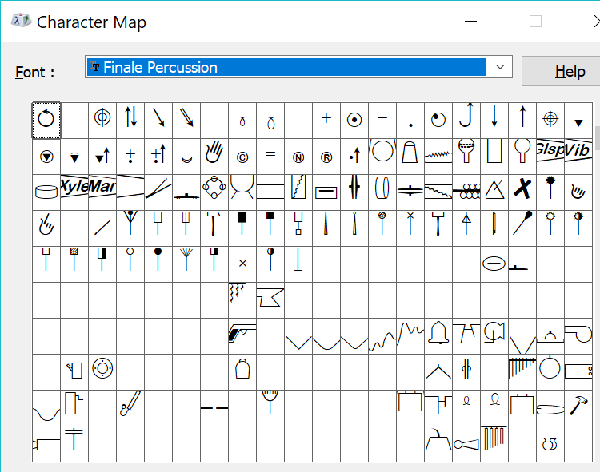
This is (some of) what I get when I open Finale Percussion in the Windows Character Map utility. So the symbols were there.

Yes, you would need to Create your own Articulation/Expression/Text Field to use them.


Comment actions Permalink
Avatar
0

… I assume the only way to obtain those symbols for articulations is by creating a new articulation and selecting a percussion font. Is that correct? …


Yes.


You can save your custom articulations as a library (that you can load into other Finale documents):

File menu > Save Library…


To include only your custom articulations in the new library, delete from the Articulation Selection all other articulations than your custom articulations.

To play it safe, do this on a backup copy of the document.


By The Way:

The procedure is similar with expressions, chord suffixes, &c.

Comment actions Permalink

Please sign in to leave a comment.