New post
Avatar
0

Is it possible to change flags from a single note into an extend beam as you can often see in harp glissandi?

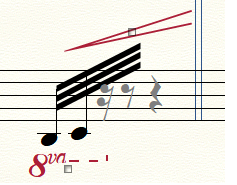
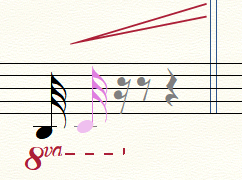
I tried to make extended beams on one single flagged note by notating two notes at first (1st. image below), then extend beams and after that hide the second note. When hiding the next note however, the extended beams break and go back to flag notation (2nd. image below).

Thanks for any suggestions!

Finale 25.5 | Win 10

3 comments

Date Votes
Avatar
0


Special Tools Tool.


Instead of hiding the second note, replace the stem with an empty shape:

sub-tool Custom Stem Tool


To hide the notehead, replace the notehead with a blank character, e. g. the Spacebar character:

sub-tool Note Shape Tool

Comment actions Permalink
Avatar
0

If you have a lot of these, you might consider setting beams to cross rests in document options/beams.

Comment actions Permalink
Avatar
0

@Peter T.: I had hoped there would be a less cumbersome way, but your method works, thanks!

@Vaughan S.: That would be a nice way to do it, but it will effect every beam-over-rest in my entire score..... Thanks anyway!

Comment actions Permalink

Please sign in to leave a comment.