I'm amazed to discover that there is no 15va treble clef in the clef tool. How can this be? Is it hiding somewhere else (as a symbol in a font)?
Many thanks!


You're right, there isn't one in Engraver, Jazz, Maestro or Petrucci. Opus (the Sibelius font) doesn't have it, either, because Sibelius adds the number itself. The November font is beautiful and does have it but it's a commercial font. Fughetta is a PD font and it looks like an altered version of Petrucci and it also has it. It's not that hard to make it yourself in the clef designer. I did this to create a treble clef with an (8) below it. This was before I bought the November font, which has this clef, as well.

… It's not that hard to make it yourself in the clef designer. I did this to create a treble clef with an (8) below it. This was before I bought the November font, which has this clef, as well …
1) Indeed it is easy to create a 15ma clef symbol in the Shape Designer.
And you can use your clef shape in the Clef Designer - exactly as you can use a font character.
2) The Maestro font has a {treble clef glyph with an 8 below it} - in slot #86.
You can add parenthesis around its 8 - to get (8) - via the Shape Designer trick from 1).
Vaughan Schlepp,
I have been looking though the November font, and I have found the treble clef with an 8 below it.
But I have not found the variation with parenthesis around the 8:
(8)
- Where is it ?
Dear Peter,
I thanks for your advice. I couldn't see in the clef designer how one chooses to add a number to the clef. I also couldn't see how one duplicates the clefs already in the list (I assume that it's like articulations, where you duplicate an articulation before you make changes, otherwise you're just editing an existing articulation rather than adding a new one: maybe clefs don't work like that). It is absolutely not intuitive how one does it, it easy to fathom. As is so often the case, the user manual is also not helpful!
Dear Peter,
Thanks for your advice. I couldn't see in the clef designer how one chooses to add a number to the clef. I also couldn't see how one duplicates the clefs already in the list (I assume that it's like articulations, where you duplicate an articulation before you make changes, otherwise you're just editing an existing articulation rather than adding a new one: maybe clefs don't work like that). It is absolutely not intuitive how one does it, nor is it easy to fathom. As is so often the case, the user manual is also not helpful!
… I assume that it's like articulations, where you duplicate an articulation before you make changes, otherwise you're just editing an existing articulation rather than adding a new one: maybe clefs don't work like that …
No, it is not like that.
There are always exactly 18 clefs in a Finale document, not more, not less.
You can edit/customize each of the 18 clefs, but you can neither duplicate nor delete them; their number is always 18.
… I couldn't see in the clef designer how one chooses to add a number to the clef …
A clef symbol can be a font character, or it can be a shape, created in the Shape Designer:
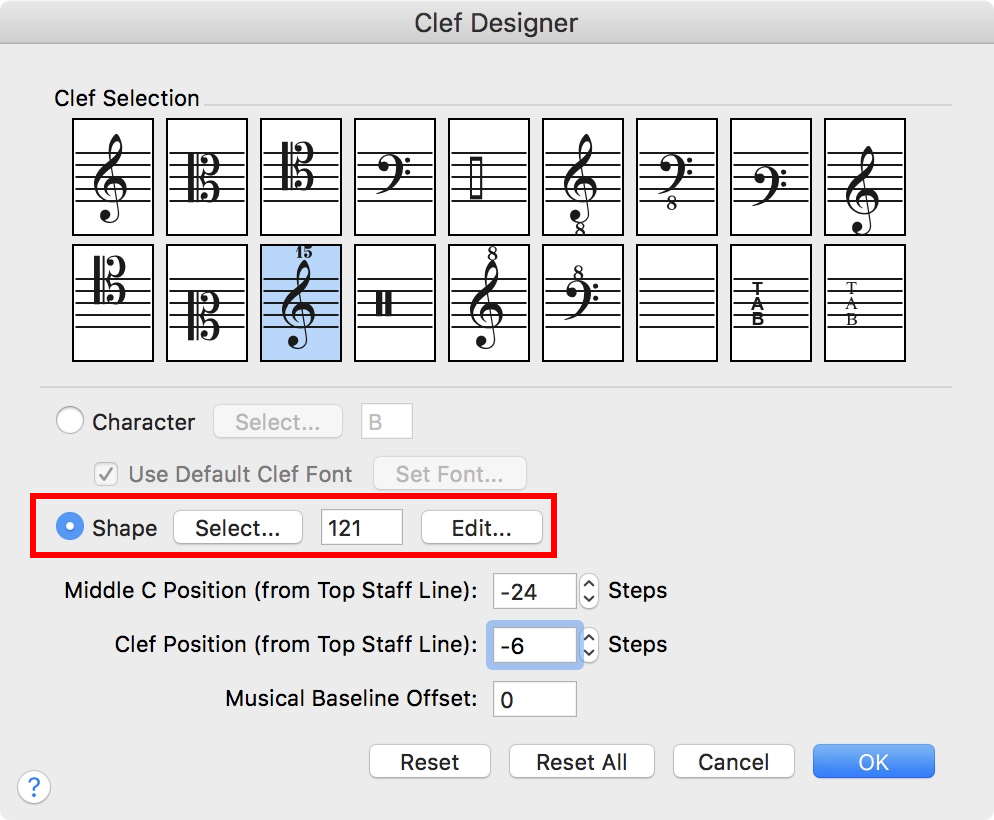
In the Shape Designer, create a text block with the G clef symbol, and create another text block with the number.
Then, move the {number} text block in position relative to the {G clef symbol} text block.
By The Way:
An articulation, too, can be a font character, or a shape.
Please sign in to leave a comment.
7 comments
Date Votes