

I am trying to create the notation highlighted in the attached picture. This screenshot is directly from the current Visual Index (Fin25, Win10), but this specific item is not clickable, and thus no linked solution presents itself. As near as I can figure, it is the only thing on the visual index that is not clickable! It is also not clickable in the 2012 or 2014 visual indices I was able to find in the web archives.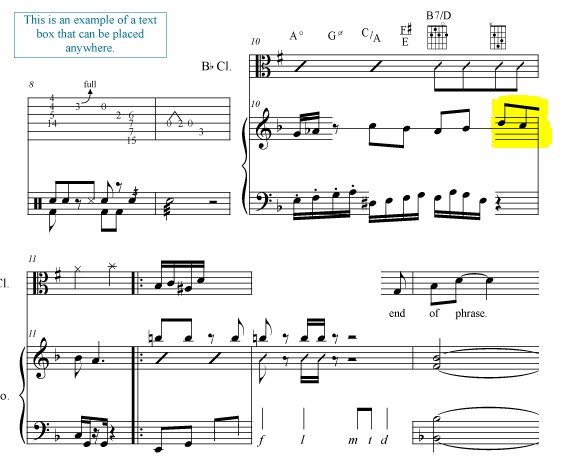
- As you can see, it is NOT a beam over barline because it does not connect to the next measure.
- It does not appear to be a beam over a rest as the measure is complete.
- I am aware of the technique of globally changing the beam over rest for the entire document and manually breaking beams, but I need this notation used only once in the entire large document, so I can't believe the only solution is to make the global change, insert the rest, hide said rest, then create an invisible note (that I don't want to playback), and the manually break all beams in the rest of the document.
- I have done a search on using other hidden technique workarounds and the only solution I have currently have is the multistep solution of creating a fake quarter note, adding a hidden staccato articulation (because I really want an 8th note), and using the custom line tool to manually create a "floating" beam.
- Ideally, I need this to be both a visual and playback solution. Again, I can't believe that something that is (was?) clearly possible can only be accomplished by creating two totally separate documents.
Someone please help!


7 comments
Date Votes