New post
Avatar
0

I've encountered this problem many times, and I am very particular about the placement of expression marks, articulation marks, text, etc. in my compositions, so this drives me crazy. 


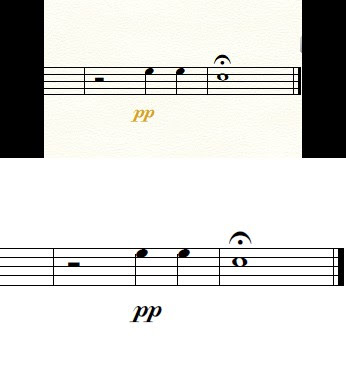
First of all, I'm using the newest version of Finale (Finale 25) on a computer that runs on Windows 10. What happens is I spend a significant amount of time tweaking and nudging around my dynamic markings so they're all exactly where I want them, and then when I export the parts as pdfs, some of the dynamic markings get offset. If you look closely at the picture I attached, you'll see that the top image (in the Finale file with the dynamic marking exactly where i want it) is different than the bottom image (after exporting as a pdf).


I'm thinking it's just some sort of bug in the software, but does anyone know how to fix this?


-Nate
 

2 comments

Date Votes
Avatar
0

Nate Campbell,


In your screen shot I notice that it shows the very last two measures of the document (because of the Final Barline).

I also notice the pp marking’s colour, indicating that the marking’s positioning has been unlinked between between the score and the linked part.

However, I do not know whether your screen shot shows the score or the linked part.


* Could you attach screen shots of the very last two measures in both the score and the linked part?


Also, I do not know whether the bottom image - with the exported PDF - shows the score PDF or the linked part PDF.


* Could you attach PDF images of the very last two measures in both the score and the linked part?

Comment actions Permalink
Avatar
0

You might also try exporting the files as a PDF through the Graphics tool. See if that keeps things in place. (It will also give you a smaller file, and print in true black.)

Comment actions Permalink

Please sign in to leave a comment.