New post
Avatar
0

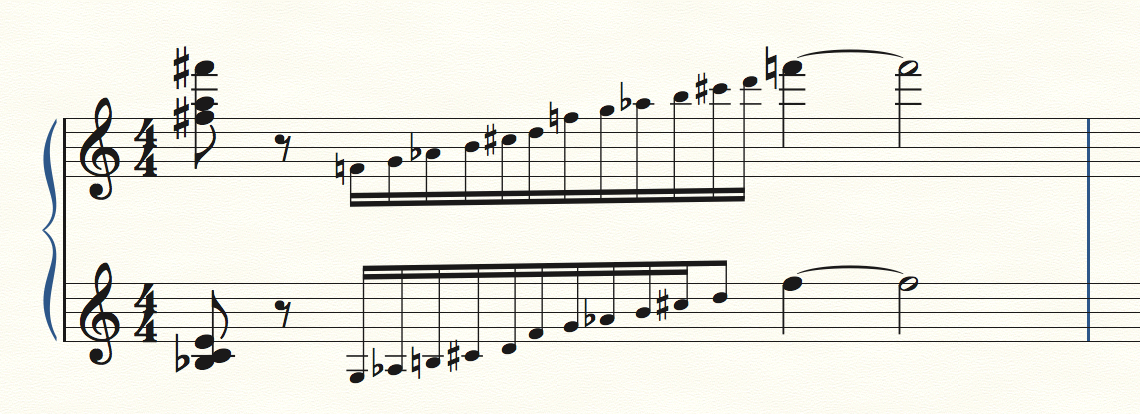
Same metrical data in a piano score's two staves, yet the grace notes don't line up! Why? Also-suppose you want, say 7 16th note grace notes in the right hand, but in the left hand you want the 6th note to be the equivalent of a eighth note grace not (you get the picture!). What's the best way to handle this?  THANK YOU!

27 comments

Date Votes
Avatar
0

Grace notes are spaced according to their own requirements, i.e. grace notes with ledger lines will take more space than grace notes without, just as with regular notes. If you had, for example, three grace notes with ledger lines lined up exactly with three grace notes without, the latter would be too far apart. If you want this anyway, you'll have to move them manually.

Comment actions Permalink
Avatar
0

P.S. Perhaps you should remove your duplicate post.

Comment actions Permalink
Avatar
0

Not sure what duplicate post you may be referring to, but thank you for your help. I was eventually see that automatic spacing has been moved into the preference folder, and went from there. Still can't figure out how to make the last of a series of 16th note grace notes into an eighth!

Comment actions Permalink
Avatar
0

You're probably going to have to use tuplets.

Comment actions Permalink
Avatar
0

Interesting...that makes sense...but tuplet grace notes...has there ever been such a thing!? I can't get the last two grace notes in the left hand, both pitched to D, tie...THANK YOU!


Comment actions Permalink
Avatar
0

Well ... just to be clear you won't be using "tuplet notation" just using the tuplet function to produce the result.

Comment actions Permalink
Avatar
0

Not sure I understand what you mean...could I send you the measure and have you show me what you mean?
G

Comment actions Permalink
Avatar
0

Sure, attach a pic and we can go from there. That will make it easier for others trying to help as well.

Comment actions Permalink
Avatar
0

Great...not at my music computer now, but will attach a jpeg of the bar as soon as I am.

Thanks VERY MUCH

GE

Comment actions Permalink
Avatar
0

You created a duplicate post by mistake and someone has already responded there.

There's a difference between real, non-measured notes (grace notes) and measured ones. Since grace notes are 'out of time', they get spaced by Finale according to their own spacing requirements (accidentals, ledger lines, etc.). If you want notes to fill a specific time, then they're technically speaking not grace notes at all but tuplets. If you want 7 notes in the space of an eighth, they should then be a 32nd septuplet, 6 notes should be a 32nd sextuplet, etc. These will line up exactly as you want them because they're measured. There's no need to reduce their size, but if you really want to do that, use the resize function (in Utilities/Change).

Comment actions Permalink
Avatar
0


Thanks for the help. Here's a link to a pdf of the measure in question. I simply want to line up the grace notes in both hands. The only way I seem to be able to do it is to repeat the pitch d in the left hand-I can't make it an 8th note grace note, or tie two 16th note grace notes together. 

Thank you!

https://www.dropbox.com/s/h03tqq9y2eazx19/grace%20notes.pdf?dl=0

Comment actions Permalink
Avatar
0

Did you read my posts above? I said that when you want notes measured and lined up, they are actually no longer grace notes. For the third time: Finale spaces grace notes according to their own spacing requirements and not according to the meter because grace notes are 'out of time'. Sometimes cadenza-like figures like yours can be notated as grace notes, but if you really want them lined up you should do the following. To notate your measure, I created a 5/4 measure and set it to show as 4/4. Then I created a 12-tuplet at the beginning of the second beat (in both hands) and entered the notes, changing the enharmonics (and adding a natural in front of the second note in the R.H.). I then selected the entire second beat, selected Utilities/Change/Note Size and entered 75%.

Comment actions Permalink
Avatar
0

P.S. I also set the tuplet number not to show.

Comment actions Permalink
Avatar
0

Nice job, Vaughan!

Comment actions Permalink
Avatar
0

A bit caustic, perhaps, but your expertise is greatly appreciated!

Thank you!

I will try to replicate this process.

Gary

Comment actions Permalink
Avatar
0

Vaughan,,,two more questions: how do hide tuplets, and how do you add natural signs like the ones you put on the F natural pitch, without having to put them in parentheses if the pitch has not been altered earlier in the measure? Thanks, G


Comment actions Permalink
Avatar
0

No problem hiding tuplet, but I haven't resized in awhile, and in Finale 14 I'm having a hard time finding a way to grab all of the tuplet notes and resizing together. I'm sure I will figure it out eventually. Again, grateful for your expertise. GE

Comment actions Permalink
Avatar
0

Sir, you are brilliant! I have it all, except for the matter of how you are able to add a natural sign to a note that hasn't been altered in a measure-a small thing to deal with. Thank you!

Comment actions Permalink
Avatar
0

Glad you got it. Sorry if my response seemed caustic but, well, I did have to mention using tuplets instead of grace notes three times before you finally accepted it (and so did George Mohammed)!

Look up cautionary accidentals. There are several ways to do this. There's a Cautionary Accidentals plugin which you can set for number of measures to scan, layers, type of cautionaries, etc. This plugin would have placed a natural before the first f in the R.H. I'm a Speedy Entry users and when I want to do it on the fly, I just place the caret on the note and press the asterisk.

Comment actions Permalink
Avatar
0

Mom always said I wasn't the brightest of the bunch! Thanks, I really appreciate your help-and so does my beautiful looking score! GE

Comment actions Permalink
Avatar
0

If Simple Entry is your thing, you can use CTRL+SHIFT- - (minus) on the keypad to force show/hide an accidental while a note is selected. Also, if you hit "P" it will add a parenthetical accidental; hitting "P" again will take it out of parentheses.


But yeah, definitely go through the online manual. There are a lot of things in Finale that you have to do in a round-about way to get it to "work." You just get used to it.

Comment actions Permalink
Avatar
0

Thank you!!!

Comment actions Permalink
Avatar
0

I simply want to say thanks again to George, and Vaughn in particular for the help I was given. Just used the same lesson again: couldn't get grace notes in two layers to line up in a 4/4 bar, so I converted the bar's time signature into 17/16 with 4/4 showing, inserting the grace notes as normal 16ths and then reduced their size. Perfect!


THANK YOU!

GE

Comment actions Permalink
Avatar
0

Here's a variation to the above issue, which I am so grateful that other users helped me with! Suppose you want to align grace notes in two layers of the upper stave of a piano score in 3/8, so you change the Time Signature to include them as 16th notes (8/16), choose show another time signature as an option (3/8), add the 16ths and resize them to 75%

All good so far! But the left hand has a dotted quarter noted...it doesn't fill the bar, damn it!!!


Cheers,

GE

Comment actions Permalink
Avatar
0

So I would think you would either have to include a hidden dotted-eighth rest under the faux-grace notes in the lower staff or a hidden dotted eighth something at the end of the measure.

Comment actions Permalink
Avatar
0

That's exactly what I did, thanks. Here's an interesting twist of a problem, though: the dotted quarter in the left hand ties into the next bar (and the one after that). The hidden rests prohibit the tie from going all the way to the next note!!!  Thanks for responding...


Comment actions Permalink
Avatar
1

There are probably multiple ways of getting what you want ... but it depends. Post a pic of the problem so we can get a better understanding of the situation.

Comment actions Permalink

Please sign in to leave a comment.