New post
Avatar
0

Let's say you set the vertical distance between systems to be at 1 inch.  But it seems that any time any change is made (such as the insertion, deletion, or appending additional measures), the vertical distance between the new measures is no longer that 1 inch you specified.  Instead, the new systems are shoved together into an illegible mess.  It would be nice, if you could specify something like:  "from now on, all systems in this document will be 1 inch apart."   As it is, the vertical distance between systems must be reset each time a change occurs.    Windows 7 pro, Finale 2014.5   (i no longer upgrade, since BIAB harmonizing was dropped from future upgrades.)  

10 comments

Date Votes
Avatar
0

So save your formatting till the end?

I'm not sure I experience that situation, at least not that often.


(Having to reformat occasionally doesn't bother me that much.)

Comment actions Permalink
Avatar
0

My system margins don't change when I add, delete or edit measures within.  As J Adrain wrote, you can apply a system spacing of your choice from say system 2 through the end. The systems will retain that setting until you change it.

Comment actions Permalink
Avatar
0

Make sure and check your Page Format settings for that parameter.

Comment actions Permalink
Avatar
0

… the vertical distance between the new measures is no longer that 1 inch you specified …


You probably mean the vertical distance between new systems, right?


When it is creating new systems / pages in a score, Finale uses the settings in

Document menu > Page Format > Score…


Finale allows already existing systems / pages to be formatted differently than the default formatting for new systems.

This is what users have requested.


In Other Words:

To fix your problem, edit the default formatting for new systems / pages in the score.


Fortunately there is a simple way to do this (rather than changing the settings one by one):

Page Layout Tool.

Page layout menu > Update page Format for Score (select this menu item)

Edit the system margins in one of the systems that are formatted as desired, by changing one of the system margins to something else.

Then change the margin back to what it was (not via Undo!).

When you now take a look in

Document menu > Page Format > Score…

you will see that the settings for system margins have been updated.


NB:

The setting “Update page Format for Score” is program specific, not document specific.

When you are done fixing the default formatting, you might like to de-select “Update page Format for Score” - before you close this document, and open another document.

Comment actions Permalink
Avatar
0

Thank you so much, Peter Thomsen.  This is a huge help.    

Comment actions Permalink
Avatar
0

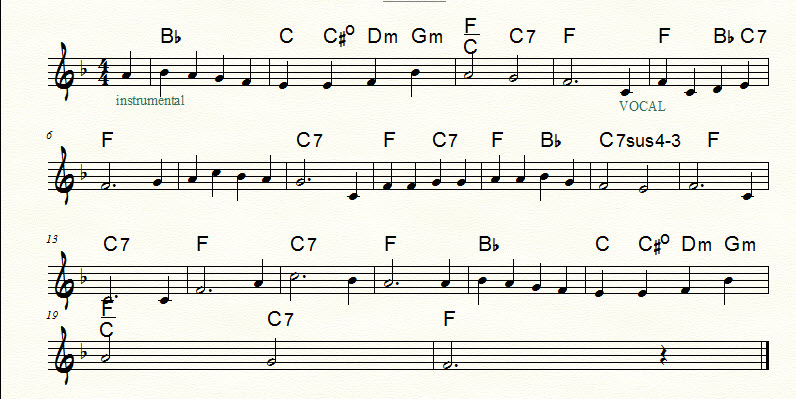
This screen shot illustrates what i was describing.  SYSTEMS / EDIT MARGINS / TOP had been set to 1".   However, when i made bar 18 wider to accommodate the 4 chords, a new system was generated.  It's top margin was far less than the 1" requested. 

Comment actions Permalink
Avatar
0

Craig Buhler,


Is your screen shot showing the score - or one of the linked parts?


If it is a linked part, then you should not examine the settings in

Document menu > Page Format > Score…

but rather the settings in

Document menu > Page Format > Parts…

Comment actions Permalink
Avatar
0

That screen shot shows the score.   This was before i implemented the procedure you suggested above, which appears to solve the problem

Comment actions Permalink
Avatar
0

By The Way:

There is a way to “reset” already existing systems / pages to the default formatting:

Page Layout Tool.

Page Layout menu > Redefine Pages…

Comment actions Permalink
Avatar
0

Thank you once again.    Members of the Finale Community such as yourself have greatly enhanced my life. 

Comment actions Permalink

Please sign in to leave a comment.