New post
Avatar
0

when I used finale 2007, editing key shortcut is really usefull. I made costumazing for my own key shortcut.

for example, selecting each tools to  each function keys.

and now I jumped to finale 25

of course there is  lots of key shortcut presets in finale 25 but I don't know how to set key command for my favorite key cutomazing.

when I tried it in the simple entry menu, it seems that function key is not available

  I really need to set my own key shortcut customazing for make my workflow faster.

13 comments

Date Votes
Avatar
0

Are you on a Mac or Windows computer?

Comment actions Permalink
Avatar
0

Mac ^^

Comment actions Permalink
Avatar
0

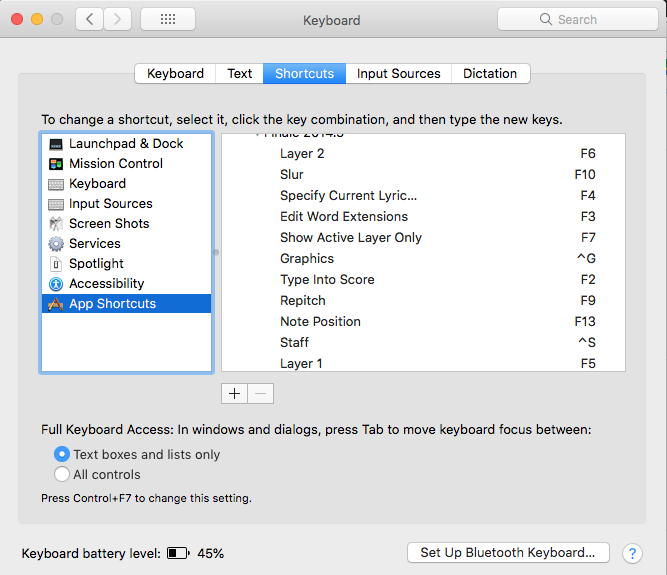
In that case, the easiest way to set up shortcuts is in the Control Panel > Keyboard > App shortcuts. I have all of my F keys and a few others set up, there.

Comment actions Permalink
Avatar
0

Oh thank you...uhmm.. but where is Control panel?  you mean system preference on the Mac?

Comment actions Permalink
Avatar
0

Yes, sorry!


Comment actions Permalink
Avatar
0

Yes, Mike means the System Preferences.


To add a keyboard shortcut for a Finale menu item, go to the Application Shortcuts, and click the + button.


Comment actions Permalink
Avatar
0

oh yes thankyou 

uhmm..is that all? 

what's next on the finale..?

there is still nothing working shortcut..

Comment actions Permalink
Avatar
0

You have to have the EXACT same wording for the shortcut as it is in the Finale menu. Also, some things just don't work with nested menus. Can you give us an example of which command you want, and which shortcut you want to assign? We can try it, and see if there is a problem.

Comment actions Permalink
Avatar
0

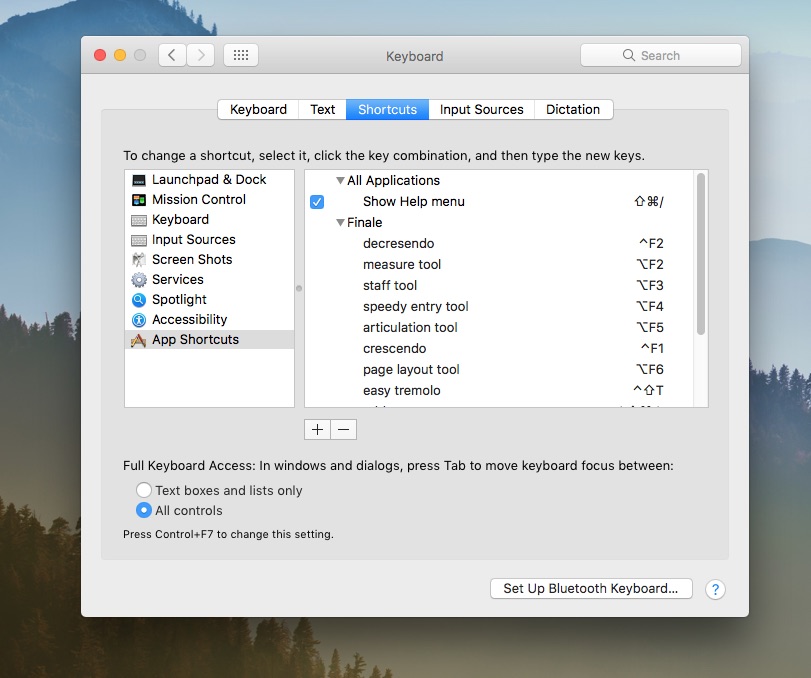
oh yes. here is my setting..


I didn't do any thing on the finale . not yet..

Comment actions Permalink
Avatar
0

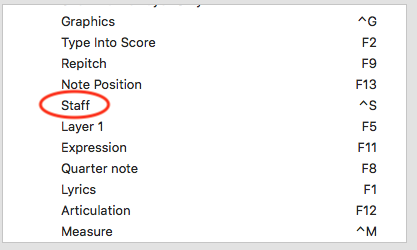
I think the problem may be that you aren't listing the tools exactly as they are listed in the menu. For example, you have staff tool and I have Staff.

Spell it with the capital letter, and no word tool. Try just that one command, and see if it works.

Comment actions Permalink
Avatar
0

oh it works~

uhm...I don't know..... just very few key is available for shortcut.

thank you for useful tip

but  I still really need to set my own shortcutㅠ

is there no other way on the finale itself for shortcut setting..?

Comment actions Permalink
Avatar
0

… is there no other way on the finale itself for shortcut setting? …


Finale itself only has the programmable metatools.


You probably already know about the programmable metatools (- right?):


a) Transposition metatools on the four number keys 6 - 7 - 8 - 9.

The four defaults are {step down}, {step up}, {octave down}, {octave up}.


b) Metatools for chord symbols, tuplets, clefs, key signatures, time signatures, articulations, expressions, smart shapes.

To program a tuplet metatool you must be the Tuplet Tool.

To program a clef metatool you must be in the Clef Tool.

&c.

To program a metatool, hold down Shift, and hit the desired trigger key (e. g. the letter A key).

Finale will now display a window where you can choose, which item will be entered by the trigger key.

If you e. g. are in the Articulation Tool, then Finale will display the Articulation Selection window.


- But you probably already knew all that (?)


c) Tool metatools.

You can program 8 tool metatools, on the 8 middle row keys F, G, H, J, K, L, semicolon (;), or apostrophe (').

In this example let us say that you want to program the letter F key to the Articulation Tool.

To do so, hold down ctrl and option, and press the letter F key.

Finale displays the Master Tool Palette where you can select the Articulation Tool, either by clicking the tool icon, or by typing the tool’s number (= 13) in the field.

From now on, you can switch to the Articulation Tool with ctrl-F.

NB:

These tool metatools are document specific, not program specific.

You can have different tool metatools in different documents.

It might be a good idea to program tool metatools in your templates.

In that way all new documents based on that template will automatically have your programmed tool metatools.

Comment actions Permalink
Avatar
0

yes thank you ~~^^

I 'll try ~

Comment actions Permalink

Please sign in to leave a comment.