New post
Avatar
0

Finale: MAC 25

MAC OS 10.11.6

I'm a music prof and am self-publishing three 200 page keyboard improv books and have several questions. Many chapters are loaded with music examples and are up to 20 pages long. (I hope I do not exhaust anyone!)

I note that an EPS notation file increases dramatically in size from 72 to 300dpi, becoming very, very large (514KD for an 8 measure excerpt). (I read that 300dpi is recommended for publication). On the other hand, using Graphics tool, a PDF file size is small, in contrast (59KD for same 8 measures).

Question: if EPS Finale files with a 72 resolution are embedded in a Word file and then converted to PDF, would a book printing still be of decent quality?

Question: if PDF Finale files are embedded in a Word file would the book printing be of equal or better visual quality of an EPS 72 resolutions?  If 300 resolution?

Finally, I read in a Community post that PDF files converted to  In-Design had inferior notation lines (at least that was my understanding).  Is that true?

Thank you for any insight/advice you can bring to these questions!  Most appreciated!


14 comments

Date Votes
Avatar
0

I wonder why you are using Word?

I suspect that what you do, is not easy to do in Word.


I wonder why you are using bitmap graphics?

Why can you not use vector graphics?

Vector graphics always print at the best possible resolution.


If you, from the Graphics Tool, export the Finale layout as PDF, you will get vector graphics.

You can convert the PDF file to EPS, if needed.

But a PDF-to-EPS conversion is probably not needed.

Comment actions Permalink
Avatar
0

Peter!

I think you made the post that I referred to re: In-Design.  Thank you for responding!

I suspect I was not as clear as I needed to be. I wasn't planning on a PDF to EPS conversion. I was asking about a PDF to Word or EPS to Word.  I embed music examples in Word, and use Word to provide a running commentary for what is happening musically.  From your post, you recommend converting Finale files to PDF (which then become uneditable once within Word, correct?)

Presently I'm working on 6 chapters (basically written) but I inputted the music examples as tiff files into Word.  Chapters then became between 75 to 250megs each. SUPER LARGE!  I was thinking of re-inputting the music examples using EPS or PDF.  You advise PDF, and seem to indicate that vector graphics (of PDF) print better "at the best possible resolution" (When you use "resolution" here does that refer to the printer resolution itself?). 

I am planning to work with a music company that assists in self-publication that plans to use In-Design at some point.  That's why I referred to your previous post.  One statement by you there worried me--that some degrading of music files could occur in In-Design (if I understood you correctly).

Any clarifications you can make to any of this?  You are obviously so much more informed and experienced than me.  I thank you for responding!


Comment actions Permalink
Avatar
0

I do not remember a post where I have referred to InDesign.

Perhaps it was not me.


… you recommend converting Finale files to PDF (which then become uneditable once within Word, correct?) …


I am not sure I can follow your thoughts.

Why are you asking?

What is the problem you are trying to solve?

Would you like to edit the PDF files within Word?

Word can not edit PDF files.


… but I inputted the music examples as tiff files into Word …


Also, Word can not edit TIFF files.


… You advise PDF, and seem to indicate that vector graphics (of PDF) print better "at the best possible resolution" (When you use "resolution" here does that refer to the printer resolution itself?) …


It is important that you understand the difference between bitmap graphics and vector graphics.


Bitmap graphics describe the image “dot-by-dot” (”this dot is black“ - “this dot is white” - &c.)

When you scale a bitmap graphic up to a much bigger size, you get “jagged edges”.


This means that the file size of bitmap graphics gets bigger with “the number of dots” - if the resolution must remain the same.

For a bitmap graphic with the double height and width you need four times as many dots, to get the same resolution.


Vector graphics, On The Other Hand, describe the image in mathematical formulas.

This means that a vector graphic does not have a resolution.

And the file size is always small.

You can scale a vector graphic up to any bigger size, and you will always get sharp edges.


I hope that this is clear?

If not, ask again.

Comment actions Permalink
Avatar
0

Peter,

Thank you again--and for your patience.

Yes, I understand that PDF's cannot be edited within Word.

The problem?  I was concerned that my total files (for 15 chapters in a book) would become extremely large if using EPS at 300dpi. PDF files seem to solve that since they are small in size.

Another aspect

I have written another 37 chapters written using MOTU's Mosaic (not updated since 2002?) on an old computer with Word. The only way I can get them to my MAC2015 is to PDF whole chapters. Probably these old nota.tion files were written with bitmap technology and at 72bpi.  So I'm worried if they will print decently.  (I know this is very unusual)

Thank you for the BITMAP vs VECTOR explanation.  I discovered that PDF doesn't have resolutions (from testing myself--the greyed out in Graphic tool). But I didn't understand that vector graphics scale nicely to different sizes--good to know.  In fact I tested that minutes before your post--some lines looked heavier than others on my computer, but when printed, no issue.  Thank you, Peter!

Comment actions Permalink
Avatar
0

Le’s get away from how you think you want to do this and focus on the results. If I am understanding correctly, you are writing a book in Word and want to drop in examples that you have created in Finale and have them look good. Right? OK. this is really easy. Forget you’ve ever heard of EPS unless you are finishing the project in an Adobe product such as In Design. Moving on...


Word does not like embedded pdf files. Period. You can drop them in, change the size etc. but the result is not good—ever. It’s about the same resolution as printing and scanning and then importing—the best results will be dull with poorly defined edges.


On the other hand, jpg or .png graphics drop right in and will be crisp and easy to read. Also really easy to do in OS X. I’ll get to that.


But first, what to do about your old files with the Mosaic examples? It depends. How are you viewing them now? Are you able to open the pages in Word—if so, how do the graphics look? Will they open in Preview—again, if so, how do the graphics look? If you can open them in both, in which app do the graphics look better?


What version of Word?


Get me some answers and I’ll have some suggestions. I put music examples into Word all the time. Easy-peasy .

Comment actions Permalink
Avatar
0

Crickets....

Comment actions Permalink
Avatar
0
Thank you, Mike.  You are tracking me, exactly, and I will try to answer your questions.  This is complicated!  Some 1000 examples have already been "dropped" into Word, the great majority via old Word (2001) and about 6 chapters in new Word (latest), which I am still creating and revising.  I've tried tiff and now pdf (yesterday).
 
 
The FINALE FILES,
Your contention that pdf files in Word don't look good shocked me.  I've looked at them on my 24" computer screen, and read the print out yesterday of a chapter with egs embedded via PDF, and they looked good to me.  But I believe what you say. The person who will be taking what I've written, doing some editing and creating covers etc, plans to work in In-Design. So that could be an issue.  However, the majority of whole chapters are in PDF form, making editing almost impossible (explained below), except for about 6 chapters written with FINALE and using the latest Word program, .
 
 
Should JPEG files be at 300dpi?  Won't those files be huge?  What's the difference between JPEG and.png?  Is one better than the other for my purposes?  Please advise. Are there differences in size.  Are they vector files, as Peter suggested using? I think not.  I can work on this conversion immediately.   
 
 
THE OLD MOSAIC FILES, VIEWING THEM, etc.
I can presently view the original files (music examples) embedded in Word along with running commentary on my old Mac with OS9.   
I can view them on my MAC 2015 in PDF form only.
They were created using OS8 and OS9 computers with Microsoft office (2001 current program on my old MAC).
Some of the old Mosaic files go back to the 1990's, others in 2000's, and yet others are recent, as I'm quicker at Mosaic than Finale.
 
 
The Mosaic notation files (ie., 37 chapters) were embedded in Word by means of the MAC picture capture.  The only way I can transport these old "Word" chapters to my MAC2015 is to convert them to PDF files using Acrobat 5. Transporting old Word to new Word results in garbled music examples. I tried transporting them via PDF program created by the guys in France (but too many issues).   I'm hoping these files will print well in Amazon's Createspace.  We plan to do a test run of 32 pages in Createspace to see how they look.
 
Am I answering your questions clearly?  Thank you so much for your interest in helping me! So appreciated.
Comment actions Permalink
Avatar
0

I asked simple questions but haven’t received answers  Let’s try again:


Q. 1: Current Mac. What version of Word? 2008, 2011, 2016/365. Unless you aren’t really using Word and I’l need to know that.


Q. 2: When you open your old files on your current Mac, you are viewing pdf files. I get that. Do the music examples look good? It’s a Yes or No question.


Please stop explaining what you’ve done and how you are doing it. I’m not interested and it doesn’t matter. Only if the answer to Q.2 is No wil I get into the old Mac.


I might be away from my iPad the rest of the day as I am traveling this afternoon and spending too much time in airports etc. In that case, I’ll look at this and respond tomorrow when I am home. This is easy but I need both questions answered first. You’ve already told me more than I need to know otherwise.

Comment actions Permalink
Avatar
0

Mike,

My 2015 MAC is OS10.11.6

Q1. Word on MAC2015 is latest download, of just a couple of days ago, 16.13.1 (18523)

Q2. Yes. The PDF files (from Old Mosaic) to me look good, useable, and I've printed them in past for students. 

Comment actions Permalink
Avatar
0

Ok, I'm back. 


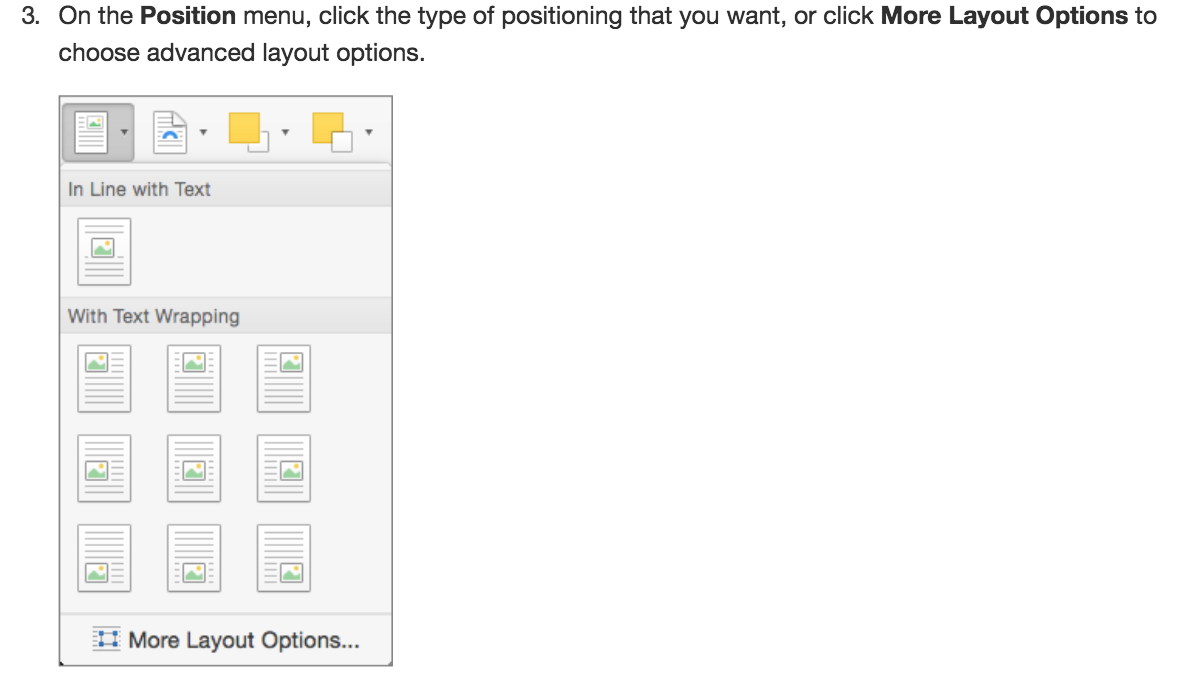
I'm going to assume that you are familiar with the various graphics properties in Word. Resizing objects is quite easy and is the same in all versions. Text Wrapping changes from version to version even if the principles are the same, more or less. In any case, Resizing and Text Wrapping are the only things you really need to know.

https://support.office.com/en-us/article/control-text-wrapping-around-objects-in-word-for-mac-d764f846-3698-4374-baa5-2e869d1f4913?ui=en-US&rs=en-US&ad=US


Bring on a Mac with a recent OS, Preview is your best friend for what you want to do. This works the same with Finale and with your old .pdf files. 


Open the Finale document with your musical examples or open the .pdf of your old files.

Open Preview. 

Click on the File menu, scroll down to and hover over Take Screenshot. A submenu will open, drag right and click onto From Selection... This will change the cursor to a crosshair target.

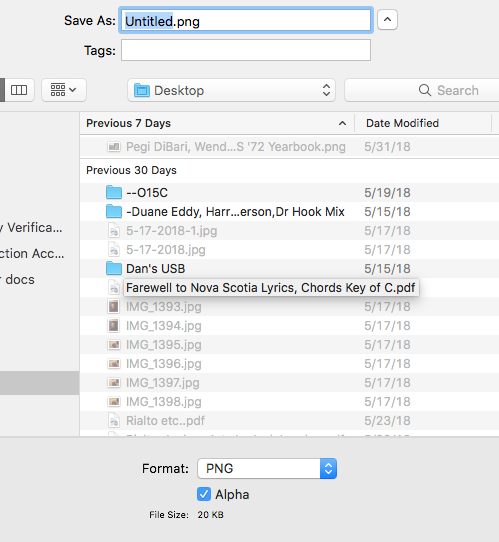
Go to your Finale file or pdf and draw a box as tightly as you can around your musical example. When you release, it creates a .png file called Untitled. If the box is not tight enough or otherwise not right, Cancel and try again.

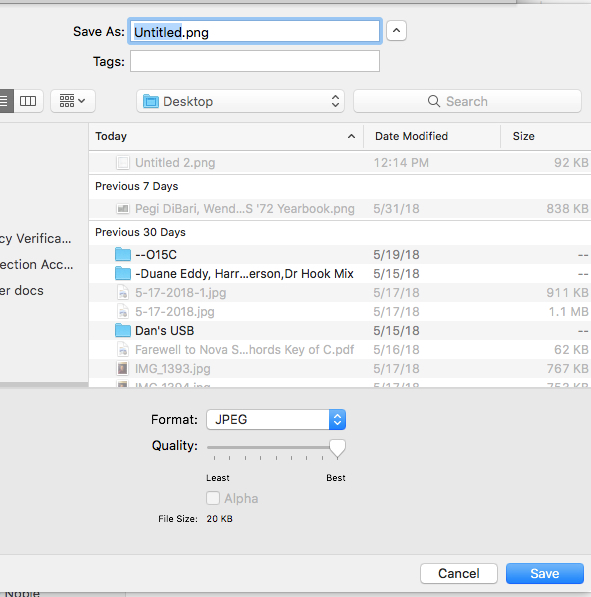
When it's right, click on Save. A menu will now appear that lets you title the graphic and select a folder to save it. You'll see a menu below that lets you change to another file type. I don't know that it will make a difference in Word 2016 whether you save as .png or .jpg other than .png files are smaller.


One of the many things I like about this approach is that you don't have to do any graphics export in Finale—if you have 20 examples on one page, it's still only one page. Neither does it matter how you created your old documents. If the graphic looks good in Preview, it is good.

Now you can drop your graphics into Word. You will have to set the size; when you click on it within the doc, the Graphics Tools should appear and you will set Text Wrapping. For most users, it's Tight but there are advantages to In Front of Text, too.

The only down side is that I know no way to automate this. Perhaps there are preference settings in Word 2016? I know of none in 2008 or 2011.

Comment actions Permalink
Avatar
0

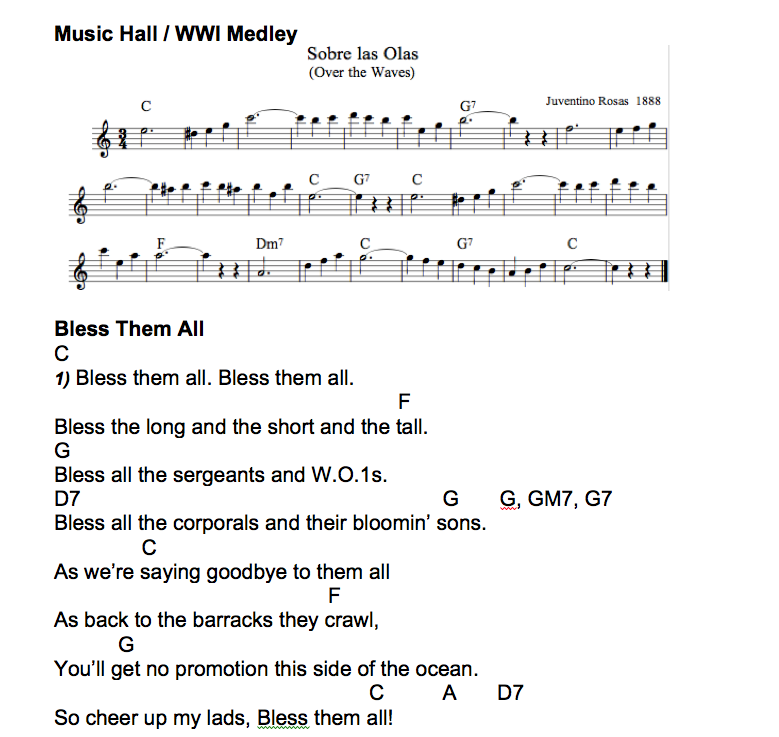
Here's part of a page I did awhile back for a band that uses text charts. The lead player likes certain things written out. This is a partial page done in Word 2008. I did the music example in Encore and made a .jpg in Preview right from the Encore page on my Mac.


Comment actions Permalink
Avatar
0

The other thing that Preview can do is to screen scrape your text from those old files, assuming that you created the .pdf files directly from the Word doc and didn't take a picture. Otherwise, you'll have to open those old files in Word and grab the text from there.


Although this won't work with graphics (yet?), there's am open source freeware project called LibreOffice that can open and convert many old formats to including MacWrite, AppleWorks... just about any old word processor for Mac, Windows, DOS or Unix you can name.

https://www.libreoffice.org/download/download/

Comment actions Permalink
Avatar
0

Mike,

You've gone beyond the call of duty!  And then some!

I will look this over very carefully.  It looks wonderful!

Thank you!!!  Hope it helps someone else as well.


Comment actions Permalink
Avatar
0

You’re welcome. Much easier to do than to read about it, actually. When I finally understood what you wanted, I realized it was something I’ve done a lot over the years.


This would have been a bear to write on my iPad at my kids’ place in Austin but at home on my iMac? Piece of cake — unless you said No on whether the graphics looked good. Then I would have fired up my G4 and that would have taken some time as I remembered how to do things in OS 9 (Yikes!).


Comment actions Permalink

Please sign in to leave a comment.