New post
Avatar
1

Hi there,

The lyrics vertical default position mostly works fine but for some occasional low notes I need to lower lyrics. This is very easy to do but I notice that Finale shifts all lyrics up or down when changing the vertical position of the four triangles or via the 'Adjust baseline' menu. Is there a way to move lyrics up and down locally, so just for one note or a couple of notes, or one page only?

And how do I go back to the default position in the 'Adjust baseline' menu? What is the default value?

Thanks!

Finale 25.5 | Win10

3 comments

Date Votes
Avatar
0

Quoting the manual:

“At the left edge of the screen is a row of four small triangles pointing to the right. They control the baseline for the lyrics. If necessary, click the staff whose lyrics need adjustment.


Drag the leftmost triangle up or down to set the baseline for the entire piece (for the selected lyric type and number). As you drag it, the other three triangles move with it.


Drag the second triangle up or down to set the baseline for the selected staff only, all the way through the piece (for the selected lyric). As you drag this triangle, the two triangles to its right move with it.


Drag the third triangle up or down to set the baseline for this staff, this system only (for the selected lyric). As you drag this triangle, the rightmost triangle moves with it. Use this third triangle only in Page View (so you can see the system you’re affecting).


Drag the rightmost triangle up or down to set the baseline for the next syllable, before it’s entered. This option is useful when you’re entering lyrics with the Type Into Score feature or by Click Assigning one syllable at a time.”


… how do I go back to the default position in the 'Adjust Baseline' menu? …


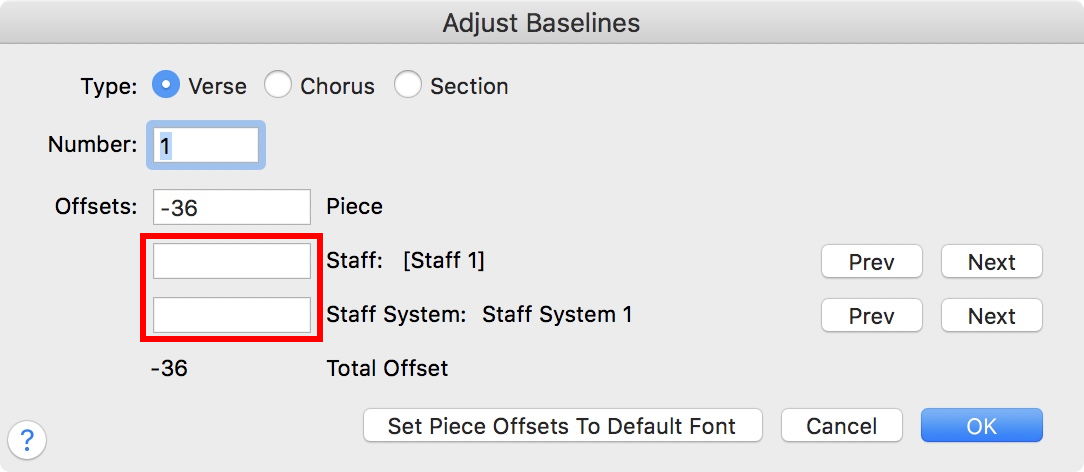
To get all four triangles back to the same vertical position, first click the relevant system/staff.

Then go to Adjust Baselines, and clear the two fields in the red rectangle (in the screen shot the Measurement Units are Points):


You will have to do this for each staff and system where the four triangles are not aligned.


… What is the default value? …


The document’s default value is shown in the field above the red rectangle.

In the document shown in the screen shot the default value is -36 Points.


To adjust a single syllable:

Lyrics menu > Adjust Syllables

Handles will appear on all syllables (obviously you must be in the correct Verse and Layer).

You can drag-select a handle, and use the Arrow keys to nudge the positioning.

Comment actions Permalink
Avatar
0

Hi Peter,

Thanks for your detailed reply! I didn't have a chance to try the procedure you describe yet but I'll let you know.

Comment actions Permalink
Avatar
0

Hi Peter,

I promised to get back to you on the item above: Everything works, thanks for your explanation!

Comment actions Permalink

Please sign in to leave a comment.